Customize check box and radio button in Aem adaptive forms | Community
Skip to main content
sobhan_sahu
Level 4
July 6, 2017
Solved

Customize check box and radio button in Aem adaptive forms

  • July 6, 2017
  • 3 replies
  • 2316 views

Hi All,

I am working on Aem 6.2 where m creating some themes . Requirement is that on click of check box its widget should get filled with some blue color from the initial gray or white colour.

I am not able to achieve the same. Please help me with the same.

Thanks
This post is no longer active and is closed to new replies. Need help? Start a new post to ask your question.
Best answer by poojac_2204

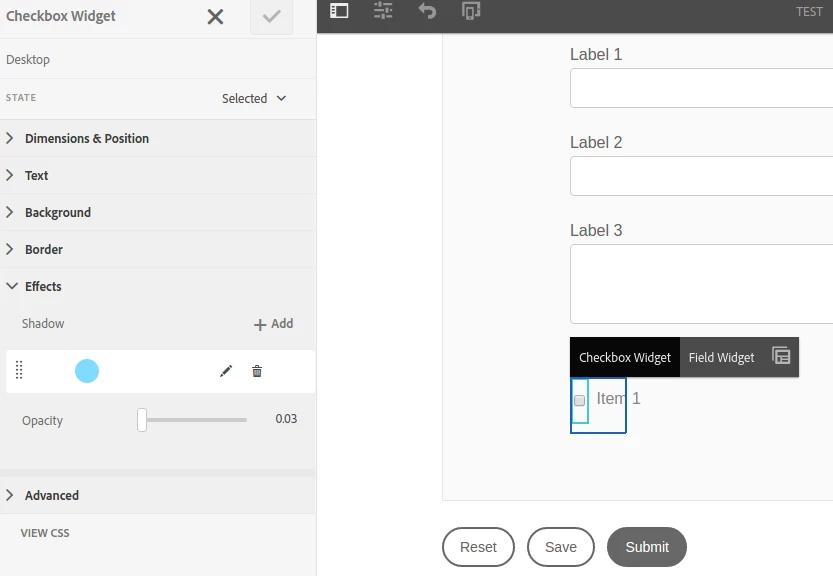
To change the css of radio/checkbox  component , first select that component in theme editor in edit mode. It should look like below screenshot

In left side of screen you can see the options to change the css of checkbox. Select the state of checkbox as selected and apply the changes you want to do for selected state.

In your case you can give background-color or shadow-color to checkbox widget in selected state.

Hope it helps !!

3 replies

kautuk_sahni
Community Manager
Community Manager
July 7, 2017

Moving this question to AEM Forms.

~kautuk

Kautuk Sahni
poojac_2204Accepted solution
Level 4
July 7, 2017

To change the css of radio/checkbox  component , first select that component in theme editor in edit mode. It should look like below screenshot

In left side of screen you can see the options to change the css of checkbox. Select the state of checkbox as selected and apply the changes you want to do for selected state.

In your case you can give background-color or shadow-color to checkbox widget in selected state.

Hope it helps !!

sobhan_sahu
Level 4
July 10, 2017

Hi Pooja,

I am not able to override the default image comes for the checkbox. Using the methods mentioned above its filling the sadhows but on click i need to show a checkbox with blue backgrounds and white colored tick mark. if I am giving my new image as background in selected stated then its coming in the backside of the defalut checbox icon. Can I move it to the front some how?

Thanks,
Sobhan