Change the HTML Form title | Community
Skip to main content
August 20, 2021
Solved

Change the HTML Form title

  • August 20, 2021
  • 1 reply
  • 1329 views

Hello everyone,


i'm creating some XDP forms with AEM Livecycle designer and then i open in HTML using the browser.

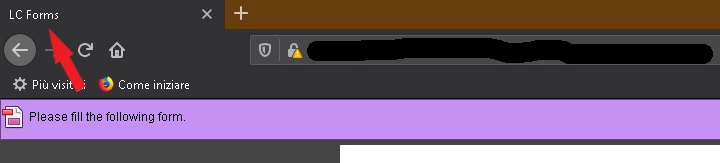
The form title in the web browser is always LC Forms. How can i change it using livecycle or via code?


Thank you very much.


Kind regards


This post is no longer active and is closed to new replies. Need help? Start a new post to ask your question.
Best answer by workflowuser

Easiest way is to make sure your xdp template has Title defined. Once you import the xdp into AEM Form, select the XDP template and open its properties tab and make sure there is a value in the title field as shown in this screenshot. then when you render the xdp you will see the title instead of the default LC  Forms.


1 reply

August 20, 2021

I will send you something shortly

workflowuserAdobe EmployeeAccepted solution
Adobe Employee
August 20, 2021

Easiest way is to make sure your xdp template has Title defined. Once you import the xdp into AEM Form, select the XDP template and open its properties tab and make sure there is a value in the title field as shown in this screenshot. then when you render the xdp you will see the title instead of the default LC  Forms.


AmiAdobeAuthor
August 20, 2021

Thank you for the reply. I've already done this, but doesn't work.


I mean when i load the page in a browser: the browser title page says "LC Forms"