Solved
Calculate table total based on condition - xfa.resolveNode does not work.
Hello experts,
I am new to Adobe forms and i have been struggling to calculate the total of a column based on condition.
My problem is that when i try the code below i cannot access any property of oFields(e.g. length, item...). I tried different combinations but nothing seems to work:
var oFields = xfa.resolveNodes("tblHandlingUnits.rowHUDataTBL[*]");
for (var i = 0; i < len; i++){
if (oFields.) // check each row for specific value{
var total = total + oFields.// the amount of the current row{
}
Here is how the Hierarchy looks like:
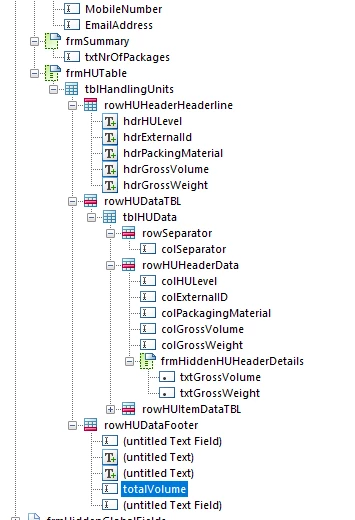
Can you please give any suggestion?
Thank you!




