AEM Forms Server Install Pdf Generator Readiness Test Error | Community
Skip to main content
Level 2
September 12, 2019
Solved

AEM Forms Server Install Pdf Generator Readiness Test Error

  • September 12, 2019
  • 6 replies
  • 6576 views

New install of AEM Forms Server on a Windows Server. Turnkey installation at step PDF Generator System Readiness Test. Clicked Start received this error:

Located server log in: C:\Adobe\Adobe_Experience_Manager_Forms\jboss\standalone\log

Many warnings about [author] user. I reference the screenshots I took of the previous steps and I never specified a user by name, I'm unable to locate this user via admin interface so I'm unsure what I'm doing wrong, any ideas?

WARN  [com.adobe.idp.um.businesslogic.authentication.AuthenticationManagerBean] (Thread-255) Authentication failed for user [author] (Scheme - Username/Password) Reason: Username or password is incorrect . Refer to debug level logs for category com.adobe.idp.um.businesslogic.authentication for further details

In the previous step I specified three domain accounts for multi-threading in the step admin user credentials for native PDF conversions. I made sure these users are admins on the server but I don't think this is related.  I'm a newbie to AEM Forms as much detail as you could provide would be appreciated.

This post is no longer active and is closed to new replies. Need help? Start a new post to ask your question.
Best answer by Mayank_Gandhi

If this a 6.5 install below error can be ignored. It's known a thing on 6.5. Let us know what help you need to begin with AEM.

Regards,

Mayank

WARN  [com.adobe.idp.um.businesslogic.authentication.AuthenticationManagerBean] (Thread-255) Authentication failed for user [author] (Scheme - Username/Password) Reason: Username or password is incorrect . Refer to debug level logs for category com.adobe.idp.um.businesslogic.authentication for further detail

6 replies

Adobe Employee
September 12, 2019

is your PDF generation working?

if so you could ignore this warning

pagan_devAuthor
Level 2
September 12, 2019

I thought that was the intent of this screen, if there's another way for me to test this, could you point me to an example?

Mayank_Gandhi
Adobe Employee
Adobe Employee
September 12, 2019

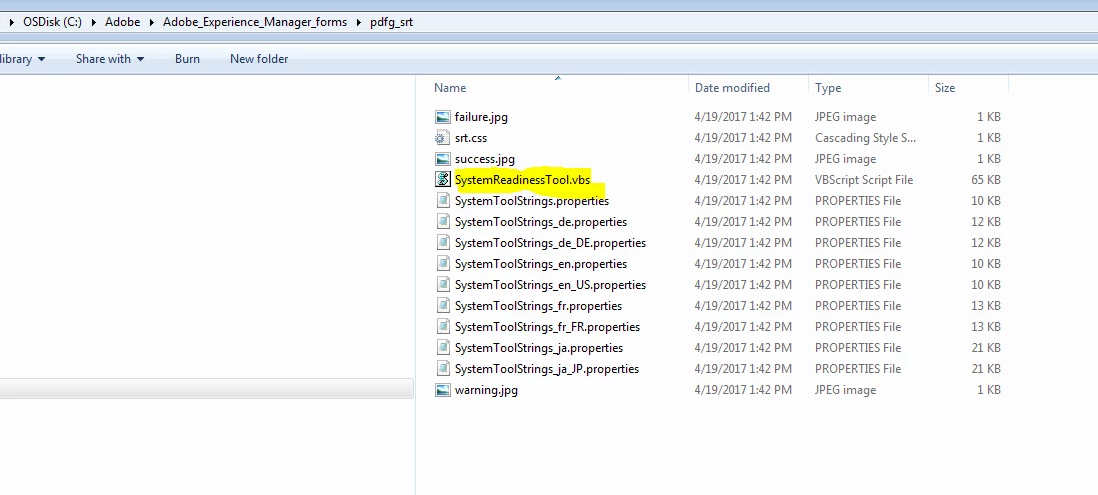
That's fine you can run SRT explcilitely and chek for the environment variable.

1) Navigate to %INSTALL_ROOT%\pdfg_srt

2) Run the tool with a command such as follows:
cscript SystemReadinessTool.vbs C:\srtreport Locale en

3) Once the script finishes, navigate to C:\srtreport and load the SystemReadinessTool.html file in a browser.

Mayank_Gandhi
Adobe Employee
Mayank_GandhiAdobe EmployeeAccepted solution
Adobe Employee
September 12, 2019

If this a 6.5 install below error can be ignored. It's known a thing on 6.5. Let us know what help you need to begin with AEM.

Regards,

Mayank

WARN  [com.adobe.idp.um.businesslogic.authentication.AuthenticationManagerBean] (Thread-255) Authentication failed for user [author] (Scheme - Username/Password) Reason: Username or password is incorrect . Refer to debug level logs for category com.adobe.idp.um.businesslogic.authentication for further detail

pagan_devAuthor
Level 2
September 12, 2019

Thanks for the feedback, I'm going to continue with the installation with the warnings in place as suggested. The SystemReadinessTool.vbs file does not exist under the install root directory or any sub directories. You are correct in your guess this is a 6.5 installation.

Mayank_Gandhi
Adobe Employee
Adobe Employee
September 12, 2019

You should have SRT file in the install directory: