AEM forms designer // Cannot import XSD - too many resolved schema nodes | Community
Skip to main content
October 2, 2018
Solved

AEM forms designer // Cannot import XSD - too many resolved schema nodes

  • October 2, 2018
  • 5 replies
  • 5731 views

Hello,

I hope you are able to help me.

We are investigating the use of AEM forms (previously Adobe Livecycle) to populate data in dynamic pdf forms.

When creating the data connection and importing the XSD (XML Schema), following error appears:

"

The schema described by the selected root element cannot be read

as the number of resolved schema nodes exceeds the supported limit.

Please select a different root element of modify your XML Schema to decrease the schema size.

"

Unfortunately none of these suggestions are applicable to us.

I heard that there is a limit of 100,000 nodes. This is done for memory considerations. The limitation is a resolved node count not a direct 1 to 1 node in the schema.  There is a registry setting that will allow to increase this number.

Unfortunately I haven't yet found this setting.

Could you please assist me increasing this limit?

Thanks and best regards,

Alexander

[Moderator Note: Personal information removed]

This post is no longer active and is closed to new replies. Need help? Start a new post to ask your question.
Best answer by kjaeggin

Alexander,

you will need to add the MaxResolvedXSDNodes as a new DWORD(32) value under the Options key. I don't believe it is there by default.

Sorry if that was not clear.

Thanks,

KJ

5 replies

DarrenBiz
October 3, 2018

Can you provide a bit more information? e.g.

  • Where are you seeing this error? Workbench? Designer?
  • How many unique nodes are actually in your schema?
  • Is your schema well formed? [1]
  • Does it contain any recursive nodes? [2]

[1] W3C XML Schema (XSD) Validation online

[2] IBM Knowledge Center

Adobe Employee
October 3, 2018

Hello Alexander,

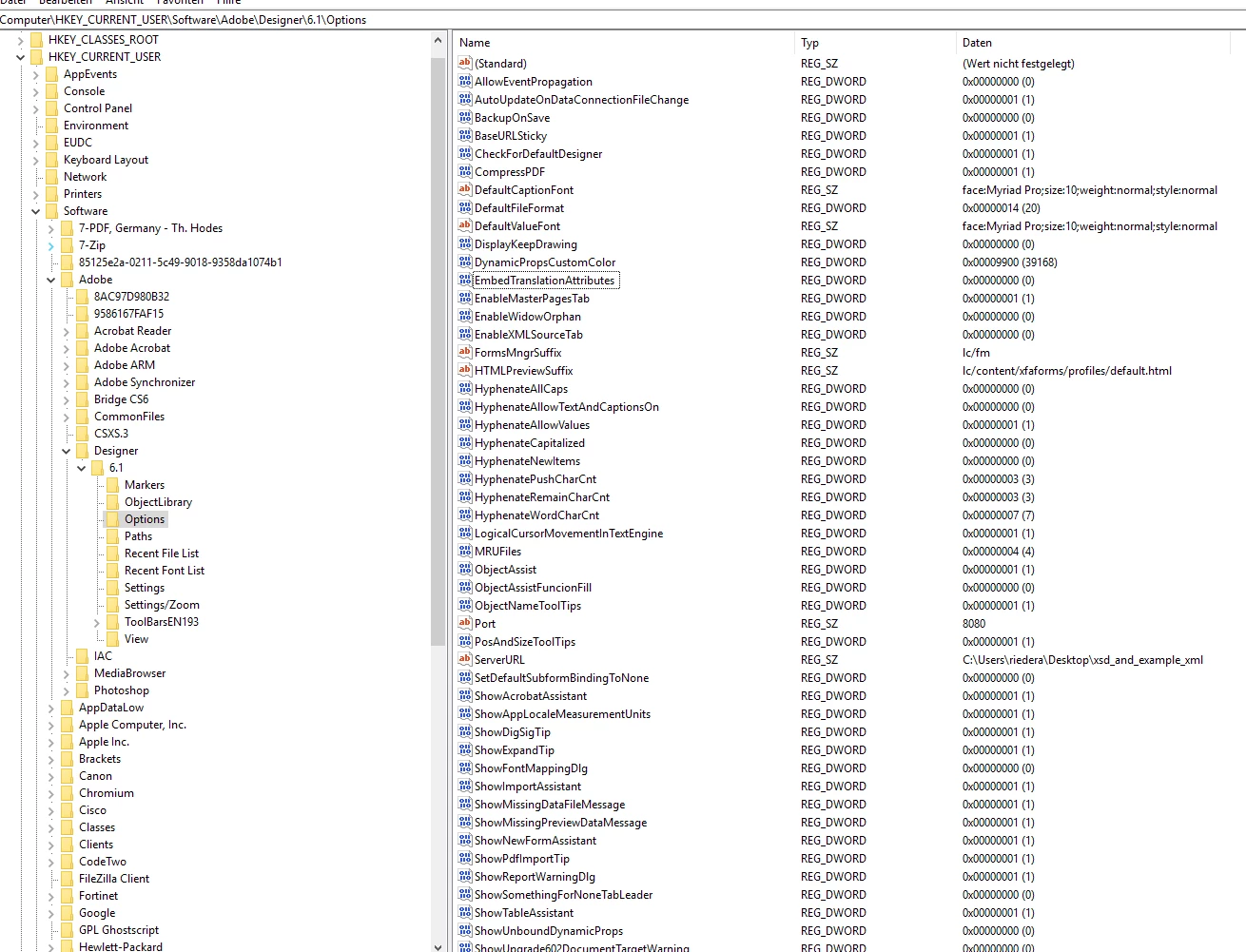
I believe the Registry key you are looking for is this:

HKEY_CURRENT_USER\SOFTWARE\Adobe\Designer\6.3\Options\MaxResolvedXSDNodes

DWORD(32bit) {value needs to be hexadecimal}

October 4, 2018

Hi Kjaeggin,

thanks for your answer. Unfortunately I can't find the key you mentionned.

I got the following under Options:

Thanks for your help,

Alex

kjaegginAdobe EmployeeAccepted solution
Adobe Employee
October 4, 2018

Alexander,

you will need to add the MaxResolvedXSDNodes as a new DWORD(32) value under the Options key. I don't believe it is there by default.

Sorry if that was not clear.

Thanks,

KJ

October 8, 2018

Hi KJ,

this worked, thanks a lot.

Really appreciate your solution.

Have a nice one and best regards,
Alex