AEM Forms Core Components - AF Core bundle issue | Community
Skip to main content
April 24, 2025
Solved

AEM Forms Core Components - AF Core bundle issue

  • April 24, 2025
  • 2 replies
  • 2322 views


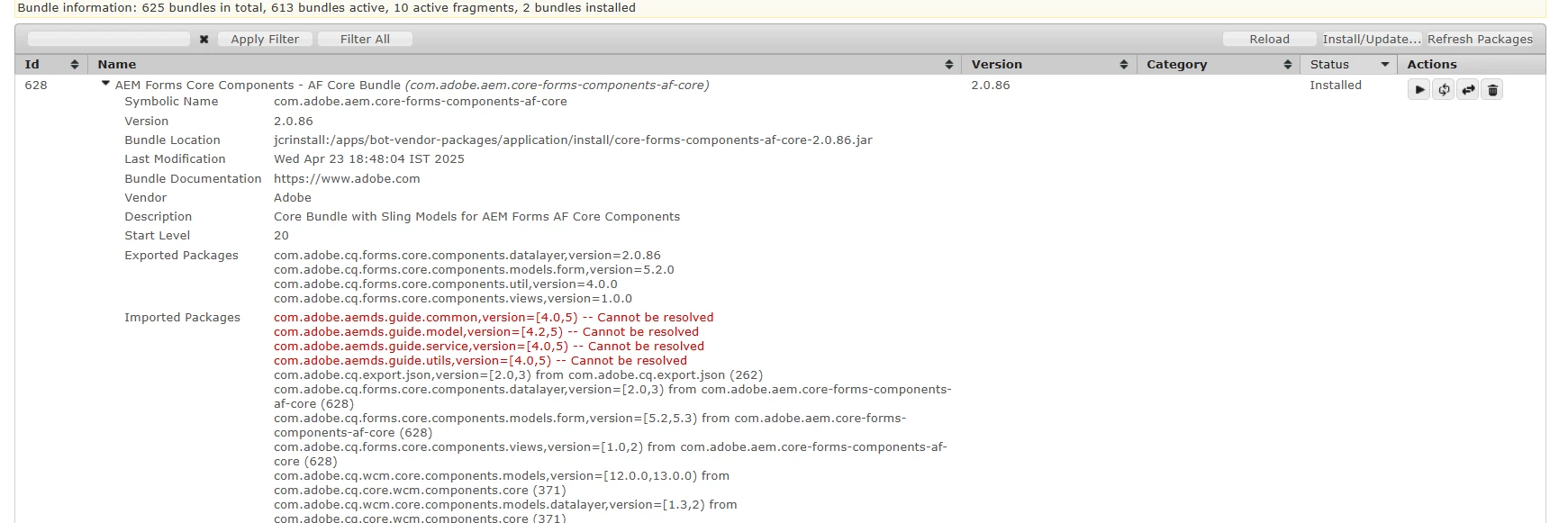
AEM Forms Core Components - AF Core Bundlecom.adobe.aem.core-forms-components-af-core


status is in installed state.

seeing this issue from last week only , before that it was working fine


    <core.wcm.components.version>2.23.4</core.wcm.components.version>
    <core.forms.components.version>2.0.76</core.forms.components.version>
  <core.forms.components.af.version>2.0.76</core.forms.components.af.version>
    <aem.forms.sdk.api>2023.09.11.00-230901</aem.forms.sdk.api>
    <bnd.version>5.1.2</bnd.version>
    <aem.sdk.api>2023.10.13804.20231005T183332Z-230901</aem.sdk.api>


archtype details

aemVersion=cloud
sdkVersion=latest
languageCountry=${languageCountry}
includeExamples=n
includeErrorHandler=n
frontendModule=general
singleCountry=y
includeDispatcherConfig=y
includeCommerce=n
includeForms=n
includeFormsenrollment=y
includeFormscommunications=n
sdkFormsVersion=latest
datalayer=y
amp=n
enableDynamicMedia=n
enableSSR=n
precompiledScripts=n
includeFormsheadless=n


Best answer by Sakshi5

Hello @nagendraba3 ,


In case you are using AEM SDK for AEM v2025.4.20476.20250414T214138Z-250300, then can you just remove the embed of following from all/pom.xml:

<embedded>
    <groupId>com.adobe.aem</groupId>
    <artifactId>core-forms-components-af-apps</artifactId>
    <type>zip</type>
   <target>/apps/${appId}-vendor-packages/application/install</target>
</embedded>


and


<embedded>
   <groupId>com.adobe.aem</groupId>
   <artifactId>core-forms-components-af-core</artifactId>
   <target>/apps/${appId}-vendor-packages/application/install</target>
</embedded>

Basically, now these are part of product, you are embedding versions:

  <core.forms.components.version>2.0.76</core.forms.components.version>
  <core.forms.components.af.version>2.0.76</core.forms.components.af.version>
Whereas with this sdk, 3.0.104 is available in product OOTB. Additionally either core pom.xml needs to be updated, one will need to update the range of import (bolded portion is the one that is added) or if its not being consumed in customization, then you can go ahead and remove the dependencies of artifacts core-forms-components-core and core-forms-components-af-core


<plugin>
<groupId>biz.aQute.bnd</groupId>
<artifactId>bnd-maven-plugin</artifactId>
<executions>
<execution>
<id>bnd-process</id>
<goals>
<goal>bnd-process</goal>
</goals>
<configuration>
<bnd><![CDATA[
Import-Package: javax.annotation;version=0.0.0,com.adobe.cq.forms.core.components.models.form;version="[5.0.0,6.0.0)",*
]]></bnd>
</configuration>
</execution>
</executions>
</plugin>

Also make sure older bundles of core components are uninstalled and trashed.


2 replies

Adobe Employee
April 25, 2025

Hello @nagendraba3 


Could you please confirm your SDK release version?

Starting April release, we are shipping the core components included in the AEM forms-addon far file.

You might want to remove the core components installed in /apps/core/fd to avoid any duplicity.


Please test this and let us know if you face any further issues.


Thanks,

Rahul Pandey

Sakshi5
Adobe Employee
Sakshi5Adobe EmployeeAccepted solution
Adobe Employee
April 25, 2025

Hello @nagendraba3 ,


In case you are using AEM SDK for AEM v2025.4.20476.20250414T214138Z-250300, then can you just remove the embed of following from all/pom.xml:

<embedded>
    <groupId>com.adobe.aem</groupId>
    <artifactId>core-forms-components-af-apps</artifactId>
    <type>zip</type>
   <target>/apps/${appId}-vendor-packages/application/install</target>
</embedded>


and


<embedded>
   <groupId>com.adobe.aem</groupId>
   <artifactId>core-forms-components-af-core</artifactId>
   <target>/apps/${appId}-vendor-packages/application/install</target>
</embedded>

Basically, now these are part of product, you are embedding versions:

  <core.forms.components.version>2.0.76</core.forms.components.version>
  <core.forms.components.af.version>2.0.76</core.forms.components.af.version>
Whereas with this sdk, 3.0.104 is available in product OOTB. Additionally either core pom.xml needs to be updated, one will need to update the range of import (bolded portion is the one that is added) or if its not being consumed in customization, then you can go ahead and remove the dependencies of artifacts core-forms-components-core and core-forms-components-af-core


<plugin>
<groupId>biz.aQute.bnd</groupId>
<artifactId>bnd-maven-plugin</artifactId>
<executions>
<execution>
<id>bnd-process</id>
<goals>
<goal>bnd-process</goal>
</goals>
<configuration>
<bnd><![CDATA[
Import-Package: javax.annotation;version=0.0.0,com.adobe.cq.forms.core.components.models.form;version="[5.0.0,6.0.0)",*
]]></bnd>
</configuration>
</execution>
</executions>
</plugin>

Also make sure older bundles of core components are uninstalled and trashed.


New Member
April 25, 2025

@rahulpandey27   , @sakshi5 

after removing suggested code , 

"all" package build is getting failed. 


do we need to remove it any other place ?


please advice 

Sakshi5
Adobe Employee
Adobe Employee
April 28, 2025

@sakshi5 


Hi Sakshi , 


removed given embeds from all/pom.xml


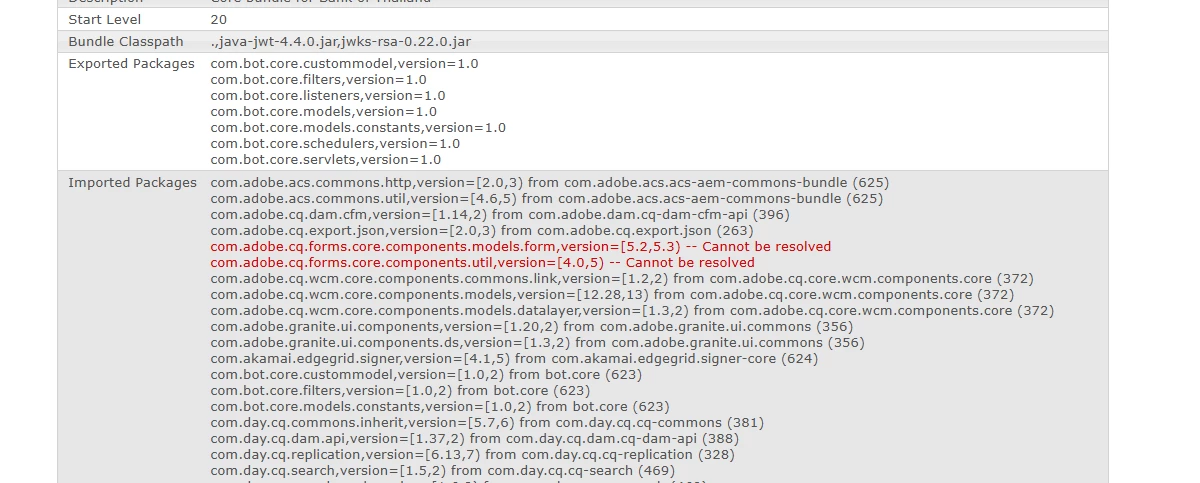
added below code in core pom.xml, but still some getting error. Attached screenshot  

 
<plugin> <groupId>biz.aQute.bnd</groupId> <artifactId>bnd-maven-plugin</artifactId> <executions> <execution> <id>bnd-process</id> <goals> <goal>bnd-process</goal> </goals> <configuration> <bnd><![CDATA[ Import-Package: javax.annotation;version=0.0.0,com.adobe.cq.forms.core.components.models.form;version="[5.0.0,6.0.0)",* -includeresource: ${settings.localRepository}/com/auth0/java-jwt/4.4.0/java-jwt-4.4.0.jar;lib:=true, ${settings.localRepository}/com/auth0/jwks-rsa/0.22.0/jwks-rsa-0.22.0.jar;lib:=true -fixupmessages "Classes found in the wrong directory"; restrict:=error; is:=warning ]]></bnd> </configuration> </execution> </executions> </plugin>


currently my all/pom.xml 

<!-- forms core components dependencies --> <dependency> <groupId>com.adobe.aem</groupId> <artifactId>core-forms-components-apps</artifactId> <type>zip</type> </dependency> <dependency> <groupId>com.adobe.aem</groupId> <artifactId>core-forms-components-core</artifactId> </dependency> <dependency> <groupId>com.adobe.aem</groupId> <artifactId>core-forms-components-af-apps</artifactId> <type>zip</type> </dependency> <dependency> <groupId>com.adobe.aem</groupId> <artifactId>core-forms-components-af-core</artifactId> </dependency>

 my core pom.xml

<!-- AEM Forms Dependencies --> <dependency> <groupId>com.adobe.aem</groupId> <artifactId>aem-forms-sdk-api</artifactId> </dependency> <dependency> <groupId>com.adobe.aem</groupId> <artifactId>core-forms-components-core</artifactId> </dependency> <dependency> <groupId>com.adobe.aem</groupId> <artifactId>core-forms-components-af-core</artifactId> </dependency>


in apps pom.xml

<plugin> <groupId>org.apache.jackrabbit</groupId> <artifactId>filevault-package-maven-plugin</artifactId> <configuration> <allowIndexDefinitions>true</allowIndexDefinitions> <properties> <cloudManagerTarget>none</cloudManagerTarget> <noIntermediateSaves>true</noIntermediateSaves> </properties> <group>com.bot</group> <name>bot.ui.apps</name> <packageType>application</packageType> <repositoryStructurePackages> <repositoryStructurePackage> <groupId>com.bot</groupId> <artifactId>bot.ui.apps.structure</artifactId> </repositoryStructurePackage> </repositoryStructurePackages> <dependencies> <dependency> <groupId>com.adobe.aem</groupId> <artifactId>core-forms-components-af-apps</artifactId> <version>${core.forms.components.af.version}</version> </dependency> </dependencies> </configuration> </plugin>


we definitely need 

com.adobe.cq.forms.core.components imports in our code 
 
Please advice

Hi @nagendraba3 , make sure the older bundles are uninstalled and trashed.