AEM Adative forms (OSGI -Forms add-on -OnPremises) Pattern property copying missing "/" UI | Community
Skip to main content
March 4, 2025
Solved

AEM Adative forms (OSGI -Forms add-on -OnPremises) Pattern property copying missing "/" UI

  • March 4, 2025
  • 1 reply
  • 324 views

Hi Team

Problem:
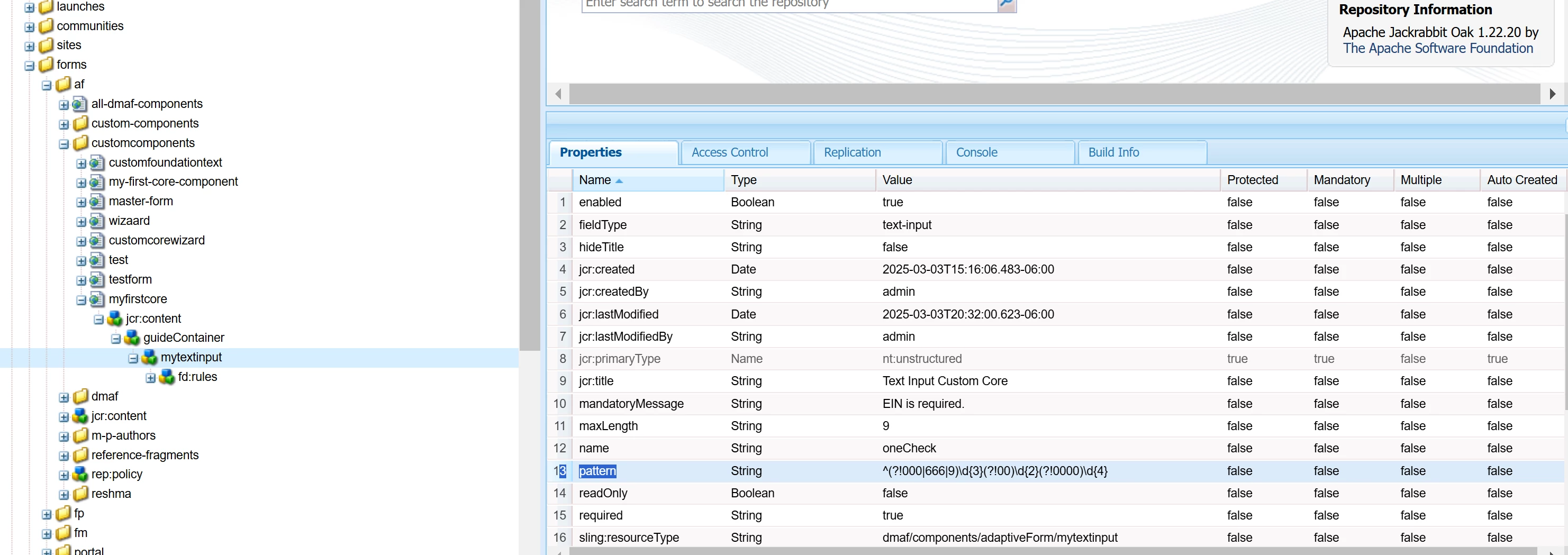
When copying the pattern property from the Adaptive Forms Core Component and pasting it into a custom core component, the "/" is missing when viewed in the UI. This is causing the pattern validation to fail.Any suggestion to fix this issue .

Original pattern: ^(?!000|666|9)\d{3}(?!00)\d{2}(?!0000)\d{4}
UI showing after copy this property to custom component level
pattern: ^(?!000|666|9)d{3}(?!00)d{2}(?!0000)d{4}
 

Regards

Vara


Best answer by rishim22446870

@varaandeI just tested the same use case, and it worked fine. Here are the steps I followed:

  1. Copied the pattern and pasted it into the pattern option as part of the text input configuration in the edit dialog.
  2. Saved the configuration.
  3. Reopened the text input configuration and confirmed that the slash was retained.

1 reply

rishim22446870
Adobe Employee
rishim22446870Adobe EmployeeAccepted solution
Adobe Employee
March 6, 2025

@varaandeI just tested the same use case, and it worked fine. Here are the steps I followed:

  1. Copied the pattern and pasted it into the pattern option as part of the text input configuration in the edit dialog.
  2. Saved the configuration.
  3. Reopened the text input configuration and confirmed that the slash was retained.