AEM 6.3 - Swagger Rest Call Returning 404
I've made a simple Rest API with a couple GET calls. one returns a string and one returns a json object.
The rest service works when called externally and returns the string and object.
However when trying to call or test the methods, after successfully hooking it to a data form model, aem gives a 404.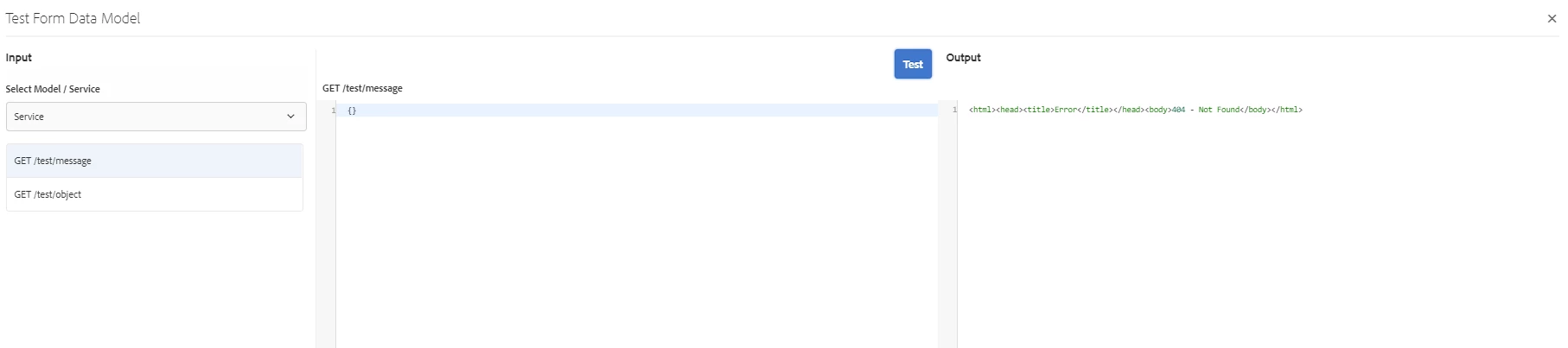
12.12.2018 15:40:44.075 *ERROR* [0:0:0:0:0:0:0:1 [1544665244058] POST /content/dam/formsanddocuments-fdm/test-swagger.executeDermisQuery.json HTTP/1.1] com.adobe.aem.dermis.core.servlet.DermisBridgeServlet Exception while executing operation
com.adobe.aem.dermis.exception.DermisException: <html><head><title>Error</title></head><body>404 - Not Found</body></html>
at com.adobe.aem.dermis.core.rest.service.RestInvoker.invokeOperation(RestInvoker.java:126)
at com.adobe.aem.dermis.core.rest.service.RestConnector.executeRequest(RestConnector.java:115)
at com.adobe.aem.dermis.api.AbstractConnector.executeOperation(AbstractConnector.java:435)
swagger.json file used,
{
"swagger": "2.0",
"info": {"version": "0.0.1-SNAPSHOT",
"title": "RestTest"
},
"host": "localhost:8083",
"basePath": "/rest",
"schemes": ["http"
],
"paths": {"/test": {
"get": {
"consumes": [
],
"produces": ["text/plain"
],
"parameters": [],
"responses": {"200": {
"description": "OK",
"headers": {},
"schema": {"type": "string"
}}
}
}
},
"/test/exception": {"get": {
"consumes": [
],
"produces": ["application/json"
],
"parameters": [],
"responses": {"200": {
"description": "OK",
"headers": {},
"schema": {"$ref": "#/definitions/TestObject"
}},
"406": {"description": "Not Acceptable",
"headers": {},
"schema": {"type": "object"
}}
}
}
},
"/test/message": {"get": {
"consumes": [
],
"produces": ["application/json"
],
"parameters": [],
"responses": {"200": {
"description": "OK",
"headers": {},
"schema": {"type": "string"
}}
}
}
},
"/test/object": {"get": {
"consumes": [
],
"produces": ["application/json"
],
"parameters": [],
"responses": {"200": {
"description": "OK",
"headers": {},
"schema": {"$ref": "#/definitions/TestObject"
}}
}
}
}
},
"definitions": {"TestObject": {
"properties": {
"id": {
"type": "integer"
},
"name": {"type": "string"
}}
}
}
}


