6.4 no longer allows custom themes? | Community
Skip to main content
Level 4
July 10, 2018
Solved

6.4 no longer allows custom themes?

  • July 10, 2018
  • 14 replies
  • 9577 views

Hi!

In our 6.2/6.3 installation, I had set up a custom template and theme using the process shown at AEM 6.0 Forms Help | Creating custom adaptive form themes​.

We had no entry on the "Adaptive Form Theme" property of the Form Container - we would set the dropdown to blank and our template would force all look and feel.

Now we are building a clean installation of 6.4, but our above solution no longer works. I don't want to recreate all the work I did in LESS to a new Theme, and I find the the Theme Editor to be very clunky and difficult to use. Is there any way to point the theme to a "blank" theme that will allow the original template to be used?
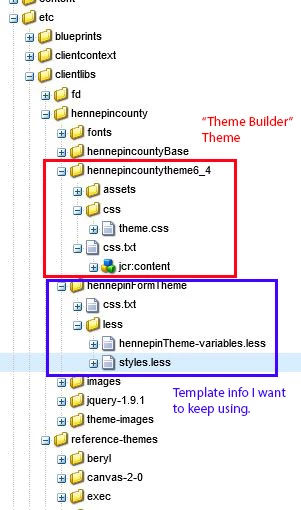
Thanks!

This post is no longer active and is closed to new replies. Need help? Start a new post to ask your question.
Best answer by Khushwant_Singh

The documentation is being updated. It will be published once ready.

14 replies

baronforoAuthor
Level 4
July 23, 2018

Also, I found another potential bug. All of our help icons disappeared, and it looks like the bootstrap glyphicon location may have changed?

In my CSS Less code, I had to manually update bootstrap references:

@font-face {

  font-family: 'Glyphicons Halflings';

  src:url('../fd/af/third-party/fonts/glyphicons-halflings-regular.eot');

to

@font-face {

  font-family: 'Glyphicons Halflings';

  src:url('/libs/fd/af/runtime/clientlibs/third-party/resources/fonts/glyphicons-halflings-regular.eot');

baronforoAuthor
Level 4
July 23, 2018

Also, I'm finding that the div#guideContainerTheme links to /etc.clientlibs/fd/afaddon/clientlibs/adobesign/common.css and /etc.clientlibs/fd/af/runtime/clientlibs/guidetheme2/common.css are causing radio buttons and checkboxes to disappear. I am trying to recover in my custom theme code, but because the div#guideContainerTheme is at the end of the page it is difficult to over-write some sections. I can get to re-appear if I add

.guideCheckBoxItem .guideFieldWidget input[type="checkbox"], .guideRadioButtonItem .guideFieldWidget input[type="radio"] {

    /* float: none; */

    /* vertical-align: middle; */

    margin-top: 0px !important;

    width: auto!important;

}   

to my code, but the checkboxes float to the right of the label, rather than to the left, as they should.

I may have to put an extra CSS file in my footer to correct.

smacdonald2008
Level 10
July 25, 2018
baronforoAuthor
Level 4
July 25, 2018

Excellent! I'll read through and double-check things.

I am noticing that it says "only if you have upgraded from a version that does not have Theme Editor" - since 6.4 requires a Theme, it might be good to add information from How to programmatically force a theme in 6.4

I had to create a new theme and strip out all the CSS in that theme, but am still encountering issues like the latest ones above, as I'm overwriting common.css, entered by having a theme. Perhaps the engineers could include a "No Theme" option in the future?

IainClucas
Level 3
October 27, 2022

Hi, did you get a resolution to this? We have a similar situation where we do not what the theme at all. The client provides a Design platform for all their components including CSS. We can create our own version of guide components that SuperType to the originals. In our components we can add the required CSS classes. 


However, like you, I cannot run the form without a theme. I have created an empty theme but it is not really empty. I have removed the themeRef from the properties, but the code says (no theme have this default one).


I am minded to create a new page type for non-themed forms where I update the includeTheme.jsp to remove the code that included the theme clientlibs.


However a NoTheme options would be a really nice solution.