User Groups limited to specific DAM folders | Community
Skip to main content
Level 2
August 3, 2022
Solved

User Groups limited to specific DAM folders

  • August 3, 2022
  • 1 reply
  • 1763 views

I am new to user admin in AEM as a CS and have a request to create user groups that can only see a specific project in the DAM. Right now we are working with three project folders for testing purposes, but the final work will include up to 75 or more project folders.


My DAM top level folders:

  • /content/dam/projectX/...
  • /content/dam/projectY/...
  • /content/dam/projectZ/...

I need to have a user group that can read /projectX but should not even be able to see the other project folders due to client confidentiality. Additionally, there will be users that have access to more than one project, but not all projects so they might need to see X and Z, but not Y for example.


I have created a user group with the path /content/dam/projectX given "jcr:read" access, but when I login with a user in that group it still sees /projectY and /projectZ. I even tried setting the read access on a lower subfolder inside of /projectX but the user can still see the entire DAM folder structure with the other projects visible.


I feel like using denies wouldn't help because when a user is in two groups (X and Z) they would block/deny each other?


Any help would be appreciated, thanks!!
This post is no longer active and is closed to new replies. Need help? Start a new post to ask your question.
Best answer by achennapragada

Hello @kate.sumbler-2 ,

To provide access to specific folder to specific user groups, please try the following

  1. Create a User group (e.g. group-projectx)
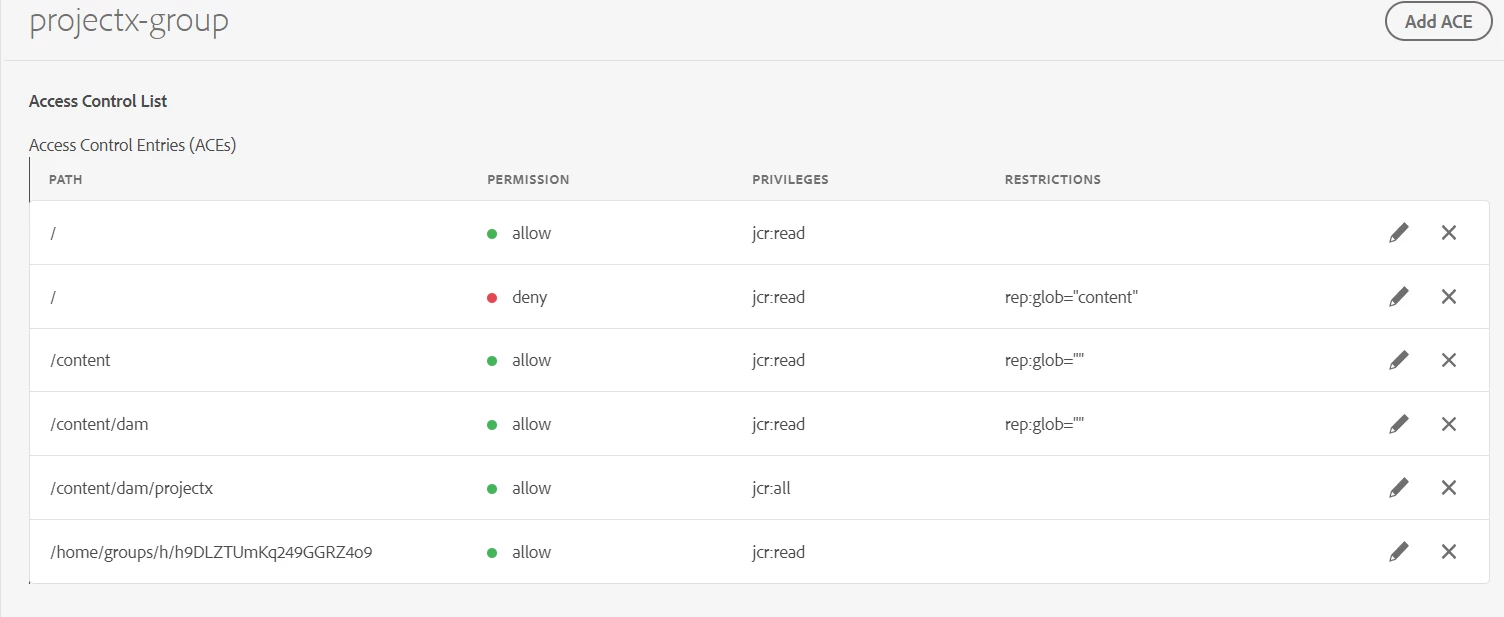
  2. Navigate to permissions page (http://localhost:4502/security/permissions.html) and add the ACE's as below


Using the above approach users will have access to specific folders only( in above case : content/dam/projectx) and will not have access to any other folders or any new folders that will be created in DAM as we are not denying other folders and explicitly giving permissions to specific folder 


In this way the user groups can be configured to specific folders based on the requirement 


There are multiple ways to configure user groups and permissions in AEM and is dependent on the business requirements. Couple of approaches below 

There are also ways to automate user groups creation. Request you to please try exploring these options before implementing the final solution.

1 reply

achennapragadaAccepted solution
Level 2
August 4, 2022

Hello @kate.sumbler-2 ,

To provide access to specific folder to specific user groups, please try the following

  1. Create a User group (e.g. group-projectx)
  2. Navigate to permissions page (http://localhost:4502/security/permissions.html) and add the ACE's as below


Using the above approach users will have access to specific folders only( in above case : content/dam/projectx) and will not have access to any other folders or any new folders that will be created in DAM as we are not denying other folders and explicitly giving permissions to specific folder 


In this way the user groups can be configured to specific folders based on the requirement 


There are multiple ways to configure user groups and permissions in AEM and is dependent on the business requirements. Couple of approaches below 

There are also ways to automate user groups creation. Request you to please try exploring these options before implementing the final solution.

Level 2
August 4, 2022

(edited to remove error)


Thank you, I just tried this out and it is now working as I expect!

Level 2
August 4, 2022

Hi @kate.sumbler-2 ,

Can you please edit the deny rule by removing the additional quotes there? ""content"" -> "content" in ACE-> rep:global=content


Yes, I just noticed that after reviewing again and removed the additional quotes. Everything is working as I would like now, thank you!