Prevent image from auto download | Community
Skip to main content
Level 6
February 17, 2021
Solved

Prevent image from auto download

  • February 17, 2021
  • 1 reply
  • 2523 views

When I open the link below, the image download automatically. I wanted to prevent the image from downloading and wanted it to load on the browser, so I unchecked the checkbox in Apache Sling Content  Disposition Filter for the field Enable For All Resource Paths. But even if I add content/*:image/jpg to Included Resource Paths & Content Types, the image still gets downloaded. I also tried by adding the absolute image path to Excluded Resource Paths, the image still gets downloaded. How can I prevent it?

http://localhost:4502/content/dam/v-foundation.jpg

This post is no longer active and is closed to new replies. Need help? Start a new post to ask your question.
Best answer by Manjunath_K

@shaheena_sheikh 

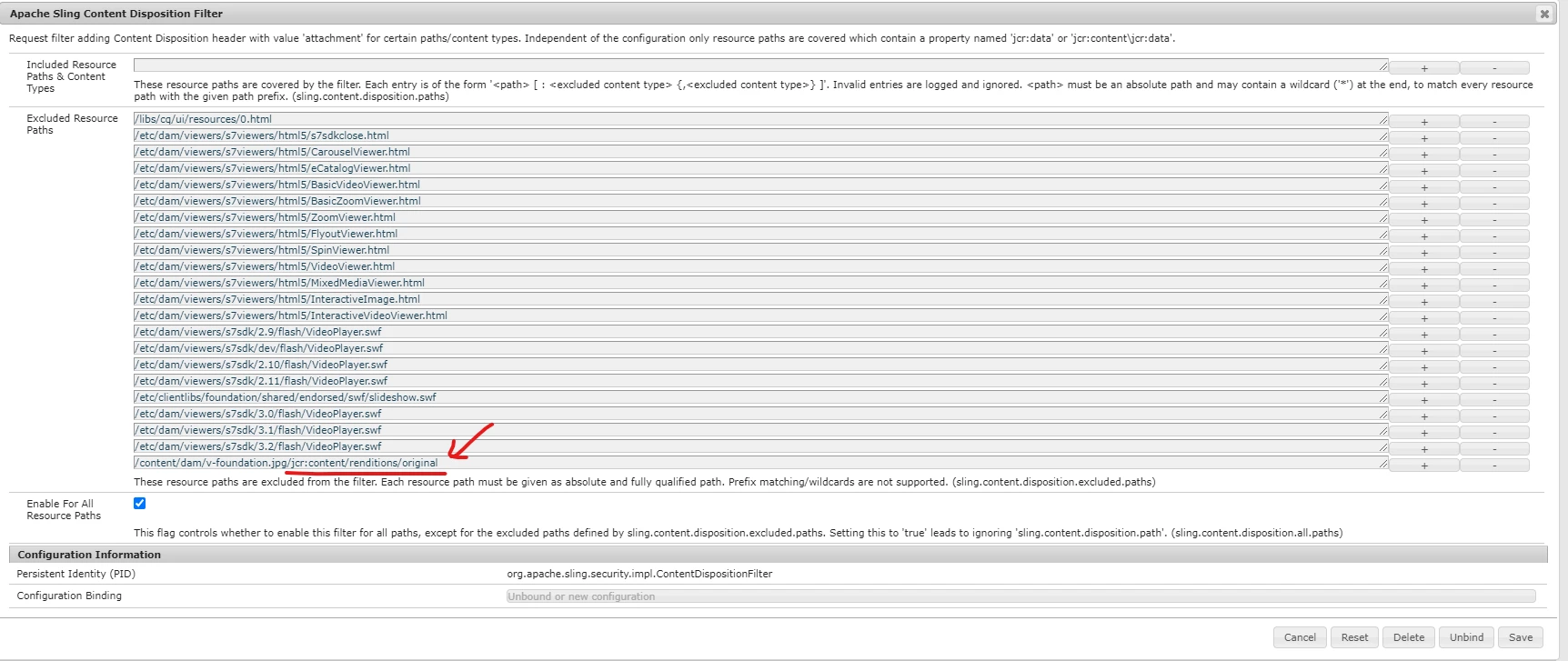
Keep "Enable For All Resource Paths" checked which is by default checked for security feature against XSS attacks.


If any specific one or two files for which you want to prevent/exclude adding header "Content-Disposition : attachment"  then include that resource path(complete path of original rendition as mentioned below) in "Excluded Resource Paths", for these excluded resource paths "Content-Disposition : attachment" won't be set & which can be viewed in browser without download.


/content/dam/v-foundation.jpg/jcr:content/renditions/original


Hope this helps!

1 reply

Manjunath_K
Manjunath_KAccepted solution
Level 7
February 21, 2021

@shaheena_sheikh 

Keep "Enable For All Resource Paths" checked which is by default checked for security feature against XSS attacks.


If any specific one or two files for which you want to prevent/exclude adding header "Content-Disposition : attachment"  then include that resource path(complete path of original rendition as mentioned below) in "Excluded Resource Paths", for these excluded resource paths "Content-Disposition : attachment" won't be set & which can be viewed in browser without download.


/content/dam/v-foundation.jpg/jcr:content/renditions/original


Hope this helps!

Level 6
February 22, 2021
That is working for specific images. How can I set it up for all the images in a particular folder under /content/dam?