Overlapping issue in metadata schema when using text area field | Community
Skip to main content
Adobe Employee
December 1, 2022
Solved

Overlapping issue in metadata schema when using text area field

  • December 1, 2022
  • 1 reply
  • 1722 views

Hi All,

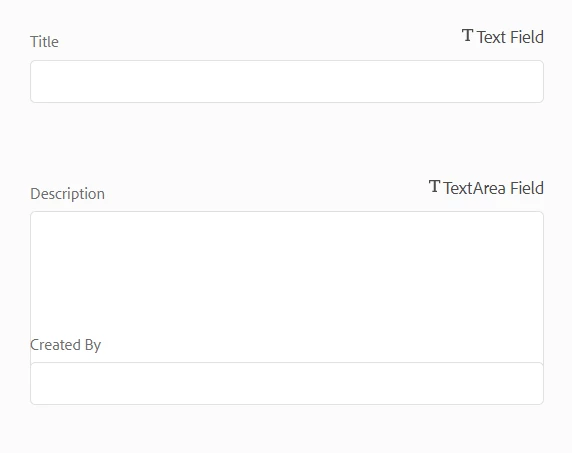
Customer has a requirement to use text area field for the description in metadata schema. When we add textarea we are seeing fields are getting overlapped. But while viewing the asset properties is it displaying fine, no overlapping issue. Is there a solution to overcome this issue in the schema editor.
Thanks

This post is no longer active and is closed to new replies. Need help? Start a new post to ask your question.
Best answer by krati_garg

It is cloud service @krati_garg and i am using my local AEM SDK 8085 release version


@thanikon
I was checking this on AEM On Prem, and now when I test it on AEM SDK, I face similar issue.

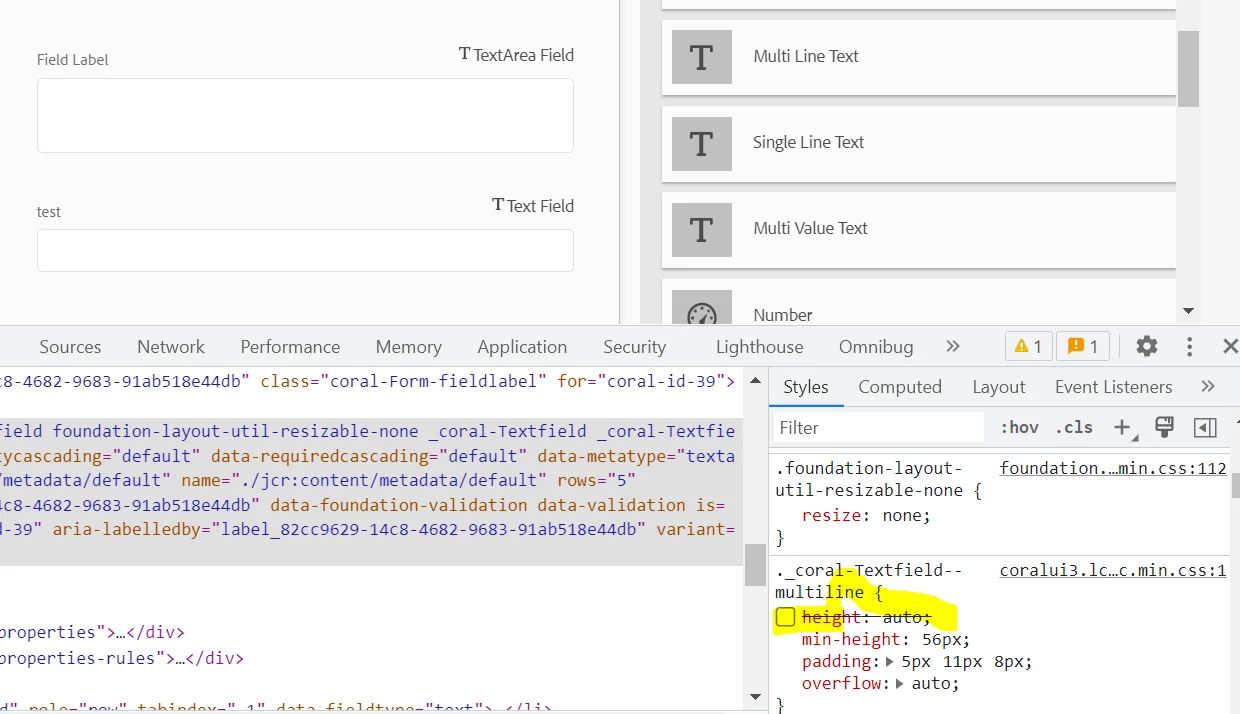
Appears to be a OOTB issue. I fixed it by updating css for following class ._coral-Textfield--multiline on the browser. I unchecked the auto height option.

You can overlay and apply your custom css to fix this.

Hope this helps

1 reply

krati_garg
Adobe Employee
Adobe Employee
December 1, 2022

@thanikon 

I believe you must have created custom field for including Text Area in your metadata schema.


Can you please explain, how you have added Text Area on to your metadata Schema Form.

When overlaying for custom fields, we can also handle its rendering and fix overlapping issues with underlying Css 
Looking into below JSP, might fix the issue:

/dam/gui/coral/components/admin/schemaforms/formbuilder/v2/view.jsp


and the customfield.jsp

thanikonAdobe EmployeeAuthor
Adobe Employee
December 1, 2022

Thank you for the response @krati_garg .

We have overlay the schema form builditems.jsp alone. Rest of the things like view.jsp and clientlibs are serving from OOTB only. I have tried to overlayed the clientlibs but it is impacting the layout view.

krati_garg
Adobe Employee
Adobe Employee
December 1, 2022

Thanks @krati_garg .Here is the path we have -

/apps/dam/gui/coral/components/admin/schemaforms/formbuilder/v2/builditems.jsp

and for the text area field we have code in jsp as:

<li class="field" data-fieldtype="text">
<div class="formbuilder-template-title"><coral-icon icon="text" alt="" size="M"></coral-icon><span><%= i18n.get("Multi Line Text") %></span></div>
<script class="field-properties" type="text/x-handlebars-template">
<sling:include resource="<%= fieldTemplateResource %>"
resourceType="dam/gui/coral/components/admin/schemaforms/formbuilder/formfields/v2/textareafield" />
</script>
</li>

Is this code snippet is sufficient or will i share the builditems.jsp file

Thanks.


Above looks good. 
Can you please check the  granite:data/metatype value is set as textareafield (see the screen shot below)

Go to your 

/dam/gui/coral/components/admin/schemaforms/formbuilder/formfields/v2/textareafield/textareafield.jsp
