Not receiving notification email when assinging task to group | Community
Skip to main content
Level 2
April 8, 2022

Not receiving notification email when assinging task to group

  • April 8, 2022
  • 3 replies
  • 1230 views

Hello everyone,


Right now, I have an Assign Task step that is assigned to a specific group and I checked the Notify Assignee by Email, but I'm not receiving any email and I'm part of the "Forms Management" Group.
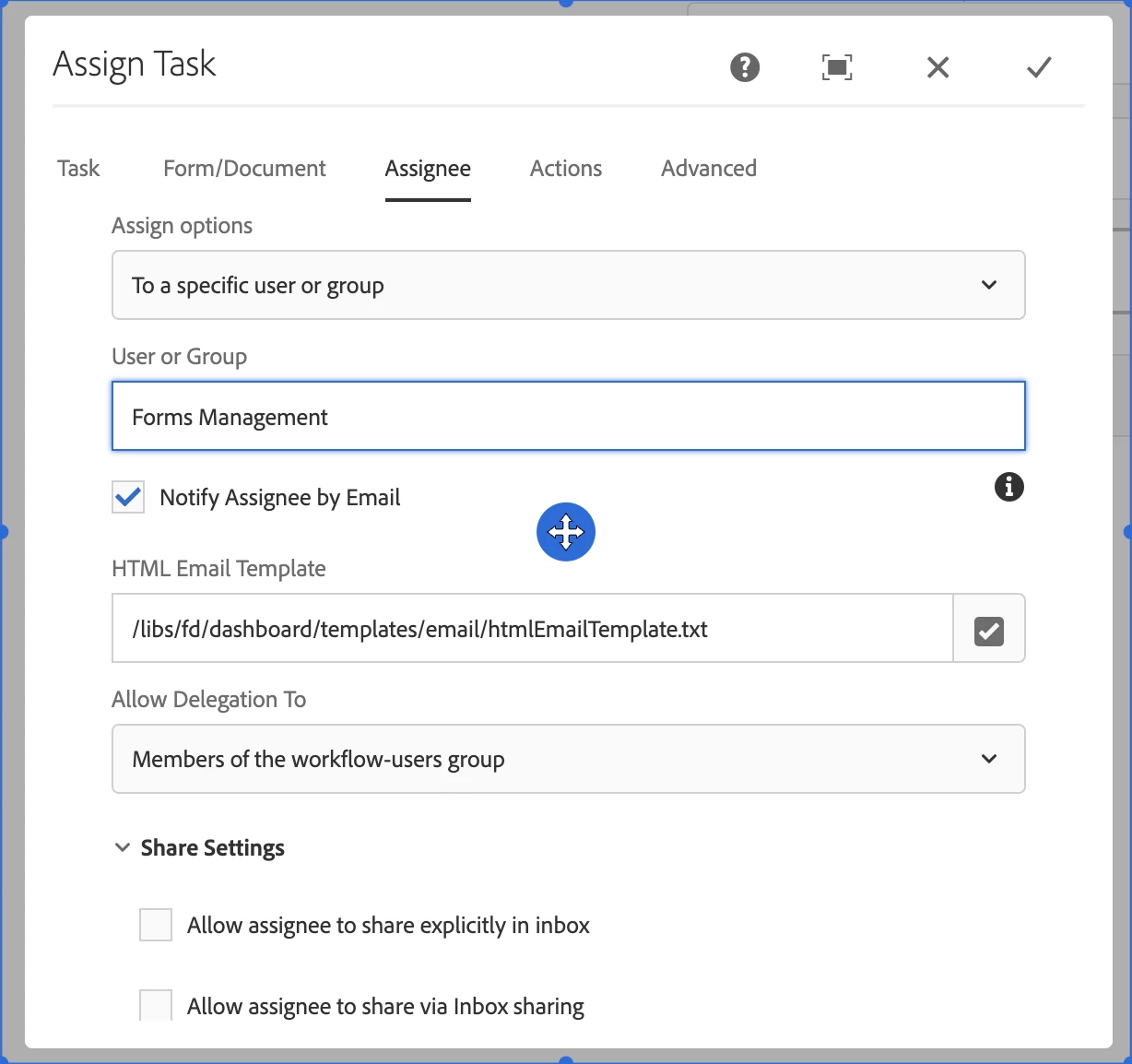
After not receiving the notification email, I went to the inbox to start the task thinking that maybe accessing the task would send me the email but didn't work as well.


I reconfigured the Assign Task step to be assigned to a specific user and did get a notification email. That makes me think that when is assigned to the group, the notification email doesn't work. Could someone please help me validate this scenario or maybe I'm missing some configuration?


Thank you!

This post is no longer active and is closed to new replies. Need help? Start a new post to ask your question.

3 replies

diksha_mishra
Community Advisor
Community Advisor
April 11, 2022

@sebasrios  Can you please check if the group has any users assigned to it? You can re-assign your user to group and try this again.

SebasRiosAuthor
Level 2
April 18, 2022

Hey @diksha_mishra,


When I created the group I added myself and another member with email addresses configured, and then tested the assigned task and we didn't receive any notification email. I re-assigned the users as you asked, but the issue is still happening

Level 4
May 25, 2023

This is happening to me as well.  We're on 6.5.13. I don't see any relevant errors in our logs either.  

crich2784
Level 6
December 12, 2023

This is officially not support in this fashion.  Please read the response from Adobe support below:


  • I have tried to replicate this at my end and can see the same behavior. After checking this with engineering, I can confirm this is working as defined.

    In AEM, there is no way to associate an email id with a group. We have certain limitations in obtaining the list of users in the assignee group and their email addresses which are listed as below :

    - Performance issues for getting group memberships and listing of users in a group especially when users/groups are large in size.
    - Security issues - The workflow author who is selecting the assignee can read the groups it has access to, but should not list/read the other members of the group.

    So we would not be trying to send email to each group member automatically. This is working as designed.

    What is recommended in this case, is to provide an email address ( a DL for the group) in Assign Task step using literal/variable.

    Notify Assignee by Email - Toggle on
    For Recipient Address
    (Option 1) - Use default email configured with assignee
    (Option 2) - Available as literal
    (Option 3) - Available as Variable
    Use option 2 or 3 from above.

    As stated, please create a DL email ID for the group and use it as default email for that group in AEM.