Need single line text to have multiple lines coral UI | Community
Skip to main content
June 28, 2022
Solved

Need single line text to have multiple lines coral UI

  • June 28, 2022
  • 2 replies
  • 1794 views

Hi, 


I have a single line text field in my metadata schema editor and I need to know if I can create a new form component that has multiple lines like a text area rather than a single line where you can enter a really long string without a line break. Is that possible to create in /libs/granite/ui/components/coral/foundation/form/textfield ?

This post is no longer active and is closed to new replies. Need help? Start a new post to ask your question.
Best answer by lukasz-m

Hi @jacobs1633233,

If you are using AEM as a Cloud, please upgrade to version 2021.4.0 or newer as @vanegi suggested. Unfortunately the change included in AEM as a Cloud is not incorporated in AEM 6.5/6.4. You can still create custom component. Please find all details below.

  1. Overlay /libs/dam/gui/coral/components/admin/schemaforms/formbuilder/formfields/v2/textfield, under apps you should get this /apps/dam/gui/coral/components/admin/schemaforms/formbuilder/formfields/v2/textfield, rename textfield to textarea. In the end this should looks like this:
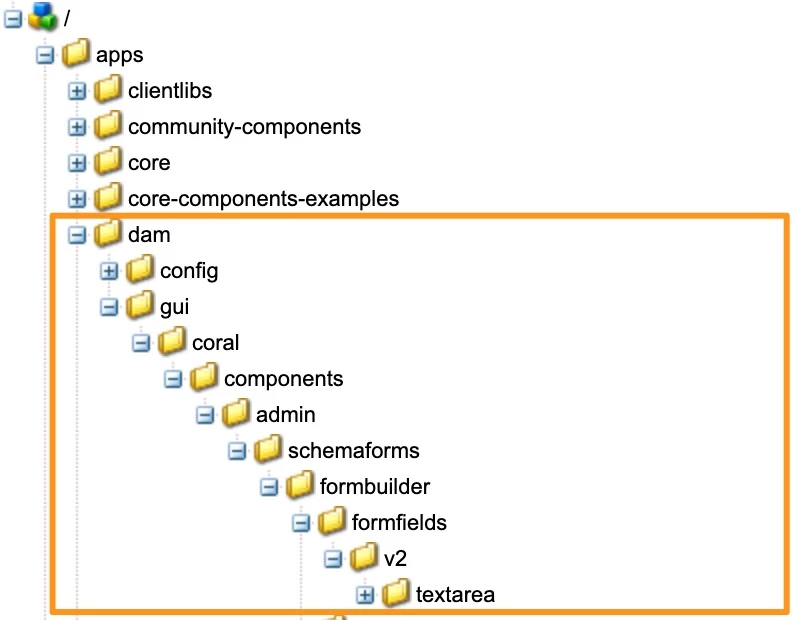
  2. Copy textfield.jsp from /libs/dam/gui/coral/components/admin/schemaforms/formbuilder/formfields/v2/textfield to /apps/dam/gui/coral/components/admin/schemaforms/formbuilder/formfields/v2/textarea, and rename it to textarea.jsp, this is the expected structure.
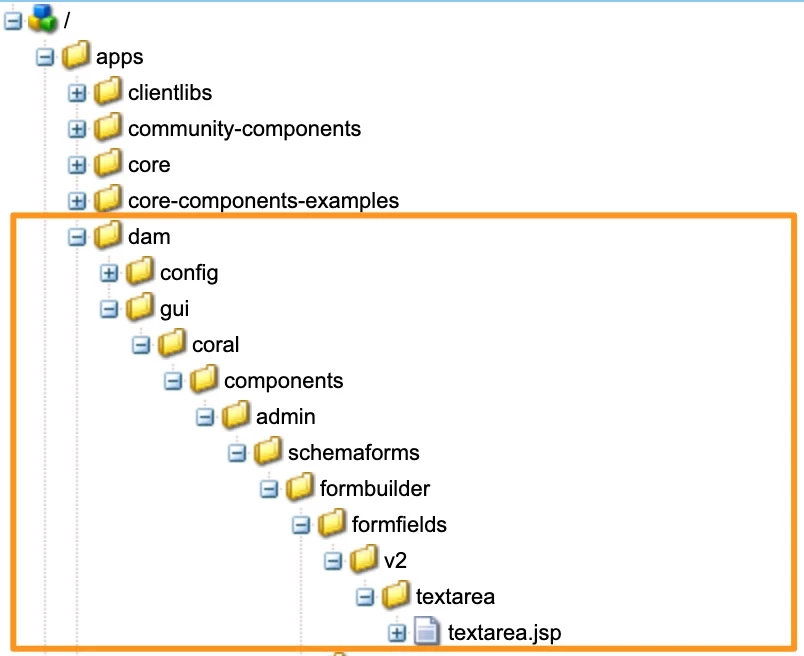
  3. Edit textarea.jsp and paste below code
    <%--
    
      ADOBE CONFIDENTIAL
      __________________
    
       Copyright 2012 Adobe Systems Incorporated
       All Rights Reserved.
    
      NOTICE:  All information contained herein is, and remains
      the property of Adobe Systems Incorporated and its suppliers,
      if any.  The intellectual and technical concepts contained
      herein are proprietary to Adobe Systems Incorporated and its
      suppliers and are protected by trade secret or copyright law.
      Dissemination of this information or reproduction of this material
      is strictly forbidden unless prior written permission is obtained
      from Adobe Systems Incorporated.
    
    --%><%
    %><%@include file="/libs/granite/ui/global.jsp" %><%
    %><%@ page session="false" contentType="text/html" pageEncoding="utf-8"
             import="org.apache.sling.api.resource.ValueMap" %><%
    
    	ValueMap fieldProperties = resource.adaptTo(ValueMap.class);
    	String key = resource.getName();
    	String resourcePathBase = "dam/gui/coral/components/admin/schemaforms/formbuilder/formfieldproperties/";
    
    %>
    
    <div class="formbuilder-content-form" role="gridcell">
        <label class="fieldtype">
        <coral-icon alt="" icon="text" size="XS"></coral-icon><%= xssAPI.encodeForHTML(i18n.get("Text Area")) %>
        </label>
        <sling:include resource="<%= resource %>" resourceType="granite/ui/components/coral/foundation/form/textarea"/>
    </div>
    <div class="formbuilder-content-properties">
    
        <input type="hidden" name="<%= xssAPI.encodeForHTMLAttr("./items/" + key) %>">
        <input type="hidden" name="<%= xssAPI.encodeForHTMLAttr("./items/" + key + "/jcr:primaryType") %>" value="nt:unstructured">
        <input type="hidden" name="<%= xssAPI.encodeForHTMLAttr("./items/" + key + "/resourceType") %>" value="granite/ui/components/coral/foundation/form/textarea">
        <input type="hidden" name="<%= xssAPI.encodeForHTMLAttr("./items/" + key + "/sling:resourceType") %>" value="dam/gui/components/admin/schemafield">
        <input type="hidden" name="<%= xssAPI.encodeForHTMLAttr("./items/" + key + "/granite:data/metaType") %>" value="text">
    
        <% 
            String[] settingsList = {"labelfields", "metadatamappertextfield", "placeholderfields", "titlefields"};
            for(String settingComponent : settingsList){
                %>
                <sling:include resource="<%= resource %>" resourceType="<%= resourcePathBase + settingComponent %>"/>
                <%
            }
        %>
    
        <coral-icon class="delete-field" icon="delete" size="L" tabindex="0" role="button" alt="<%= xssAPI.encodeForHTMLAttr(i18n.get("Delete")) %>" data-target-id="<%= xssAPI.encodeForHTMLAttr(key) %>" data-target="<%= xssAPI.encodeForHTMLAttr("./items/" + key + "@Delete") %>"></coral-icon>
    
    </div>
    <div class="formbuilder-content-properties-rules">
        <label for="field">
        	<span class="rules-label"><%= i18n.get("Field") %></span>
            <%
                String[] fieldRulesList = {"disableineditmodefields", "showemptyfieldinreadonly"};
                for(String ruleComponent : fieldRulesList){
                    %>
                        <sling:include resource="<%= resource %>" resourceType="<%= resourcePathBase + ruleComponent %>"/>
                    <%
                }
    
            %>
        </label>  
        <label for="requirement">
        	<span class="rules-label"><%= i18n.get("Requirement") %></span>
            <% String requiredField = "v2/requiredfields"; %>
            <sling:include resource="<%= resource %>" resourceType="<%= resourcePathBase + requiredField %>"/>
        </label> 
        <label for="visibililty">    
            <span class="rules-label"><%= i18n.get("Visibility") %></span>
            <% String visibilityField = "visibilityfields"; %>
            <sling:include resource="<%= resource %>" resourceType="<%= resourcePathBase + visibilityField %>"/>
        </label>     
    </div>
    In general above code is a copy of textfield.jsp, where granite/ui/components/coral/foundation/form/textfield has been changed to granite/ui/components/coral/foundation/form/textarea
  4. Overlay /libs/dam/gui/coral/components/admin/schemaforms/formbuilder/v2/builditems.jsp, under apps you should see below structure /apps/dam/gui/coral/components/admin/schemaforms/formbuilder/v2/builditems.jsp
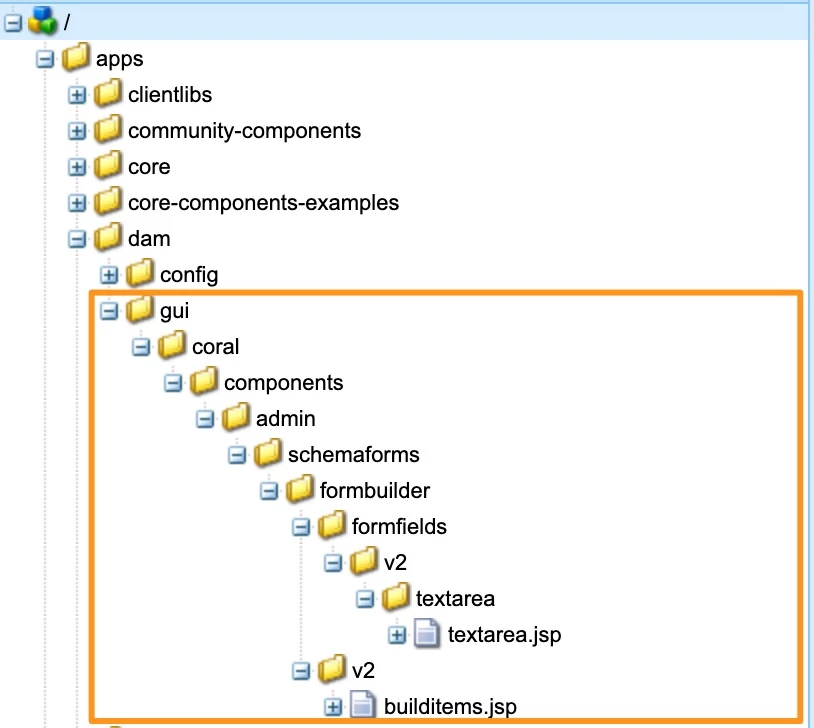
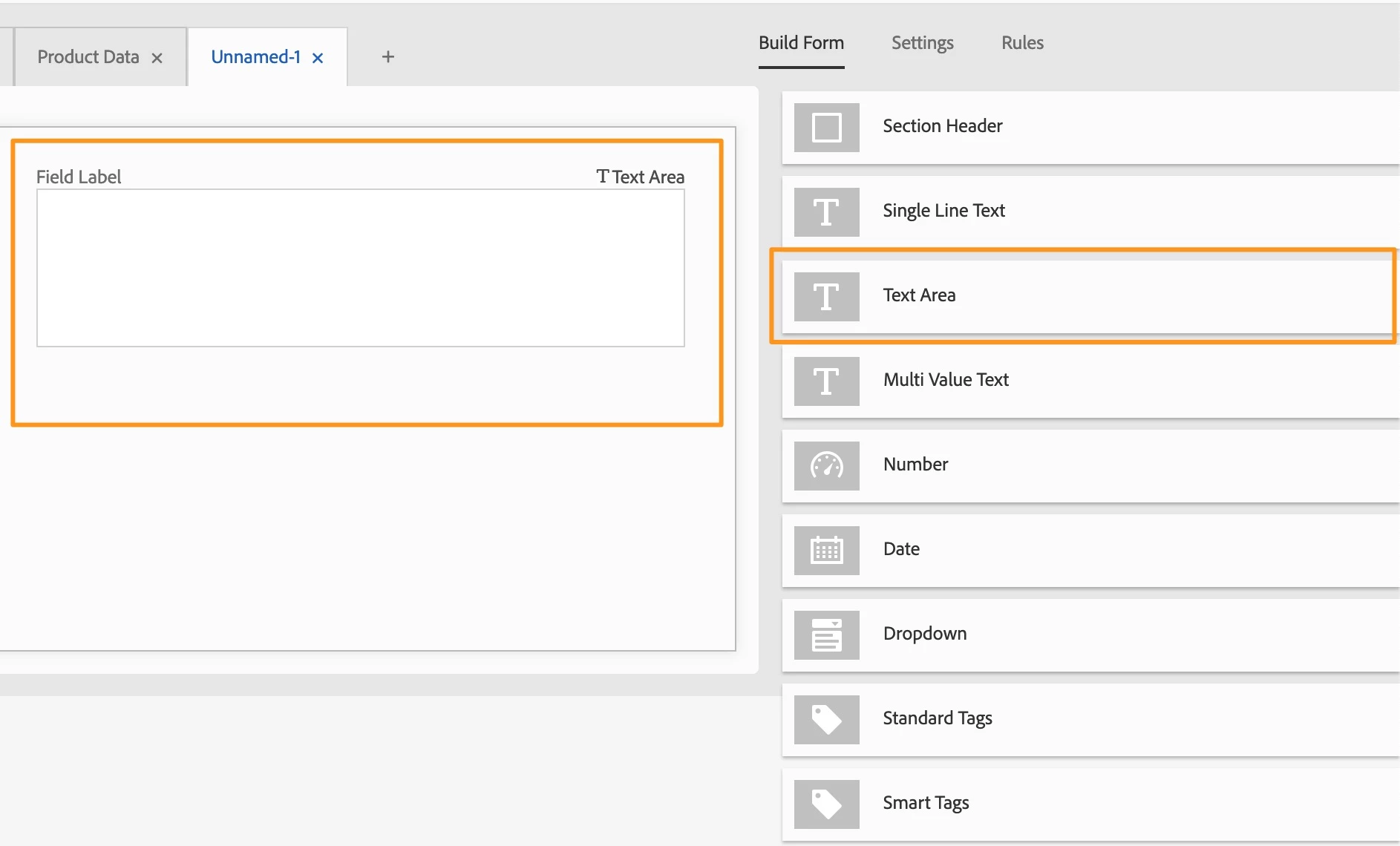
  5. Edit /apps/dam/gui/coral/components/admin/schemaforms/formbuilder/v2/builditems.jsp and add below code.
    <li class="field" data-fieldtype="text" tabindex="-1" role="menuitem">
      <div class="formbuilder-template-title"><coral-icon icon="text" alt="" size="M"></coral-icon><span><%= i18n.get("Text Area") %></span></div>
      <script class="field-properties" type="text/x-handlebars-template">
        <sling:include resource="<%= fieldTemplateResource %>"
          resourceType="dam/gui/coral/components/admin/schemaforms/formbuilder/formfields/v2/textarea" />
      </script>
    </li>
    You can place above code snippet between list elements representing Single Line Text and Multi Value Text
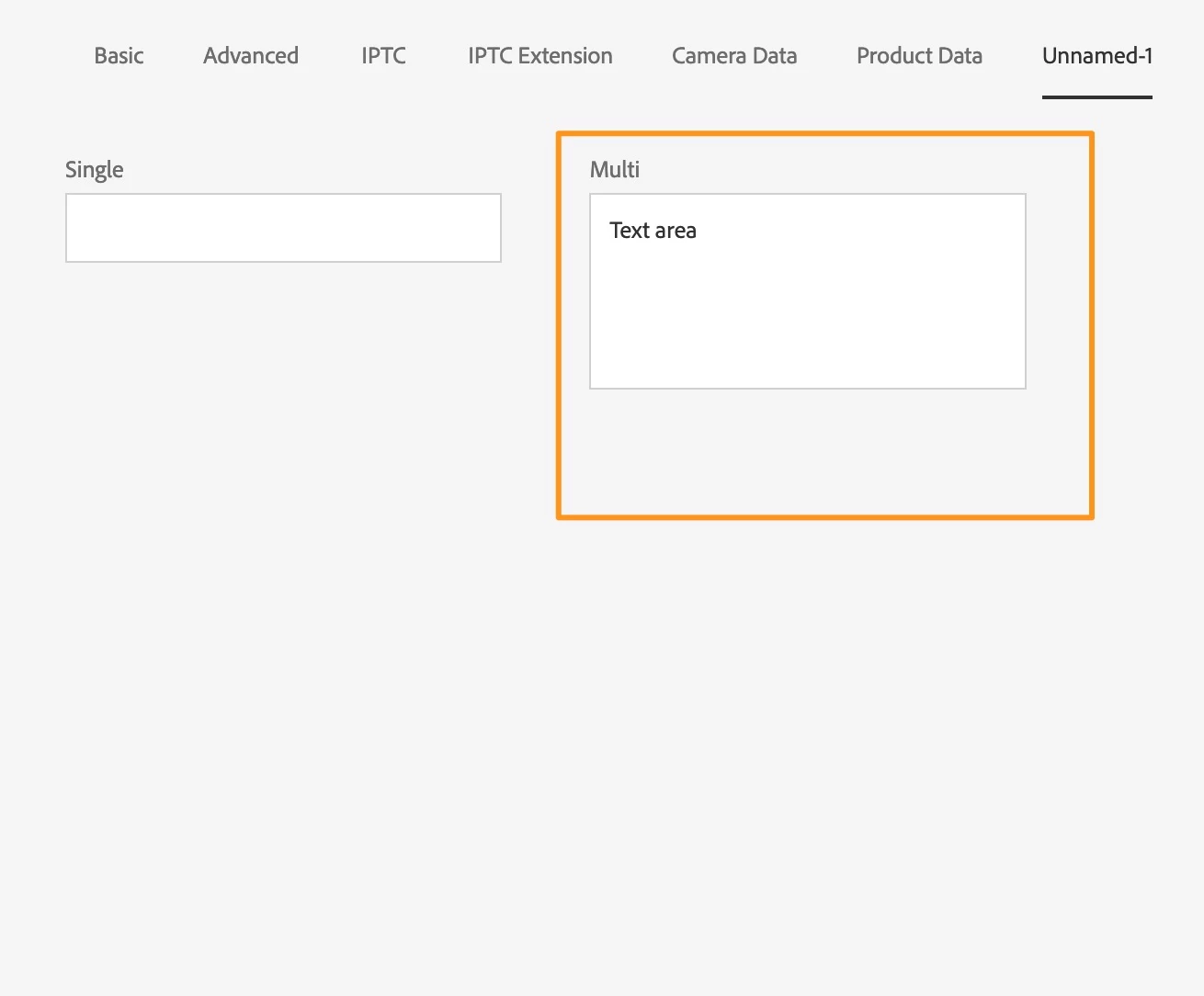
  6. Final result looks like that:

2 replies

vanegi
Adobe Employee
Adobe Employee
June 28, 2022

Hi @jacobs1633233,

Please refer this thread that has similar discussion:

https://experienceleaguecommunities.adobe.com/t5/adobe-experience-manager-ideas/add-textarea-type-of-field-to-aem-assets-metadata-schema-editor/idi-p/395867


This feature has been delivered in the April release for Cloud Service and is available in 2021.4.0 version.

Thanks!!

lukasz-m
Community Advisor
lukasz-mCommunity AdvisorAccepted solution
Community Advisor
June 28, 2022

Hi @jacobs1633233,

If you are using AEM as a Cloud, please upgrade to version 2021.4.0 or newer as @vanegi suggested. Unfortunately the change included in AEM as a Cloud is not incorporated in AEM 6.5/6.4. You can still create custom component. Please find all details below.

  1. Overlay /libs/dam/gui/coral/components/admin/schemaforms/formbuilder/formfields/v2/textfield, under apps you should get this /apps/dam/gui/coral/components/admin/schemaforms/formbuilder/formfields/v2/textfield, rename textfield to textarea. In the end this should looks like this:
  2. Copy textfield.jsp from /libs/dam/gui/coral/components/admin/schemaforms/formbuilder/formfields/v2/textfield to /apps/dam/gui/coral/components/admin/schemaforms/formbuilder/formfields/v2/textarea, and rename it to textarea.jsp, this is the expected structure.
  3. Edit textarea.jsp and paste below code
    <%--
    
      ADOBE CONFIDENTIAL
      __________________
    
       Copyright 2012 Adobe Systems Incorporated
       All Rights Reserved.
    
      NOTICE:  All information contained herein is, and remains
      the property of Adobe Systems Incorporated and its suppliers,
      if any.  The intellectual and technical concepts contained
      herein are proprietary to Adobe Systems Incorporated and its
      suppliers and are protected by trade secret or copyright law.
      Dissemination of this information or reproduction of this material
      is strictly forbidden unless prior written permission is obtained
      from Adobe Systems Incorporated.
    
    --%><%
    %><%@include file="/libs/granite/ui/global.jsp" %><%
    %><%@ page session="false" contentType="text/html" pageEncoding="utf-8"
             import="org.apache.sling.api.resource.ValueMap" %><%
    
    	ValueMap fieldProperties = resource.adaptTo(ValueMap.class);
    	String key = resource.getName();
    	String resourcePathBase = "dam/gui/coral/components/admin/schemaforms/formbuilder/formfieldproperties/";
    
    %>
    
    <div class="formbuilder-content-form" role="gridcell">
        <label class="fieldtype">
        <coral-icon alt="" icon="text" size="XS"></coral-icon><%= xssAPI.encodeForHTML(i18n.get("Text Area")) %>
        </label>
        <sling:include resource="<%= resource %>" resourceType="granite/ui/components/coral/foundation/form/textarea"/>
    </div>
    <div class="formbuilder-content-properties">
    
        <input type="hidden" name="<%= xssAPI.encodeForHTMLAttr("./items/" + key) %>">
        <input type="hidden" name="<%= xssAPI.encodeForHTMLAttr("./items/" + key + "/jcr:primaryType") %>" value="nt:unstructured">
        <input type="hidden" name="<%= xssAPI.encodeForHTMLAttr("./items/" + key + "/resourceType") %>" value="granite/ui/components/coral/foundation/form/textarea">
        <input type="hidden" name="<%= xssAPI.encodeForHTMLAttr("./items/" + key + "/sling:resourceType") %>" value="dam/gui/components/admin/schemafield">
        <input type="hidden" name="<%= xssAPI.encodeForHTMLAttr("./items/" + key + "/granite:data/metaType") %>" value="text">
    
        <% 
            String[] settingsList = {"labelfields", "metadatamappertextfield", "placeholderfields", "titlefields"};
            for(String settingComponent : settingsList){
                %>
                <sling:include resource="<%= resource %>" resourceType="<%= resourcePathBase + settingComponent %>"/>
                <%
            }
        %>
    
        <coral-icon class="delete-field" icon="delete" size="L" tabindex="0" role="button" alt="<%= xssAPI.encodeForHTMLAttr(i18n.get("Delete")) %>" data-target-id="<%= xssAPI.encodeForHTMLAttr(key) %>" data-target="<%= xssAPI.encodeForHTMLAttr("./items/" + key + "@Delete") %>"></coral-icon>
    
    </div>
    <div class="formbuilder-content-properties-rules">
        <label for="field">
        	<span class="rules-label"><%= i18n.get("Field") %></span>
            <%
                String[] fieldRulesList = {"disableineditmodefields", "showemptyfieldinreadonly"};
                for(String ruleComponent : fieldRulesList){
                    %>
                        <sling:include resource="<%= resource %>" resourceType="<%= resourcePathBase + ruleComponent %>"/>
                    <%
                }
    
            %>
        </label>  
        <label for="requirement">
        	<span class="rules-label"><%= i18n.get("Requirement") %></span>
            <% String requiredField = "v2/requiredfields"; %>
            <sling:include resource="<%= resource %>" resourceType="<%= resourcePathBase + requiredField %>"/>
        </label> 
        <label for="visibililty">    
            <span class="rules-label"><%= i18n.get("Visibility") %></span>
            <% String visibilityField = "visibilityfields"; %>
            <sling:include resource="<%= resource %>" resourceType="<%= resourcePathBase + visibilityField %>"/>
        </label>     
    </div>
    In general above code is a copy of textfield.jsp, where granite/ui/components/coral/foundation/form/textfield has been changed to granite/ui/components/coral/foundation/form/textarea
  4. Overlay /libs/dam/gui/coral/components/admin/schemaforms/formbuilder/v2/builditems.jsp, under apps you should see below structure /apps/dam/gui/coral/components/admin/schemaforms/formbuilder/v2/builditems.jsp
  5. Edit /apps/dam/gui/coral/components/admin/schemaforms/formbuilder/v2/builditems.jsp and add below code.
    <li class="field" data-fieldtype="text" tabindex="-1" role="menuitem">
      <div class="formbuilder-template-title"><coral-icon icon="text" alt="" size="M"></coral-icon><span><%= i18n.get("Text Area") %></span></div>
      <script class="field-properties" type="text/x-handlebars-template">
        <sling:include resource="<%= fieldTemplateResource %>"
          resourceType="dam/gui/coral/components/admin/schemaforms/formbuilder/formfields/v2/textarea" />
      </script>
    </li>
    You can place above code snippet between list elements representing Single Line Text and Multi Value Text
  6. Final result looks like that:
June 28, 2022

Hi @lukasz-m , 


I do not have coral under my apps/dam/gui 


Do you know if there was a location change with any updates for /coral folder in apps?