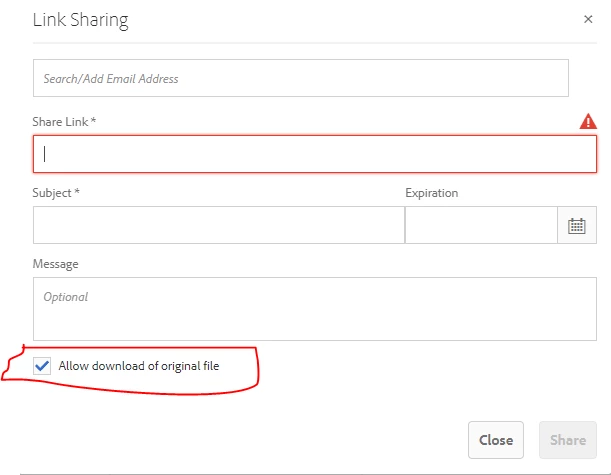
How to uncheck & disable "Allow Download" in Brand Portal Asset Sharing! | Community
Skip to main content
This post is no longer active and is closed to new replies. Need help? Start a new post to ask your question.
Best answer by vikasbharti

The configurable options for asset download are limited and detailed information on what's allowed is mentioned in this help article: https://experienceleague.adobe.com/docs/experience-manager-brand-portal/using/download/brand-portal-download-assets.html%3Flang%3Dde#configure-download

Other than that, there is no option to customize the share link form. 

2 replies

Level 3
February 2, 2023

I'd like to piggy back on this inquiry, can you set image terms to the share link interface in Brand Portals?  These terms are already in a field in the metadata.


Level 2
February 2, 2023

Hi @sos  Thanks for your response. This dialog comes from "/libs/dam/gui/content/assets/adhocassetsharedialog" and at the Brand Portal level I am not sure how i can customize it!

vikasbhartiAdobe EmployeeAccepted solution
Adobe Employee
February 6, 2023

The configurable options for asset download are limited and detailed information on what's allowed is mentioned in this help article: https://experienceleague.adobe.com/docs/experience-manager-brand-portal/using/download/brand-portal-download-assets.html%3Flang%3Dde#configure-download

Other than that, there is no option to customize the share link form.