How to hide Quick Action items from non-admin groups | Community
Skip to main content
April 28, 2021
Solved

How to hide Quick Action items from non-admin groups

  • April 28, 2021
  • 1 reply
  • 1233 views

Hello, I need to hide the quick action item EDIT from non-admin groups.
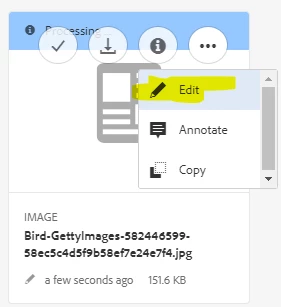
 

I am new to AEM and I can only hide the edit button in the action bar using 

/libs/dam/gui/content/assets/jcr:content/actions/selection/editasset but I cannot hide the button in Quick Action. Please advise!
This post is no longer active and is closed to new replies. Need help? Start a new post to ask your question.
Best answer by Kiran_Vedantam

Hi @10024,


Go to the user admin section [localhost:4502/useradmin] and provide read-only permissions to the group to the path you are wanting to restrict them.


Hope this helps.


Thanks,
Kiran Vedantam.

1 reply

Kiran_Vedantam
Community Advisor
Kiran_VedantamCommunity AdvisorAccepted solution
Community Advisor
June 1, 2021

Hi @10024,


Go to the user admin section [localhost:4502/useradmin] and provide read-only permissions to the group to the path you are wanting to restrict them.


Hope this helps.


Thanks,
Kiran Vedantam.