Asset upload - dam:physicalheightindpi calculation | Community
Skip to main content
October 13, 2023
Solved

Asset upload - dam:physicalheightindpi calculation

  • October 13, 2023
  • 2 replies
  • 813 views

Hello All,


Could anyone point me to more details of how the below fields are calculated for any asset uploaded to AEM DAM? Which workflow step is responsible for it?
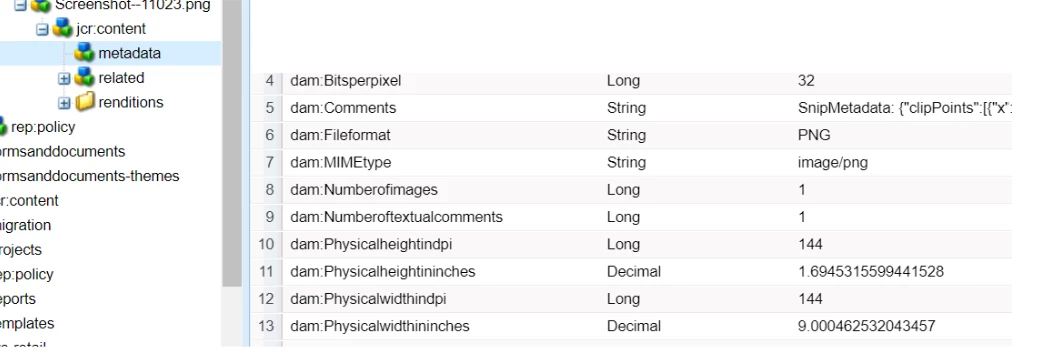


dam:Physicalheightindpi

dam:Physicalheightininches

dam:Physicalwidthindpi

dam:Physicalwidthininches


Thanks in Advance!

This post is no longer active and is closed to new replies. Need help? Start a new post to ask your question.
Best answer by Adilos-Cantuerk

I believe this is a setting that is made with Photoshop within the picture.
Open up a picture in Photoshop, then select image > image size 
on the bottom you see the value in the resolution that was assigned to the picture.

2 replies

Adilos-Cantuerk
Community Advisor
Adilos-CantuerkCommunity AdvisorAccepted solution
Community Advisor
October 17, 2023

I believe this is a setting that is made with Photoshop within the picture.
Open up a picture in Photoshop, then select image > image size 
on the bottom you see the value in the resolution that was assigned to the picture.

Adilos-Cantuerk
Community Advisor
Community Advisor
October 17, 2023

I just had a quick test - opened up a picture, set the resolution to 123ppi and uploaded it into DEV.
As expected - the file now looks like this:

Why does this value bother you? 
Does it have an impact on something? 
Pixel size matters for most use cases - not dpi/ppi

bk5Author
October 18, 2023

Thanks @adilos-cantuerk for the update.

We get value as "-1" for both dam:Physicalheightindpi and 

dam:Physicalwidthindpi for most of the (90%) assets and thus wanted to check what logic is responsible for this.