
AEM Cloud - HTTP API - Asset Upload - 400 Invalid recursion selector value 'initiateUpload'
Hi there,
I'm trying to build a small app that leverages the HTTP API explained here to upload assets to our Cloud AEM instance:
When I execute the initial HTTP request via Postman, I'm getting a response back, but it's just this:
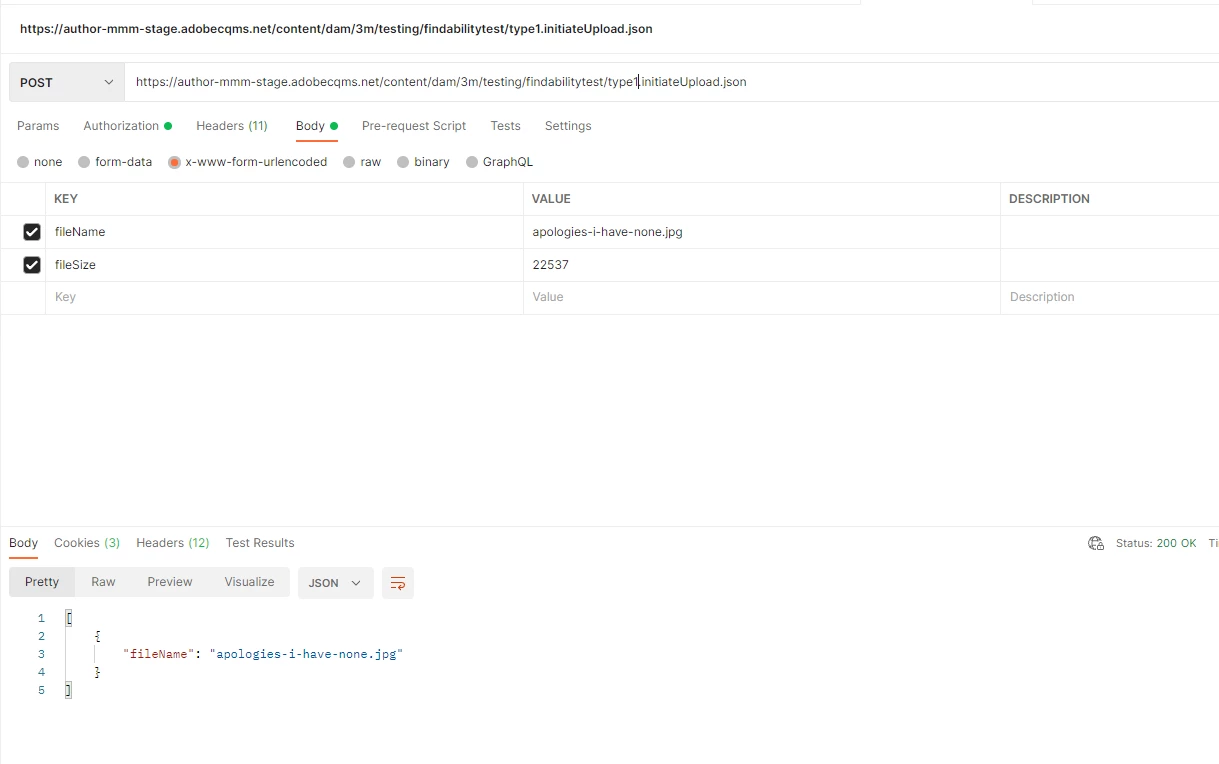
[{"fileName":"apologies-i-have-none.jpg"}]
I've tested connectivity to the API by calling other parts of it using Basic Authentication, and that works fine.
When I try similar via the aem-upload node.js packages, I get failures but for different reasons. Using the script identified here:
https://github.com/adobe/aem-upload#uploading-files
This is the response:
PS C:\Users\uk003619\source\repos\aemuploader> node .\aemuploader.js
sending 1 files to httptransfer with options {
"uploadFiles": [
{
"fileUrl": "https://author-mmm-stage.adobecqms.net/content/dam/3m/testing/findabilitytest/type1/load.jpg",
"fileSize": 22537,
"filePath": "load.jpg"
}
],
"headers": {
"Authorization": "Basic cGF1bGNhcmRub3Rlc3RhcGl1c2VyOkFkb2JlQVBJR3JlZW5sMDBucys="
},
"concurrent": true,
"maxConcurrent": 5
}
Upload START 'load.jpg': 22537 bytes
1th failure event recorded: {"message":"Target AEM instance must have direct binary upload enabled","code":"ENOTSUPPORTED"}
Upload FAILED 'load.jpg': 'Target AEM instance must have direct binary upload enabled'
Closing all file handles
successfully uploaded files with httptransfer
Uploading result in JSON: {
"host": "https://author-mmm-stage.adobecqms.net",
"initSpent": 100,
"totalFiles": 1,
"totalTime": 898,
"totalCompleted": 1,
"finalSpent": 898,
"totalFileSize": 22537,
"avgFileSize": 22537,
"avgPutSpent": 1000,
"avgCompleteSpent": 200,
"nintyPercentileTotal": 1200,
"detailedResult": [
{
"fileName": "load.jpg",
"targetPath": "/content/dam/3m/testing/findabilitytest/type1/load.jpg",
"fileSize": 22537,
"partSize": 22537,
"fileSizeStr": "22.01 KB",
"partSizeStr": "22.01 KB",
"partNum": 1,
"putSpentFinal": 1000,
"putSpentMin": 1000,
"putSpentMax": 1000,
"putSpentAvg": 1000,
"completeSpent": 200,
"success": true,
"message": "",
"partDetails": [
{
"start": 0,
"end": 22537,
"message": "",
"elapsedTime": 1000,
"retryErrors": []
}
],
"retryErrors": []
}
],
"errors": [],
"retryErrors": []
}
success
{"host":"https://author-mmm-stage.adobecqms.net","initSpent":100,"totalFiles":1,"totalTime":898,"totalCompleted":1,"finalSpent":898,"totalFileSize":22537,"avgFileSize":22537,"avgPutSpent":1000,"avgCompleteSpent":200,"nintyPercentileTotal":1200,"detailedResult":[{"fileName":"load.jpg","targetPath":"/content/dam/3m/testing/findabilitytest/type1/load.jpg","fileSize":22537,"partSize":22537,"fileSizeStr":"22.01 KB","partSizeStr":"22.01 KB","partNum":1,"putSpentFinal":1000,"putSpentMin":1000,"putSpentMax":1000,"putSpentAvg":1000,"completeSpent":200,"success":true,"message":"","partDetails":[{"start":0,"end":22537,"message":"","elapsedTime":1000,"retryErrors":[]}],"retryErrors":[]}],"errors":[],"retryErrors":[]}
PS C:\Users\uk003619\source\repos\aemuploader>
Taking the other model described in there:
PS C:\Users\uk003619\source\repos\aemuploader> node .\run.js
wyg
yo
y1o
yo2
Creating AEM directory /content/dam/3m with title ''
post https://author-mmm-stage.adobecqms.net/api/assets/3m < failed with status code 409
AEM folder '/content/dam/3m' already exists
Creating AEM directory /content/dam/3m/testing with title ''
post https://author-mmm-stage.adobecqms.net/api/assets/3m/testing < failed with status code 409
AEM folder '/content/dam/3m/testing' already exists
Creating AEM directory /content/dam/3m/testing/findabilitytest with title ''
post https://author-mmm-stage.adobecqms.net/api/assets/3m/testing/findabilitytest < failed with status code 409
AEM folder '/content/dam/3m/testing/findabilitytest' already exists
Creating AEM directory /content/dam/3m/testing/findabilitytest/type1 with title ''
post https://author-mmm-stage.adobecqms.net/api/assets/3m/testing/findabilitytest/type1 < failed with status code 409
AEM folder '/content/dam/3m/testing/findabilitytest/type1' already exists
From 1 paths, filesystem upload compiled upload of 0 directories, 1 files, with a total size of 22537. Encountered 0 filesystem-related errors.
Uploading 1 files
sending 1 files to httptransfer with options {
"uploadFiles": [
{
"fileUrl": "https://author-mmm-stage.adobecqms.net/content/dam/3m/testing/findabilitytest/type1/load.jpg",
"fileSize": 22537,
"filePath": "C:/Users/uk003619/source/repos/aemuploader/load.jpg"
}
],
"headers": {
"Authorization": "Basic cGF1bGNhcmRub3Rlc3RhcGl1c2VyOkFkb2JlQVBJR3JlZW5sMDBucys="
},
"concurrent": true,
"maxConcurrent": 5
}
Upload START 'load.jpg': 22537 bytes
1th failure event recorded: {"message":"Target AEM instance must have direct binary upload enabled","code":"ENOTSUPPORTED"}
Upload FAILED 'load.jpg': 'Target AEM instance must have direct binary upload enabled'
Closing all file handles
successfully uploaded files with httptransfer
Uploading result in JSON: {
"host": "https://author-mmm-stage.adobecqms.net",
"initSpent": 100,
"totalFiles": 1,
"totalTime": 537,
"totalCompleted": 1,
"finalSpent": 537,
"totalFileSize": 22537,
"avgFileSize": 22537,
"avgPutSpent": 1000,
"avgCompleteSpent": 200,
"nintyPercentileTotal": 1200,
"detailedResult": [
{
"fileName": "load.jpg",
"targetPath": "/content/dam/3m/testing/findabilitytest/type1/load.jpg",
"fileSize": 22537,
"partSize": 22537,
"fileSizeStr": "22.01 KB",
"partSizeStr": "22.01 KB",
"partNum": 1,
"putSpentFinal": 1000,
"putSpentMin": 1000,
"putSpentMax": 1000,
"putSpentAvg": 1000,
"completeSpent": 200,
"success": true,
"message": "",
"partDetails": [
{
"start": 0,
"end": 22537,
"message": "",
"elapsedTime": 1000,
"retryErrors": []
}
],
"retryErrors": []
}
],
"errors": [],
"retryErrors": []
}
finished with the await
We're using AEM as a Cloud Service, which in my understanding has direct binary upload supported by default. What am I missing? Do I need to enable something on our Cloud instance?