AEM Assets as Cloud - Assets Upload Limit via UI | Community
Skip to main content
Level 2
August 8, 2024
Solved

AEM Assets as Cloud - Assets Upload Limit via UI

  • August 8, 2024
  • 3 replies
  • 1363 views

Can somebody please confirm that what is the maximum number of assets an author can upload(in parallel) using the AEM Interface in AEM Assets Cloud Service.

This post is no longer active and is closed to new replies. Need help? Start a new post to ask your question.
Best answer by digarg17

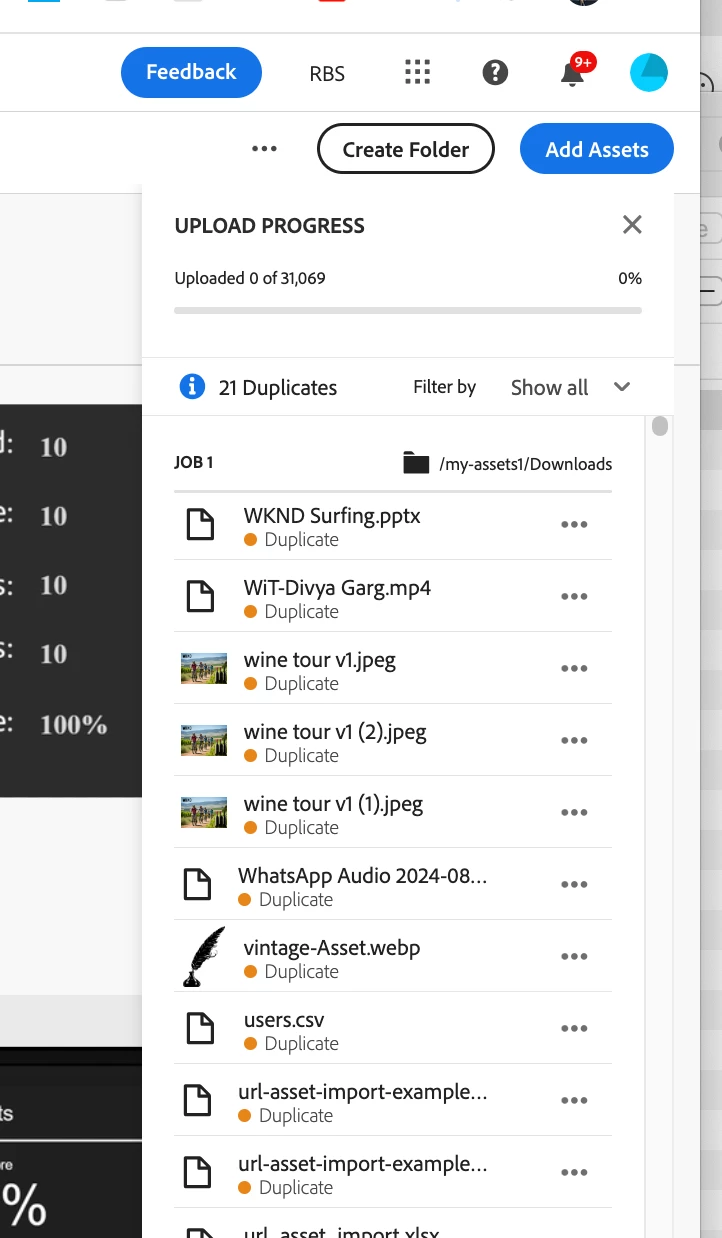
I don't think there is any limit with AEM as a cloud service due to its scalable architectre. All uploads gets queued up. I tried uploading 30k+ assets in one go, everything gets queued up as shown in picture below. 5k + jobs got created and queued up . (Assets view - new assets UI tried uploading my download folder)


3 replies

digarg17Adobe EmployeeAccepted solution
Adobe Employee
August 13, 2024

I don't think there is any limit with AEM as a cloud service due to its scalable architectre. All uploads gets queued up. I tried uploading 30k+ assets in one go, everything gets queued up as shown in picture below. 5k + jobs got created and queued up . (Assets view - new assets UI tried uploading my download folder)


EstebanBustamante
Community Advisor and Adobe Champion
August 14, 2024

Hi,


Technically, there is no limit due to the architecture of AEMaaCS. AEMaaCS is a SaaS service that scales on demand, and the assets-specific product uses a microservice architecture that allows for the separation and independent handling of services. Therefore, as explained by Digarg, there should be no limit.

Esteban Bustamante
kautuk_sahni
Community Manager
Community Manager
August 21, 2024

@gagandeepsaluja Did you find the suggestions from users helpful? Please let us know if you require more information. Otherwise, please mark the answer as correct for posterity. If you've discovered a solution yourself, we would appreciate it if you could share it with the community. Thank you!

Kautuk Sahni
Level 2
August 21, 2024

Hi @kautuk_sahni ,


I got the required details from here as well as from the Adobe support team:

"The user interface is designed to handle multiple uploads efficiently. However, it is good practice to monitor the performance and adjust the number of parallel uploads if any issues arise. Instead of uploading 1,000 assets at once, consider uploading them in batches of 100-200 assets. This can help in managing the load more effectively."


Thank you for the help.