ACS Commons Data Importer | Adobe Higher Education
Skip to main content
Level 2
March 11, 2024

ACS Commons Data Importer

  • March 11, 2024
  • 4 Antworten
  • 4342 Ansichten

Hi All,


We have around 1lakh assets for which we have to import the metadata properties of the assets, using out of the box metadata import we can import only 100 assets at a time, to overcome this we have access to data import tool under ACS AEM Commons on AEMaaCS. 
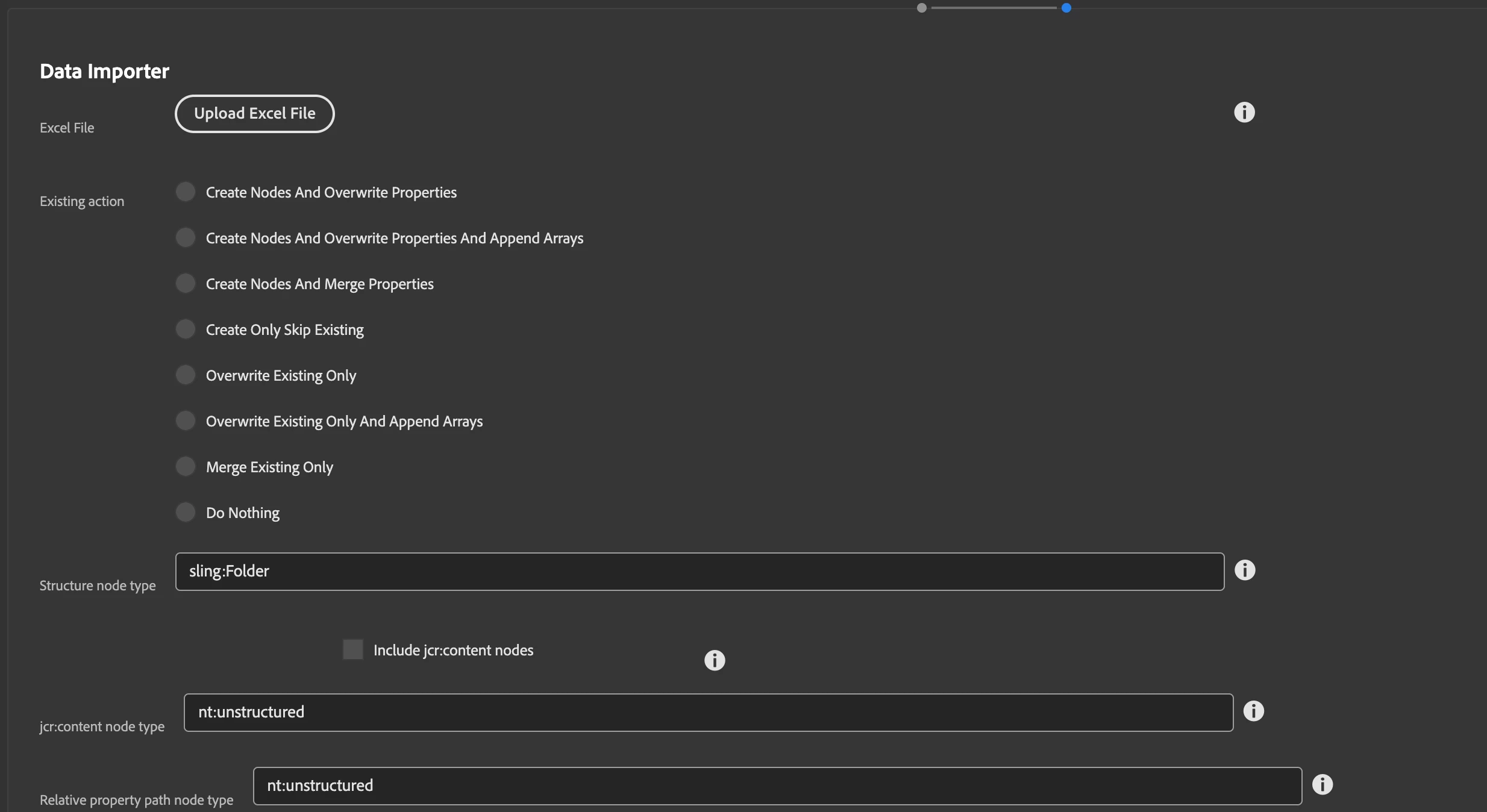


Please let me know the sample .xlsx file to be uploaded and above options to be filled while updating asset metadata properties, let us know if there is any limitations for number of assets metadata properties to be updated at once in a single .xlsx file


Thanks,

Devi

Dieses Thema wurde für Antworten geschlossen.

4 Antworten

EstebanBustamante
Community Advisor and Adobe Champion
March 11, 2024

Hi,


The format is specified on this page: https://adobe-consulting-services.github.io/acs-aem-commons/features/utils-and-apis/data-api/index.html#structure. If you need a reference or sample, you can use the sample file from here: https://adobe-consulting-services.github.io/acs-aem-tools/features/csv-asset-importer/index.html. You can download that sample and update it accordingly. The most important thing is to keep the "path" column, and then you can add all the other columns as metadata fields, following the instructions provided in the first link I shared.


As far as I know, there is no limitation on the quantity of metadata fields. However, you can simply check with one asset to make sure everything works fine before ingesting all your 1k assets


Hope this helps.


Esteban Bustamante
DeviB_Autor
Level 2
March 12, 2024

Hi @estebanbustamante,


Thanks for your response.

I have tried by uploading the sample file you had mentioned, the file is getting uploaded but the metadata properties are not updating, PFA the same


Requesting you to update metadata property for at-least 1 asset as demo.


Thanks,

Devi


Level 2
March 19, 2024

@devib_ you can't use the sample file in your AEM instance as those aren't real values mapped to your assets.

In column A, you need your own asset's path. For that, please select the folder containing the assets> click on 3 dots at top> Export Metadata. This will generate a CSV file with metadata info of your already uploaded assets. You can modify the same file, save it as .xlsx and import with your modifications.

Hope this helps.


Hi @diksha_mishra ,


I had uploaded images path which ever i had in my system, even though I'm not able to get the assets properties updated.


Thanks,

Devi

narendragandhi
Community Advisor
Community Advisor
March 13, 2024

Hi @devib_ 


Have these assets already been imported in AEM? The bulk import tool for assets also gives an option to upload the metadata for all those assets.


There is a custom script for bulk metadata update as well - https://github.com/leachuk/aem-asset-upload

If the ACS Commons options does not work you can try this script.


Thanks

Narendra

DeviB_Autor
Level 2
March 13, 2024

Hi @narendragandhi,


We already have the assets but only the metadata needs to be updated. Can you let me know regarding the bulk import tool for updating metadata of assets.


Thanks,

Devi

Kamal_Kishor
Community Advisor
Community Advisor
March 18, 2024

@devib_ : Are you selecting the appropriate options? Every option/radio field will make the importer behave in a certain way.

Please refer this (if not already seen): https://adobe-consulting-services.github.io/acs-aem-commons/features/mcp-tools/data-importer/index.html

There are several options to control how data will be brought into AEM with this tool:

  • Excel file: Provide the excel file. In Windows you must ensure the file is not currently open in Excel or you will receive an error.
  • Existing action: Decide how data should be managed if the destination nodes alread exist or do not already exist yet.
  • Structure node type: If intermediate nodes in the path are missing, this decides what type they should be.
  • Dry run: Only report on what actions would be taken without doing any actual work.
  • Detailed report: Report on all actions taken, otherwise only brief summary information is provided in the report.
  • Import in sorted order: Ignores order in spreadsheet and sorts everything by path before processing.
Adobe Employee
March 19, 2024

Hi @devib_ 


You can use OOTB Metadata Import tool to add metadata to all assets, this has batch limit of 100 which means from csv it will pick assets in batch of 100 until all asset is not updated. I have used this to update approx 70K assets and found no issue.

You can go through below link for preparation of csv to import:

https://experienceleague.adobe.com/en/docs/experience-manager-learn/assets/metadata/metadata-import-export#metadata-import


Thanks,

Level 2
March 19, 2024

Hi @priyankaku ,


We have assets in lakhs so it would be time consuming for updating 100 assets in a batch, i there any other option for updating assets properties or can we update more than 100 assets in a batch.


Thanks,

Devi

Adobe Employee
March 19, 2024

I am able to update metadata using data importer tool using below excel data, you can also use in same way metadata_name@type

pathGTIN_NBR@stringITEM_NBR@stringPROD_ID@stringITEM_GRP_NM@stringITEM_COLOR@stringITEM_SIZE@stringBRAND_NM@stringCATG_ID@stringCATG_DISP_NM@stringITEM_STATUS_CD@string
/content/dam/test-images/0072621412006_A.jpg72621412006307818prod20301178Hanes 6 Pack V-Neck Tees-Black/Grey Size XLBlack/GreyXLHanes2920103Underwear & SleepwearA
/content/dam/test-images/0072621412006_B.jpg72621412006307818prod20301178Hanes 6 Pack V-Neck Tees-Black/Grey Size XLBlack/GreyXLHanes2920103Underwear & SleepwearA
/content/dam/test-images/0072621412006_C.jpg72621412006307818prod20301178Hanes 6 Pack V-Neck Tees-Black/Grey Size XLBlack/GreyXLHanes2920103Underwear & SleepwearA
/content/dam/test-images/0072621412006_Video.mp472621412006307818prod20301178Hanes 6 Pack V-Neck Tees-Black/Grey Size XLBlack/GreyXLHanes2920103Underwear & SleepwearA
kautuk_sahni
Community Manager
Community Manager
May 16, 2024

@devib_Did you find the suggestions from users helpful? Please let us know if more information is required. Otherwise, please mark the answer as correct for posterity. If you have found out solution yourself, please share it with the community.

Kautuk Sahni