Use query data in the delivery | Community
Skip to main content
Adobe Employee
February 26, 2018
Solved

Use query data in the delivery

  • February 26, 2018
  • 9 replies
  • 8165 views

Hi,

I have a query action which queries the "Workflows" and identifies all the workflows which are in paused state due to an error. I want to create a workflow which queries this, and sends out the output of the query (all the paused workflow names) in a delivery. Is this possible?

Thanks,

Vignesh

This post is no longer active and is closed to new replies. Need help? Start a new post to ask your question.
Best answer by daniell35335226

Hi Vignesh

We have done similar things for our customers, whereby a user group needs to be alerted via an email to a list of failed workflows. 

There are several ways to do this, to be honest, however, I found the following approach to be pretty straightforward and fast. The email is sent via an alert in this case:
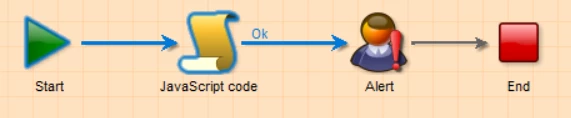
Step 1, the workflow consists of a start, javascript, alert and end activity. The Javascript is going to query the workflow table and look for paused workflows; then for each paused workflow, it is going to build a row in an HTML table.
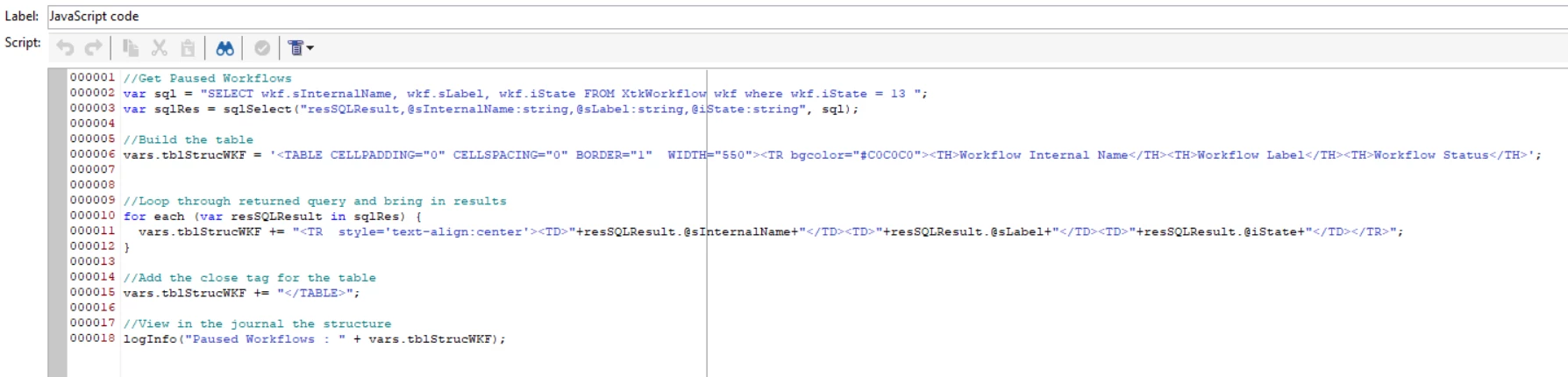
The code is below:

//Get Paused Workflows

var sql = "SELECT wkf.sInternalName, wkf.sLabel, wkf.iState FROM XtkWorkflow wkf where wkf.iState = 13 ";

var sqlRes = sqlSelect("resSQLResult,@sInternalName:string,@sLabel:string,@iState:string", sql);

//Build the table

vars.tblStrucWKF = '<TABLE CELLPADDING="0" CELLSPACING="0" BORDER="1"  WIDTH="550"><TR bgcolor="#C0C0C0"><TH>Workflow Internal Name</TH><TH>Workflow Label</TH><TH>Workflow Status</TH>';

//Loop through returned query and bring in results

for each (var resSQLResult in sqlRes) {

  vars.tblStrucWKF += "<TR  style='text-align:center'><TD>"+resSQLResult.@sInternalName+"</TD><TD>"+resSQLResult.@sLabel+"</TD><TD>"+resSQLResult.@iState+"</TD></TR>";

}

//Add the close tag for the table

vars.tblStrucWKF += "</TABLE>";

//View in the journal the structure

logInfo("Paused Workflows : " + vars.tblStrucWKF);

Step 2;

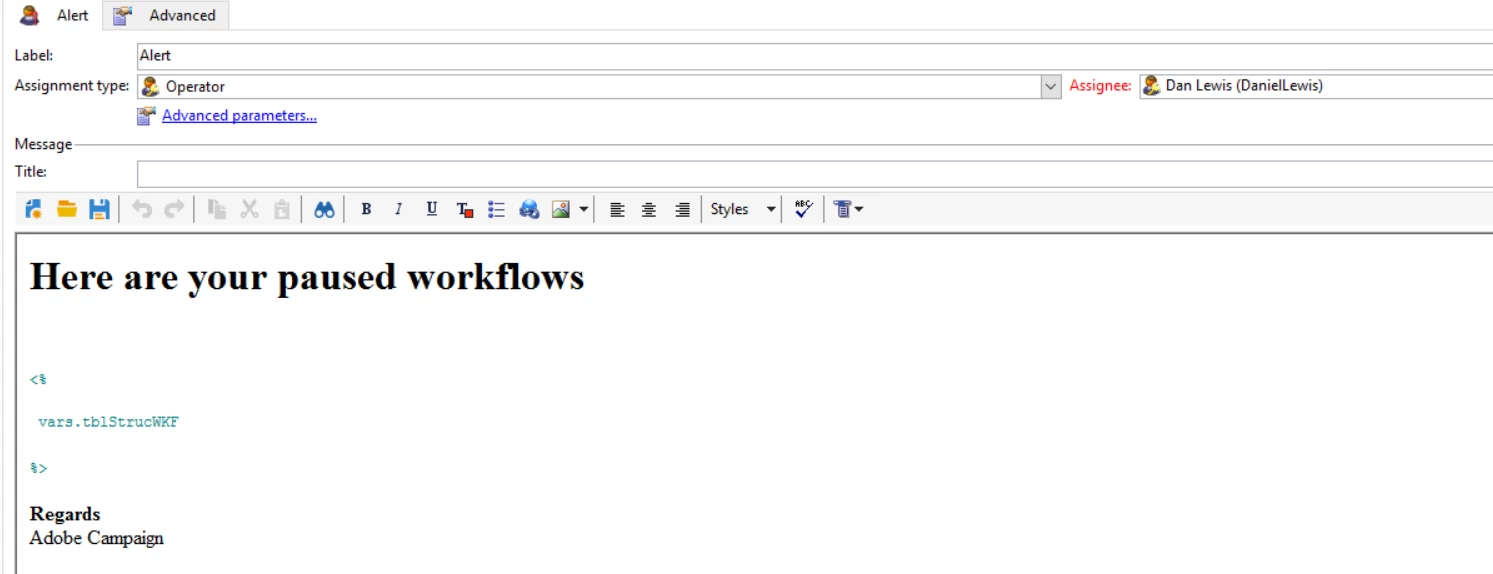
This variable that contains the result is then going to be reference in your alert:
As I said, there are several ways to do it - this is just one of them but should give you a starting point.

Kind Regards

Dan Lewis

Tech Marketer Solutions

http://www.techmarketersolutions.com

9 replies

daniell35335226Accepted solution
Level 2
February 26, 2018

Hi Vignesh

We have done similar things for our customers, whereby a user group needs to be alerted via an email to a list of failed workflows. 

There are several ways to do this, to be honest, however, I found the following approach to be pretty straightforward and fast. The email is sent via an alert in this case:

Step 1, the workflow consists of a start, javascript, alert and end activity. The Javascript is going to query the workflow table and look for paused workflows; then for each paused workflow, it is going to build a row in an HTML table.

The code is below:

//Get Paused Workflows

var sql = "SELECT wkf.sInternalName, wkf.sLabel, wkf.iState FROM XtkWorkflow wkf where wkf.iState = 13 ";

var sqlRes = sqlSelect("resSQLResult,@sInternalName:string,@sLabel:string,@iState:string", sql);

//Build the table

vars.tblStrucWKF = '<TABLE CELLPADDING="0" CELLSPACING="0" BORDER="1"  WIDTH="550"><TR bgcolor="#C0C0C0"><TH>Workflow Internal Name</TH><TH>Workflow Label</TH><TH>Workflow Status</TH>';

//Loop through returned query and bring in results

for each (var resSQLResult in sqlRes) {

  vars.tblStrucWKF += "<TR  style='text-align:center'><TD>"+resSQLResult.@sInternalName+"</TD><TD>"+resSQLResult.@sLabel+"</TD><TD>"+resSQLResult.@iState+"</TD></TR>";

}

//Add the close tag for the table

vars.tblStrucWKF += "</TABLE>";

//View in the journal the structure

logInfo("Paused Workflows : " + vars.tblStrucWKF);

Step 2;

This variable that contains the result is then going to be reference in your alert:

As I said, there are several ways to do it - this is just one of them but should give you a starting point.

Kind Regards

Dan Lewis

Tech Marketer Solutions

http://www.techmarketersolutions.com

vnagarajAdobe EmployeeAuthor
Adobe Employee
February 26, 2018

Hi Dan,

Thanks a lot for your reply. When I tried to run that workflow, I get an error "The user cannot use the 'execCommand' function without having the required 'sql' right.".

Is there any way to avoid this?

Thanks,

Vignesh

Level 2
February 26, 2018

Hi Vignesh,

You can go to your operator and give your operator this named right ="SQL SCRIPT EXECUTION". That should allow you to run the workflow. The alternative is to create the same query using javascript server Query Def - which I find less efficient.

vnagarajAdobe EmployeeAuthor
Adobe Employee
February 26, 2018

Hi Dan,

Unfortunately I do not have access to change the rights of operators in the instance.

Also I tried to use query def like below:

var query = xtk.queryDef.create( <queryDef schema="temp:enrich" operation="select"> <select> <node expr="@newFirstName"/> </select> </queryDef>); var resultSet = query.ExecuteQuery(); for each (var row in resultSet) { logInfo("From temp schema : " + row.@newFirstName); instance.vars.AKTEST = row.@newFirstName; logInfo("From instance variable : " + instance.vars.AKTEST); }

But Got the below error : "

02/26/2018 5:28:17 AM js3 SCR-160012 JavaScript: error while evaluating script 'WKF164744/js3'.

02/26/2018 5:28:17 AM js3 SOP-330011 Error while executing the method 'ExecuteQuery' of service 'xtk:queryDef'.

02/26/2018 5:28:17 AM js3 XTK-170024 The temporary 'temp:enrich' schema is not defined in the current context.

"

Don't know if I have hit a dead end here.

Thanks,

Vignesh

Level 2
February 26, 2018

Hi Vignesh

Can you give me a screenshot of your workflow? I can help you through this - no problem.

Dan

Amit_Kumar
Level 10
February 26, 2018

Hi Vignesh,

It seems like you are using enrichment to populate the results in your workflow, can you ensure that you are using the correct name if the enrichment in your query? To be safe you should always rely on schema={vars.targetSchema} to get the correct temp query name.

your query will become like this:

var query = xtk.queryDef.create( <queryDef schema={vars.targetSchema}  operation="select"> <select> <node expr="@newFirstName"/> </select> </queryDef>);

var resultSet = query.ExecuteQuery();

for each (var row in resultSet) {

logInfo("From temp schema : " + row.@newFirstName);

instance.vars.AKTEST = row.@newFirstName;

logInfo("From instance variable : " + instance.vars.AKTEST);

}

Note: ensure that your enrichment have newFirstName as attribute.

Regards,

Amit newFirstNames data

vnagarajAdobe EmployeeAuthor
Adobe Employee
February 27, 2018

Hi all,

Thanks for the help. Used Amit's suggestion on changing the schema, and now able to get the values in the instance variable. But while using the variable in the alert statement, I get an error that I do not have rights needed on the folder to complete the operation. Planning to try with a continuous delivery instead.

Thanks,

Vignesh

aungar93
August 20, 2018

Hi,

I have just tried replicating this workflow however i am getting the following error messages, does anyone know of a solution to this?

Thanks,

Adam

vnagarajAdobe EmployeeAuthor
Adobe Employee
August 22, 2018

Hi Adam,

Seems like there is an issue in the ";" character used in your script. Try developing a simple script first with only one column of values to be displayed. I was able to use the above script without any issues.

Thanks,
Vignesh