Unsubscribes in reports? | Community
Skip to main content
robertw59784382
Level 2
July 24, 2017
Solved

Unsubscribes in reports?

  • July 24, 2017
  • 5 replies
  • 3978 views

Hi,

I'm trying to add a column to each report showing how many people have unsubscribed. Ideally it should be on the same report so it is next to the delivery template and we can see how many people are unsubscribing from each specific email. I have managed to place the unsubscribed column but I am struggling to come up with a way to add the total number of unsubscribed in there (at the minute I can only see are just the number of clicks).

The only way I could think to do this was by using the tracking logs and specifying 'Email click'. However, I cannot filter the email click to be for only our unsubscribe link (as shown below). Is anyone able to offer some advice for doing this? Perhaps an alternative approach is needed!

Any response is much appreciated.

Thanks,

Rob
This post is no longer active and is closed to new replies. Need help? Start a new post to ask your question.
Best answer by davidk46719882

Hi Rob,

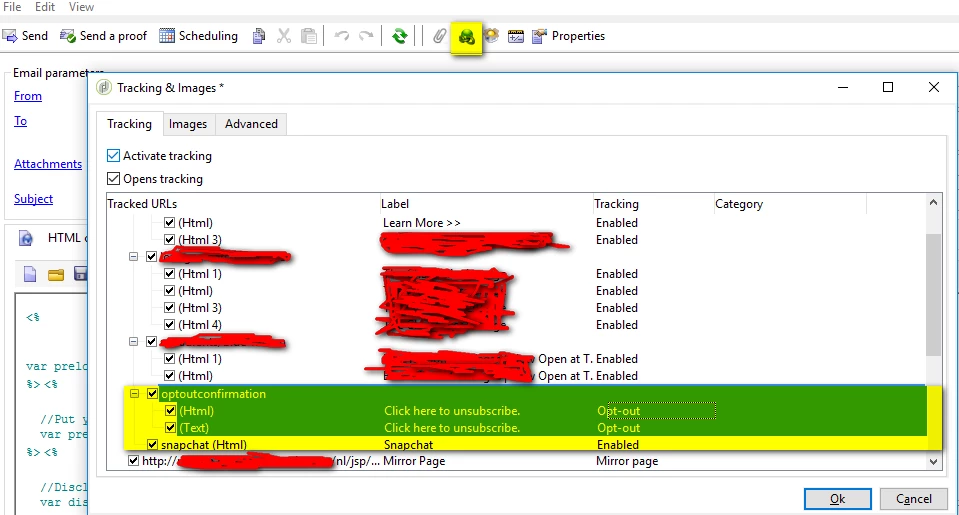
As you are not using OOTB unsubscription link, you need to declare the link you are using as opt-out

That will allow you to query url type equal to opt-out. you can also use indicators/@optout from deliveries table in your report.

Thanks

David

5 replies

Amit_Kumar
Level 10
July 25, 2017

Hi Rob,

You are almost there. If you are using the OOTB unsubscription link or a link with label Opt-out in emails, then you should select opt-out from the drop down instead of email click otherwise use your custom URL name to filter the results.

OOTB URL lable and value is like

Opt-outoptout

Regards,

Amit

robertw59784382
Level 2
July 25, 2017

Hi Amit,

Thanks for your reply.

Unfortunately we don't use the optOut indicator, so this gave me no results. I believe we are using a custom unsub URL, so filtering for a custom URL would be perfect, how can this be done?

Regards,

Rob

davidk46719882
davidk46719882Accepted solution
Level 2
July 25, 2017

Hi Rob,

As you are not using OOTB unsubscription link, you need to declare the link you are using as opt-out

That will allow you to query url type equal to opt-out. you can also use indicators/@optout from deliveries table in your report.

Thanks

David

robertw59784382
Level 2
July 27, 2017

Thanks David. That seems to be working, but results in the report are 0. I assume that's because changing tracking to opt-out only picks up future unsubscribes?

Regards,

Rob

davidk46719882
Level 2
July 27, 2017

Hi Rob,

It will work only for the future unsubscribes. But you can change the URL type to "Opt-out" in the old deliveries then recompute delivery and tracking indicators to retrieve the old unsubscribes.

Please do it on a dev/test environment first.

Thanks

David