Syntax for merge-tags using Movable Ink | Community
Skip to main content
August 12, 2019
Solved

Syntax for merge-tags using Movable Ink

  • August 12, 2019
  • 2 replies
  • 3196 views

Hi,

I'm currently trying to create some dynamic content with Movable Ink and execute through Adobe Campaign Standard.

A part of this involves setting up a merge tag in Movable Ink which queries the parameter that is read in Adobe.

However, the personalisation doesn't appear to be working and I assume it's down to me using the incorrect syntax and coding for the tag itself. Example below.
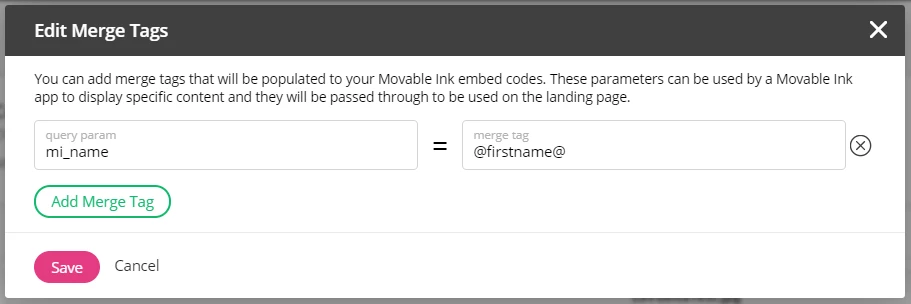
I've tried using *firstName* , @firstName@ , %firstName%......the list goes on.

Has anyone else successful managed to use movable ink with Adobe Campaign Standard.

Or can anyone tell me what the correct syntax is that I should be using.

Many thanks

Rich

This post is no longer active and is closed to new replies. Need help? Start a new post to ask your question.
Best answer by bisswang

It's a span tag generated by the Creative Editorjust insert the field there and then copy the code from the HTML generated by the editor

2 replies

bisswangAdobe EmployeeAccepted solution
Adobe Employee
August 12, 2019

It's a span tag generated by the Creative Editorjust insert the field there and then copy the code from the HTML generated by the editor

Level 2
October 30, 2022

Did anyone get this to work?