Soft Bounce Retries | Community
Skip to main content
Level 2
December 28, 2017
Solved

Soft Bounce Retries

  • December 28, 2017
  • 6 replies
  • 4755 views

In one of the adobe campaign environments, retries for soft bounce are not working. Where do i check for this error.

If i send mail to the same address from a different environment, i get a soft bounce error and retries are happening as per the default settings.

Please provide pointers to check this issue and where shall i look if auto retries by system for soft bounce does not work

This post is no longer active and is closed to new replies. Need help? Start a new post to ask your question.
Best answer by vraghav

Hi Priyanka,

There are basically two types of errors

  1. Synchronous error: the remote mail server contacted by the Adobe Campaign delivery server returned an error message. Adobe Campaign qualifies each error in order to determine whether or not the email addresses concerned should be quarantined. See Synchronous errors.
  2. Asynchronous error: a bounced mail was resent later by the incoming server. This mail is loaded into a technical mailbox the application uses to label messages with an error. After an email sending failure, Adobe Campaign applies many rules to categorize the error message.

A retry will happen only in case of a synchronous error. More information about it on our official page Quarantine management

If in case the error you are facing is asynchronous, there will be no retry even though it is marked as a soft bounce. It is still marked as Soft so that if there are 5 consecutive errors (obviously over 5 different email) the system marks that address in quarantine.

Please do check if the error captured against your address is a synchronous error or asynchronous.

Hope this helps.

Regards,

Vipul

cc: florentlb

6 replies

vraghav
Adobe Employee
Adobe Employee
December 28, 2017

Hi Priyanka,

Can you please check for following and update us here

  • The build number of instance where retries are working and the instance where it is not.
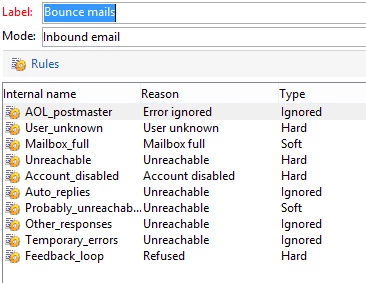
  • Check under delivery log qualification rule to see if the SMTP response is configured as Soft bounce on the instance where it is not working. Please share the screenshot of it.

Regards,
Vipul

Level 2
December 29, 2017

Hi Vipul,

Thank you for the response.

1) Not working system : Appserver is 6.1.1 build no 8850 for Linux. this is a midsourcing deployment. For this system bounce gets qualified as soft but retries do not work. I am using the default settings. (Tried mailbox full and invalid email)

     Working System : Build number is 6.1.1 build no 8850. This is a standalone deployment.

2) I am not sure how to check this point. I checked the the Mail rule set under Non deliverables management. Is this what you are looking for? Please provide more information

Level 2
December 29, 2017

Hi Vipul,

One more question related to the same topic. For the retries to work for soft bounces, do we need to set anything in serverconf or instance conf file?

Since it is a midsourcing deployment (inMail and mta in adobe cloud), i cannot check the config files. I only have access to inhouse config files where the web abd wfserver run.

Regards,

Priyanka

florentlb
Level 10
January 15, 2018

Hi Vipul,

By any chance, did you already have a look at the last answers here?

Florent

florentlb
Level 10
February 2, 2018

Vipul Raghav​, any insight on this?

vraghav
Adobe Employee
vraghavAdobe EmployeeAccepted solution
Adobe Employee
February 5, 2018

Hi Priyanka,

There are basically two types of errors

  1. Synchronous error: the remote mail server contacted by the Adobe Campaign delivery server returned an error message. Adobe Campaign qualifies each error in order to determine whether or not the email addresses concerned should be quarantined. See Synchronous errors.
  2. Asynchronous error: a bounced mail was resent later by the incoming server. This mail is loaded into a technical mailbox the application uses to label messages with an error. After an email sending failure, Adobe Campaign applies many rules to categorize the error message.

A retry will happen only in case of a synchronous error. More information about it on our official page Quarantine management

If in case the error you are facing is asynchronous, there will be no retry even though it is marked as a soft bounce. It is still marked as Soft so that if there are 5 consecutive errors (obviously over 5 different email) the system marks that address in quarantine.

Please do check if the error captured against your address is a synchronous error or asynchronous.

Hope this helps.

Regards,

Vipul

cc: florentlb

March 15, 2022

Hi Vipul,


Reopening this topic, observed that Adobe has updated the documentation here on the number of retries after a delivery temporary failure, are now based on how well an IP is performing both historically and currently a given domain.


My question is would we be able, and how, to find out the number of retries for a given domain, for e.g., can be retrieved from the administration settings in ACS.


Looking forward for your response.


Thanks,

Jared