"Address in quarantine" in delivery | Community
Skip to main content
Level 2
July 25, 2017
Solved

"Address in quarantine" in delivery

  • July 25, 2017
  • 3 replies
  • 7681 views

Hi

I create a test delivery and send message to some contact. But after  sent, I found there was a address not deliveried.

It was ignored and the description is the follow:

Address in quarantine during analysis.
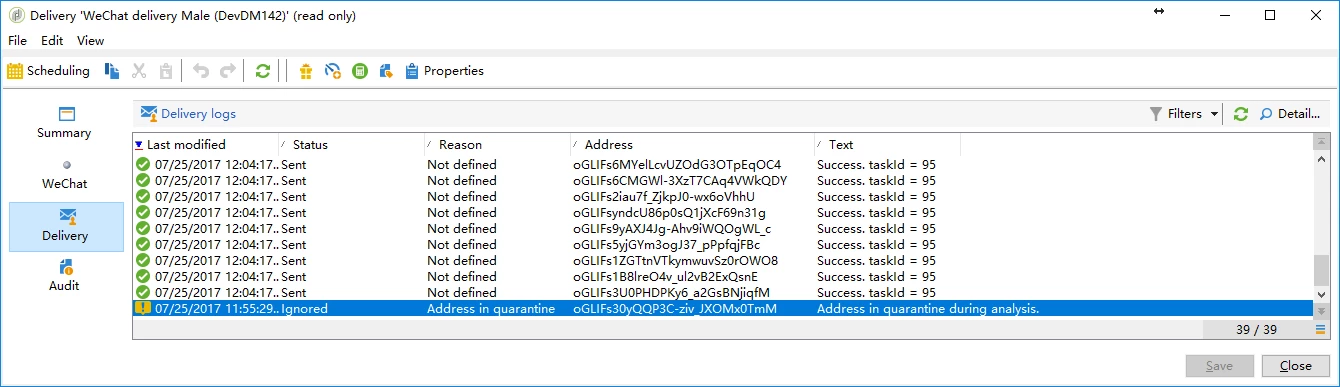
I want to remove the address from the quarantine.

Would you like to  tell me where can I find the "Address in quarantine" in Adobe Campaign, and how can I move the address out.

Best regards

This post is no longer active and is closed to new replies. Need help? Start a new post to ask your question.
Best answer by ckumari12

Hi,

Please navigate to

Administration > Campaign management > Non-deliverables management > Non-deliverables and addresses

Search the email ID and change its status from 'Quarantine' to 'Valid'.

After removal, you can contact the recipient.

Thanks,

Chandni

3 replies

ckumari12Accepted solution
Level 3
July 25, 2017

Hi,

Please navigate to

Administration > Campaign management > Non-deliverables management > Non-deliverables and addresses

Search the email ID and change its status from 'Quarantine' to 'Valid'.

After removal, you can contact the recipient.

Thanks,

Chandni

November 29, 2023

Strange.... For us we set it to valid and it still excluded. Then we deleted the entries and it is still excluding them with message Address in quarantine. Is it stored elsewhere? Does some technical workflow need to be run to clear it from memory or something>

Level 2
July 25, 2017

Hi ckumari12

Thank you very much.

I is ok now.

Best regards

February 5, 2019

I have a requirement in which all quarantined users need to be moved out of quarantine bucket and need to be re-attampted for delivery. Apart from Databae cleanup technical workflow Is there any technical workflow available which can do so or is there any way in which this task can be achieved. Your suggestion is highly appreciated.