Proxy device in "Opens" dynamic report | Community
Skip to main content
filipe23353816
Level 2
January 21, 2020
Solved

Proxy device in "Opens" dynamic report

  • January 21, 2020
  • 1 reply
  • 4671 views

Hi,


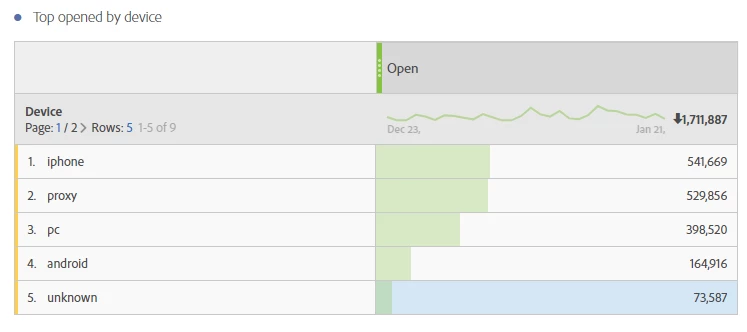
For the device dimension there is a value called "proxy". Anyone know what the means/includes? Could that be both mobile and desktop?


/Filip
 

This post is no longer active and is closed to new replies. Need help? Start a new post to ask your question.
Best answer by Adhiyan

Hello Filipe,

This can be explained by opens generated from the google image proxy server whereby the open is sent to campaign with the device and platform as proxy instead of the actual platform.


device: "proxy"#012

platform: "Proxy"#012

browser: "Google Image Proxy"#012

trackingUrlLabel: "Open"#012


The example above is an actual log from the dynamic reporting system which shows the data sent from the device to ACS.


This can explain the high no. of proxy devices you see in the open report.


Regards,

Adhiyan

1 reply

Adhiyan
Adobe Employee
AdhiyanAdobe EmployeeAccepted solution
Adobe Employee
May 22, 2020

Hello Filipe,

This can be explained by opens generated from the google image proxy server whereby the open is sent to campaign with the device and platform as proxy instead of the actual platform.


device: "proxy"#012

platform: "Proxy"#012

browser: "Google Image Proxy"#012

trackingUrlLabel: "Open"#012


The example above is an actual log from the dynamic reporting system which shows the data sent from the device to ACS.


This can explain the high no. of proxy devices you see in the open report.


Regards,

Adhiyan

Adhiyan
Adobe Employee
Adobe Employee
January 29, 2021
Hi Shiva, That because of how google handles downloading of images . When an open is tracked gmail downloads the open tracking pixel via google image proxy but when it's a click the data does not come through google image proxy. This is the reason of not seeing proxy for clicks