Personalization: convert from Upper case to Lower case in ACS | Community
Skip to main content
alicep47308254
Level 3
October 30, 2017
Solved

Personalization: convert from Upper case to Lower case in ACS

  • October 30, 2017
  • 3 replies
  • 4518 views

Hello Team,

I have a problem with the Field First Name.

The Database that I imported is made with all the First Names in Upper Case.

When I want to personalize the object is not good to see "Hello ALICE, we miss you"

There is a formula to change in a personalized fields from Upper Case to Lower Case directly in ACS?

Regards

Alice
This post is no longer active and is closed to new replies. Need help? Start a new post to ask your question.
Best answer by Adhiyan

Hey Alice,

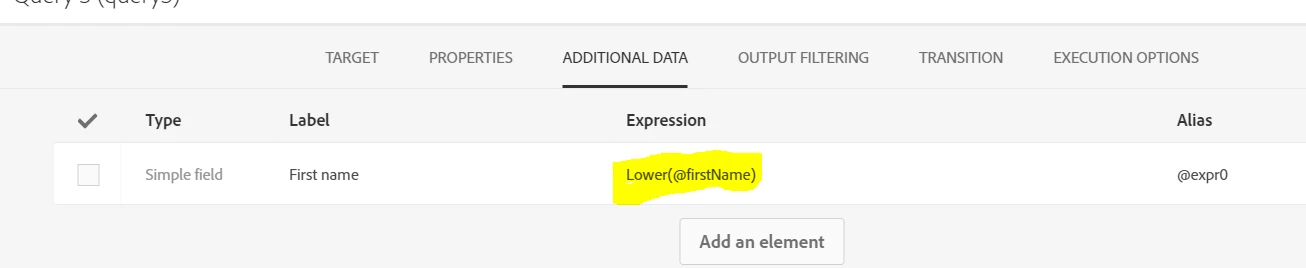
This can be done in a workflow directly. In the query activity you use for targeting , you can form an expression Lower(@firstName) or Smart(@firstName) to convert the Upper case names to lower or Smart case .

You simply need to add the firstName as an additional field like this :

Then use the targetData personalization field to use this converted value in delivery personalization.

Alternately , you can query the whole Profiles table and update the first name using the same logic using a Query and Data update activity like mentioned over here : https://docs.campaign.adobe.com/doc/standard/en/AUT_Workflow_general_operation_Using_workflow_data.html

https://docs.campaign.adobe.com/doc/standard/en/AUT_Workflow_general_operation_Using_workflow_data.html

Regards,

Adhiyan

3 replies

Adhiyan
Adobe Employee
AdhiyanAdobe EmployeeAccepted solution
Adobe Employee
October 30, 2017

Hey Alice,

This can be done in a workflow directly. In the query activity you use for targeting , you can form an expression Lower(@firstName) or Smart(@firstName) to convert the Upper case names to lower or Smart case .

You simply need to add the firstName as an additional field like this :

Then use the targetData personalization field to use this converted value in delivery personalization.

Alternately , you can query the whole Profiles table and update the first name using the same logic using a Query and Data update activity like mentioned over here : https://docs.campaign.adobe.com/doc/standard/en/AUT_Workflow_general_operation_Using_workflow_data.html

https://docs.campaign.adobe.com/doc/standard/en/AUT_Workflow_general_operation_Using_workflow_data.html

Regards,

Adhiyan

alicep47308254
Level 3
October 30, 2017

Hello Adhiyan,

there are some Wikis for all the Expression Editor that I can find in ACS?

Regards

Alice

Adhiyan
Adobe Employee
Adobe Employee
October 30, 2017

Hello Alice,

There is no wiki as such but you can explore the complete expression editor from here :

The functions are common for most databases and can be used in ACS to perform changes in how data is manipulated.

Regards,

Adhiyan