need help with some alert set up | Community
Skip to main content
Level 9
January 13, 2022
Solved

need help with some alert set up

  • January 13, 2022
  • 2 replies
  • 2653 views

Hi Community,


I am looking for some help with regards to setting up some alerting which will help me notify in an event there is/are workflows created with Keep Interim Results enabled in the Production UI.


I am aware this is not recommended, however, teams create wkfs with this enabled and I want to proactively notify them and catch these wkfs via notifications.


so far, I have been able to use a query activity and using wkf resource, configure the list with column keep results, the preview gives me workflows which have a Yes or No status for the Keep Interim results.
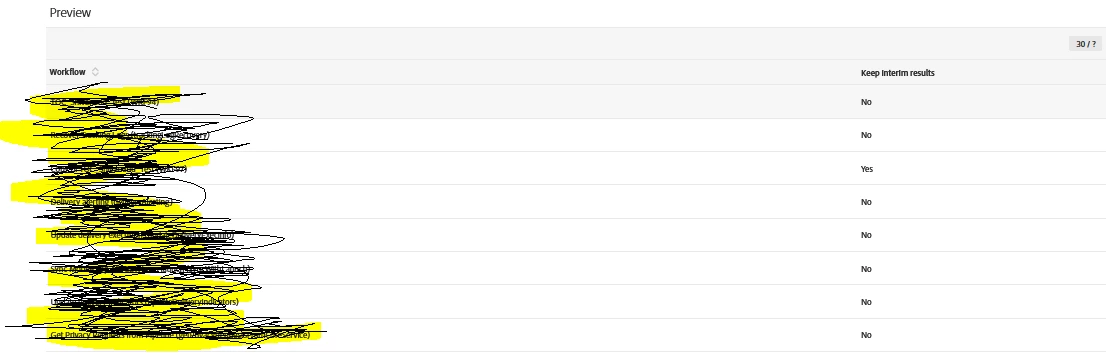


can someone please guide me on how to use this information further to set up some notification?

example: I have a result like the above image which has no workflows with keep interim results as YES, now someone create a wkf within the UI and enables the keep results within it, my plan is to run the wkf once a day and query the wks and notify me if there is a workflow found with keep interim results enabled.

This post is no longer active and is closed to new replies. Need help? Start a new post to ask your question.
Best answer by bisswang

It won't be too easy to achieve but following may work

  • Path 1 - determine affected workflows
    • Search for all workflows, keepResult unfortunately can't used for filtering here or in a segmentation activity.
    • Thus all need to be exported to a temporary file on the server as in the export you can include keepResult
    • Directly after the export, import same file again and you can have keepResult as a "regular" field
    • Then do a segmentation to determine affected records
    • Maybe followed by a test activity to check if any affected records are found
  • Path 2 - determine target users
    • Use a query to determine the profile which shall receive those records
  • Join results
    • Use an enrichment to join results together
    • Main target = Path 2
    • Add Path 1 as a join field and choose e.g. to keep 10 rows
    • Join criteria can be 1 = 1 to get a full cross join
  • E-Mail
    • in the email check for each row whether a value is set and if so print the name

2 replies

Level 5
January 13, 2022

My I suggest it maybe easier to send the notification to the creator of the workflow.  You could reconcile to the creator's profile and then send an email requesting the workflow be changed.


Otherwise you will need use a query collection of the workflow ids and reconcile to your profile before sending an email.

mmbb110Author
Level 9
January 21, 2022

@johnwi12 


actually, I want this is as a notification first to our internal members vs the creator of the wkf's, I am working on the solution provided by @bisswang  but currently stuck and asked for further help.


Level 5
January 21, 2022

Instead of an export it is probably easier to save it to an Audience.  Then you can Read the audience and reconcile it to a profile and then use it for segmentation or enrichment.


1. Create a query of records and under additional data add the email address you want to send to.

2. Reconcile to a profile the email you want to send to.

3. Save it to the audience

4. Create a fork and add Read Audience to both sides.

    a. On side of the fork add dedup email address

5. Create an Enrichment- Primary will be the dedup side.  Use N cardinality for the relationship definition and make the target is the other side of fork.

6. Send email with additional fields.

...

bisswangAdobe EmployeeAccepted solution
Adobe Employee
January 14, 2022

It won't be too easy to achieve but following may work

  • Path 1 - determine affected workflows
    • Search for all workflows, keepResult unfortunately can't used for filtering here or in a segmentation activity.
    • Thus all need to be exported to a temporary file on the server as in the export you can include keepResult
    • Directly after the export, import same file again and you can have keepResult as a "regular" field
    • Then do a segmentation to determine affected records
    • Maybe followed by a test activity to check if any affected records are found
  • Path 2 - determine target users
    • Use a query to determine the profile which shall receive those records
  • Join results
    • Use an enrichment to join results together
    • Main target = Path 2
    • Add Path 1 as a join field and choose e.g. to keep 10 rows
    • Join criteria can be 1 = 1 to get a full cross join
  • E-Mail
    • in the email check for each row whether a value is set and if so print the name
mmbb110Author
Level 9
January 14, 2022

Hi @bisswang 


Thank you for your response, its really helpful and I am trying to check it further.


currently, I am stuck, where after the export, when I am trying to import the file, I get zero output.


my wkf is as below,


query:


FileExport:


file import:


can you let me know what is missing here please?