Move Subscription Profiles into Geo and Org Unit | Community
Skip to main content
Level 4
August 2, 2017
Solved

Move Subscription Profiles into Geo and Org Unit

  • August 2, 2017
  • 5 replies
  • 2712 views

In ACS, is it possible to mass update profiles that were created by a subscription service into Geographical and Organizational Units.  I want to mass update the profiles into Geographical and Organizational Units I created through a workflow?  Can you write data into those fields with a workflow?  
This post is no longer active and is closed to new replies. Need help? Start a new post to ask your question.
Best answer by Clarence_Bunch_

John,

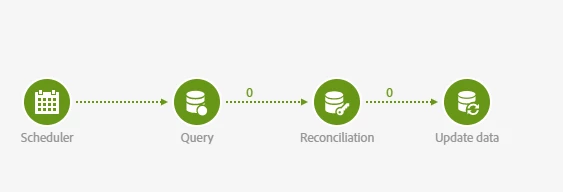
I have gotten this to work (while we wait for API to include GEO and ORG).  I had to create 2 custom fields for GEO and ORG (I called them AEM GEO and AEM ORG) and this workflow....

5 replies

florentlb
Level 10
August 3, 2017

Hi,

These fields are hidden by default. To be able to update these fields, you need to make them available from the custom resources. When extending the profile resource, you can check the option. Then publish the extension.

Resource extension is described here: Step 2: Configure the resource data structure  (step 6 is about this option).

Hope this helps,

Florent

Level 4
August 3, 2017

Florent,

I already had Geo and Org available from those steps.  How can I write via a workflow to update those fields(Geo and Org) with a value?

florentlb
Level 10
August 3, 2017

Unfortunately there is no very easy way to do it.

Once the geo and org units are available, you can import a file containing the geo and/or org unit value for each profile, reconcile these profiles with the database so that they are well identified, and then perform the update by matching the value of the geo/org unit field to the one from the file.

For example:

  1. In the Load file activity, additional columns should be defined in the Column Definition tab to include the Org and Geo unit fields in the data transition. Default values of the Org and Geo unit for the data to be imported, can be set under column properties. 
  2. An enrichment (using the Reconciliation activity) is then performed to identify the right Org/Geo unit from the orgUnit or geoUnit schemas. 
  3. In the final update activity, update the orgUnit link with the Org unit field defined in the File loading activity.

Let me know how it goes,

Florent.

Level 5
September 25, 2017

Florent,

Could you please include screenshots of the update activity?  I am having difficulties getting it to work.

John

Clarence_Bunch_AuthorAccepted solution
Level 4
September 25, 2017

John,

I have gotten this to work (while we wait for API to include GEO and ORG).  I had to create 2 custom fields for GEO and ORG (I called them AEM GEO and AEM ORG) and this workflow....