JavaScript with SQL on an Adobe Campaign SL (in a delivery) | Community
Skip to main content
alexiosb2287557
Level 2
March 30, 2018
Solved

JavaScript with SQL on an Adobe Campaign SL (in a delivery)

  • March 30, 2018
  • 5 replies
  • 4995 views

Hi, I need your help.

I am trying to run an SQL statement using Javascript in the SL section of a delivery.

The code runs fine when doing a Preview, but then breaks when Proofing.

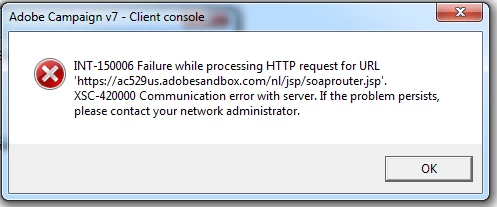
These are the errors I get when trying to send the Proof: 
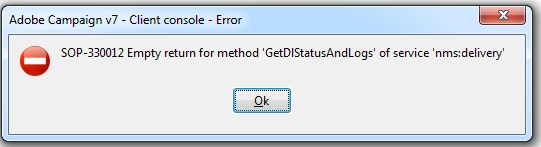
These are the errors I see when visiting the proof details:
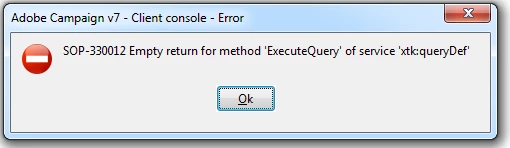
This is the JS code I use in the SL, you can see from the screenshot that the preview works and pulls data from the SQL statement.

Does this mean that I cannot use SQL in the Javascript on my Subject Line or body content?

This post is no longer active and is closed to new replies. Need help? Start a new post to ask your question.
Best answer by Kapil_Sharma_

Hi Alex,

Yes, I got it now. Thanks for clarifying.

But, as per my understanding, we can't use complex JavaScripts in the Subject Line.

Because all variables and methods of JS are not defined for Subject Line.

I tried to run some JS in the subject line and tried to fetch the data using queryDef, but got the below error :

js Error while executing the method 'ExecuteQuery' of service 'xtk:queryDef'.

And when I tried the same JS in the JavaScript Activity, it was running fine.

It means that ExecuteQuery method is not available for Subject Line, That's why I conclude that we can't use complex JS in the Subject Line. I hope it helps.

5 replies

Kapil_Sharma_
Adobe Employee
Adobe Employee
April 2, 2018

Hi,

Can you please explain what exactly is your requirement to run SQL in the Subject Line ?

Because if you just want to Put Recipient's FirstName and LastName in the Subject Line, then just use the below syntax :

<%= recipient.firstName %>

<%= recipient.lastName%>

Now if you will preview the delivery, it won't be showing the actual first name and last name of recipient, it will just show the syntax you have written there in the Subject Line.

But, if you will actually send the Delivery, it will take the First and Last Name of the recipient. You can verify that by sending the delivery to yourself first.

Regards,

Kapil Sharma

alexiosb2287557
Level 2
April 2, 2018

Hi Kapil and thanks for your reply.

I am not trying to display first name and last name on my Subject Line.

I am trying to figure out if I can run queries in the subject line to record which user received which dynamic content in Adobe Campaign.

Thus, I need to be able to run a query that saves data after my JS selects an SL to be displayed e.g. X user got Y SL.

I hope this is more clear now.

Alex

Kapil_Sharma_
Adobe Employee
Kapil_Sharma_Adobe EmployeeAccepted solution
Adobe Employee
April 3, 2018

Hi Alex,

Yes, I got it now. Thanks for clarifying.

But, as per my understanding, we can't use complex JavaScripts in the Subject Line.

Because all variables and methods of JS are not defined for Subject Line.

I tried to run some JS in the subject line and tried to fetch the data using queryDef, but got the below error :

js Error while executing the method 'ExecuteQuery' of service 'xtk:queryDef'.

And when I tried the same JS in the JavaScript Activity, it was running fine.

It means that ExecuteQuery method is not available for Subject Line, That's why I conclude that we can't use complex JS in the Subject Line. I hope it helps.

alexiosb2287557
Level 2
April 3, 2018

yeah, it seems so. thanks for checking

that is an issue for us.

thus, I guess any data saving needs to happen after the delivery has gone out, maybe on a Javascript activity to save these data.

Kapil_Sharma_
Adobe Employee
Adobe Employee
April 4, 2018

Yes, you can store the dynamic content as per the individual recipients with the help of the JavaScript.

This surely can be achieved by the JavaScript.