Javascript query limitation | Community
Skip to main content
April 6, 2018
Solved

Javascript query limitation

  • April 6, 2018
  • 6 replies
  • 7442 views

Hello,

I'm triying to retrieve, in a workflow of ACv6, the output population of a delivery, by a javascript activity but it doesn't work always. The aim of this is to retrieve the recipientID and the broadLogId.

When the population is less than 10.000 recipients, it works correctly but when it is bigger than this size the script retrieve only the first 10.000 registries in the resulset. ¿Is there any limitation for the queries in javascript?

Here is my code:
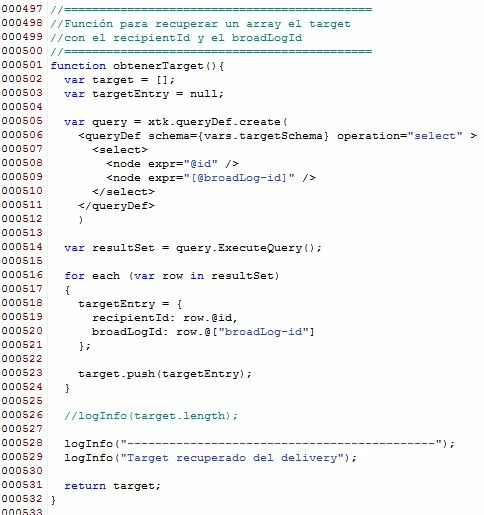
  

Anyone could help me?

Regards,

Andrés.

This post is no longer active and is closed to new replies. Need help? Start a new post to ask your question.
Best answer by Jean-Serge_Biro

Buenas tardes Andrés,

Regarding Javascript limitations, if you are hosted on Premise, you can raise the memory allocated in the serverConf.xml file:

<!-- Configuring the JavaScript interpreter

     maxMB :  Maximum size in megabytes before running the garbage collector Default: 64

     stackSizeKB :  Size of each stack chunk in kilo octets Default: 8 -->

<javaScript maxMB="512" stackSizeKB="8"/>

Please read the only documentation (as far as I know) to this configuration change below:

Actions on reports

section Memory allocation.

However, in my opinion, you should manage differently your requirement.
Because, if your result set is not 50.000 but 10 millions of line, you can't increase the server memory allocated to huge value, otherwise it would compromise other processes.
And Javascript array is not done for huge volume.

Moreover, the time to execute your Javascript code would take too long, with an expected time-out sometimes...

So I recommend you to find out another method, for instance, putting your data in a custom work table, etc.

Regards
Jean-Serge

6 replies

james_icf
April 6, 2018

I believe that queryDef is limited to 10,000 rows of results.

Someone in a similar thread mentioned that you can:

1. Break your query in multiple parts by providing some range or filters

2. write one custom sql script for your query and execute that from your js activity.

Adhiyan
Adobe Employee
Adobe Employee
April 9, 2018

Hello Andres,

Please use something like linecount=<no of records to retrieve> or noLineCount =true when creating the query def.

It would look like <queryDef schema=schemaName operation= Select lineCount= 100000 or noLineCount=true

Regards,

Adhiyan

April 9, 2018

Hello,

It has resolved the problem. Now, the query retrives the expected records.

Thank you very much for your help. It was very helpful.

Andrés.

April 16, 2018

Hello again,

I thinked that the problem was resolved when I checked it with an expected result of 30.000 registries and it worked, but now, I have tried with more than 50.000 registries and, in this case, the result of the query is an empty resultset.

The queryDef  is as you can see bellow:

Anyone knows what is the problem? Maybe a memory limitations?

Thank you in advance.

Regards,

Andrés.

Jean-Serge_Biro
Jean-Serge_BiroAccepted solution
April 16, 2018

Buenas tardes Andrés,

Regarding Javascript limitations, if you are hosted on Premise, you can raise the memory allocated in the serverConf.xml file:

<!-- Configuring the JavaScript interpreter

     maxMB :  Maximum size in megabytes before running the garbage collector Default: 64

     stackSizeKB :  Size of each stack chunk in kilo octets Default: 8 -->

<javaScript maxMB="512" stackSizeKB="8"/>

Please read the only documentation (as far as I know) to this configuration change below:

Actions on reports

section Memory allocation.

However, in my opinion, you should manage differently your requirement.
Because, if your result set is not 50.000 but 10 millions of line, you can't increase the server memory allocated to huge value, otherwise it would compromise other processes.
And Javascript array is not done for huge volume.

Moreover, the time to execute your Javascript code would take too long, with an expected time-out sometimes...

So I recommend you to find out another method, for instance, putting your data in a custom work table, etc.

Regards
Jean-Serge

April 17, 2018

Hello Jean-Serge,

Thank you very much for your quickly response. It was very useful.

As you recommend, I'll try to find another way to do my requirements.

Regards,

Andrés.