Iterating through custom table in Email Attachment | Community
Skip to main content
October 12, 2018
Solved

Iterating through custom table in Email Attachment

  • October 12, 2018
  • 8 replies
  • 3812 views

Hi team,
I need to create a logic for dynamic table within a PDF attachment of email delivery .

please let me know of any appropriate approach in this scenario. I went through documentation,however there was no proper approach mentioned for the same. I tried using following script but that didn't work out.

<%=

for (var i = 0; i< customProduct.length; i++){ 

if(customProduct[i].email==targetData.email)) { 

document.write(customProduct[i].email); 

}

%>

Note: link to the documentation

Generating personalized PDF documents

Thanks
This post is no longer active and is closed to new replies. Need help? Start a new post to ask your question.
Best answer by DebTr

Hi Chetan,

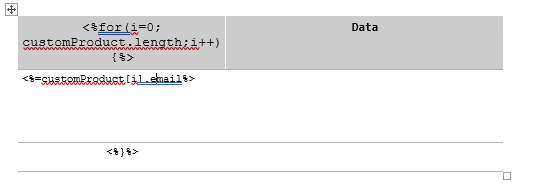
Are you trying to do something similar to this?

Regards,

Deb

8 replies

Level 6
October 15, 2018

Hi Chetan,

Are you using Open Office to create the attachment as mentioned in the documentation?

Regards,

Deb

October 16, 2018

Hey Deb,

yeah, I did upload my primary file in open office document format(.odt). FYI I got proper results on using single scripts like <%=customProduct[1].email%>. However on using loop there seems to be some kind of error.

Thanks.

Level 6
October 16, 2018

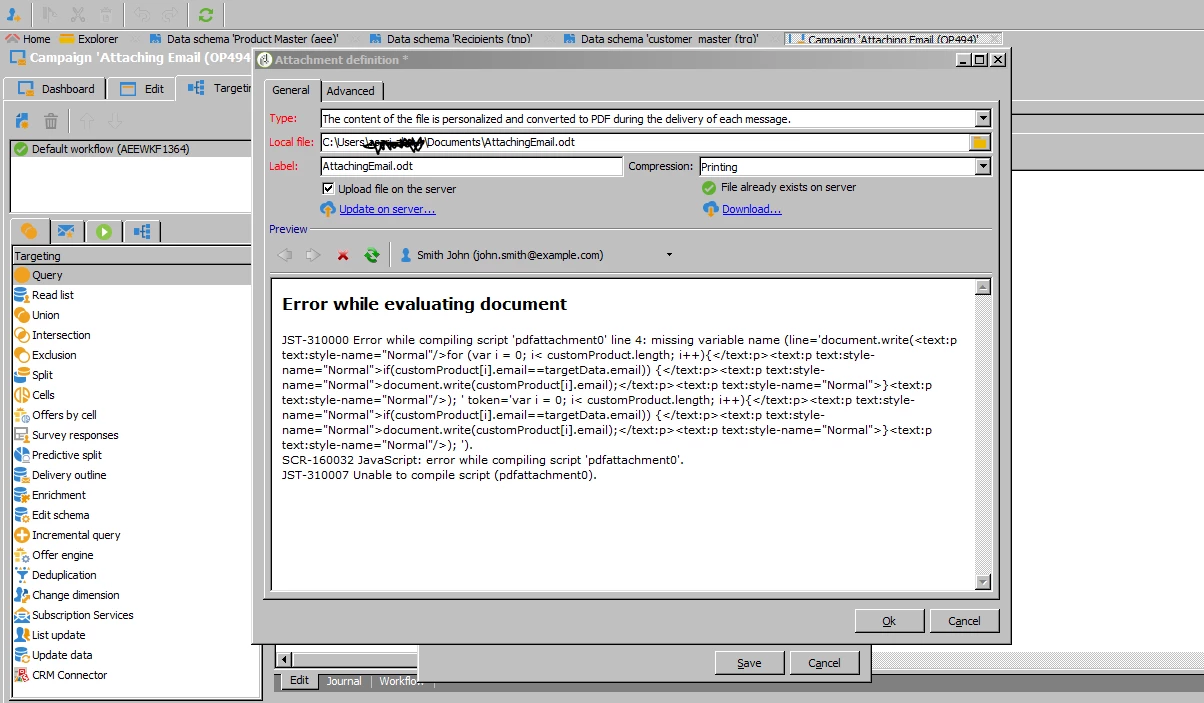
Please can you post the error message.

Regards,

Deb

October 16, 2018

Hey Deb,

Appreciate your help.
Since we were not able to render of send the campaign. I am attaching the preview.

thanks

Level 6
October 16, 2018

Hi Chetan,

Please can you try to put "<%customProduct[i].emai%>" instead of "document.write(customProduct[i].emai)" as explained in the following URL and give it a try.

Generating personalized PDF documents

Regards,

Deb

October 16, 2018

Hey Deb,
Have tried this query <%customProduct[i].email%> and its rolling perfectly. Even the query <%=customProduct.length%> got me proper results.
What I have observed is that running the whole script is giving me Error. Especially the loop part.
All of the Single statement Codes are working perfect.

Thanks.

DebTrAccepted solution
Level 6
October 16, 2018

Hi Chetan,

Are you trying to do something similar to this?

Regards,

Deb

October 17, 2018

Oh yeah.This works.
Gratitude.