How to targetData from QueryDef alias? | Community
Skip to main content
July 25, 2018
Solved

How to targetData from QueryDef alias?

  • July 25, 2018
  • 7 replies
  • 7496 views

Hi,

I'm attempting to display the result of the 'seasons' alias in a delivery using targetData. However the delivery fails due to 'targetData not defined'.

Please can you tell me how it's possible to do this?

The workflow appears as below:

The JavaScript logs the count correctly:

I there a specific way to target an alias from a queryDef in the delivery?

Many thanks,

Rob

JAVASCRIPT

var query = xtk.queryDef.create(

  <queryDef schema="temp:query2" operation="select">

   <select>

     <node expr="Countdistinct(@email)" alias="seasons"/>

   </select>

</queryDef>).ExecuteQuery();

var results = query.query2;

logInfo("Count: " +results.seasons);

DELIVERY

Seasons: <%= targetData.seasons %>
This post is no longer active and is closed to new replies. Need help? Start a new post to ask your question.
Best answer by vraghav

HI robertw937098,

Inside your JS code at the end, add the following line

instance.vars.seasons = results.seasons;

Then add an Enrichment activity between JS code and Delivery.

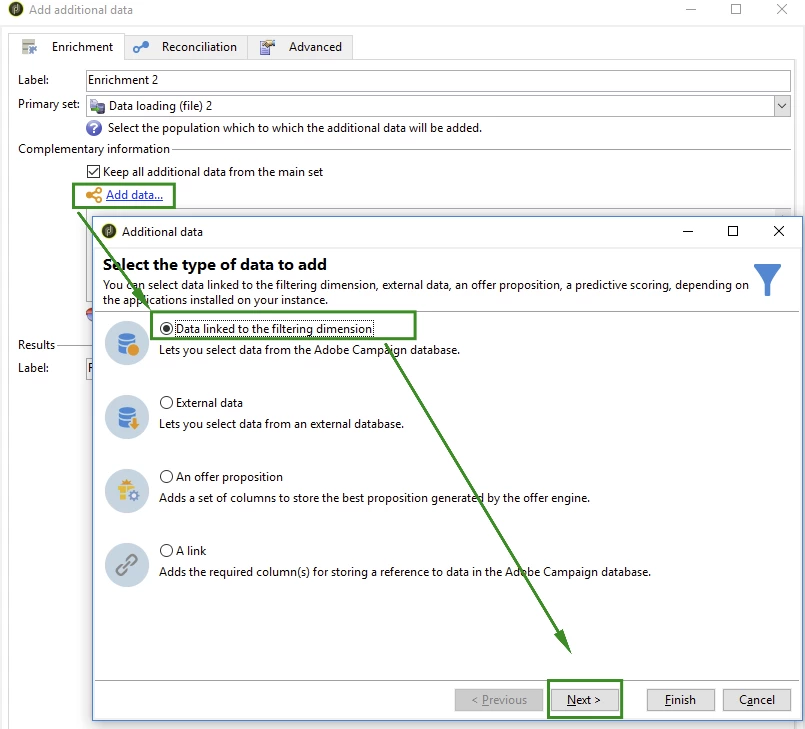
Inside the Enrichment, click on Add data and select "Data linked to filtering dimension". Click Next

Again select "Data of the filtering dimension" and click Next

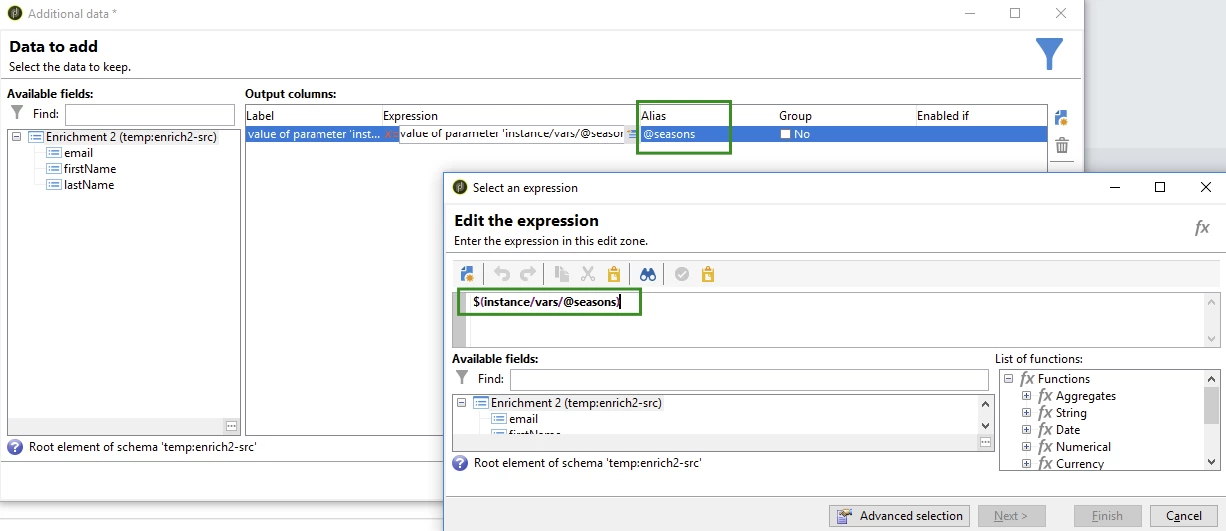
On the right hand side Click on Add to add a new expression and set the expression to $(instance/vars/@seasons)

Also mention the alias to be @seasons.

Now you can use targetData.seasons inside your delivery.

Regards,
Vipul

7 replies

Adhiyan
Adobe Employee
Adobe Employee
July 25, 2018

Hi Robert,

Can you please right click the transition after the delivery and see the schema tab to see which columns are present.

Also looking at the workflow , I guess if you add an enrichment with the same expression and an alias for the enrichment it should pick up the alias name. Make sure to define the alias with the @ symbol.

Regards,

Adhiyan

vraghav
Adobe Employee
vraghavAdobe EmployeeAccepted solution
Adobe Employee
July 26, 2018

HI robertw937098,

Inside your JS code at the end, add the following line

instance.vars.seasons = results.seasons;

Then add an Enrichment activity between JS code and Delivery.

Inside the Enrichment, click on Add data and select "Data linked to filtering dimension". Click Next

Again select "Data of the filtering dimension" and click Next

On the right hand side Click on Add to add a new expression and set the expression to $(instance/vars/@seasons)

Also mention the alias to be @seasons.

Now you can use targetData.seasons inside your delivery.

Regards,
Vipul

July 26, 2018

This worked. Thanks a lot!

I was hoping the JavaScript would create the targetData field without needing an enrichment.

September 27, 2018

Hi Vipul,

How can I make an instance variable a number data type?

It seems to default to a string.

Thanks,

Rob

Vipul Raghav

vraghav
Adobe Employee
Adobe Employee
September 28, 2018

Hi Rob,

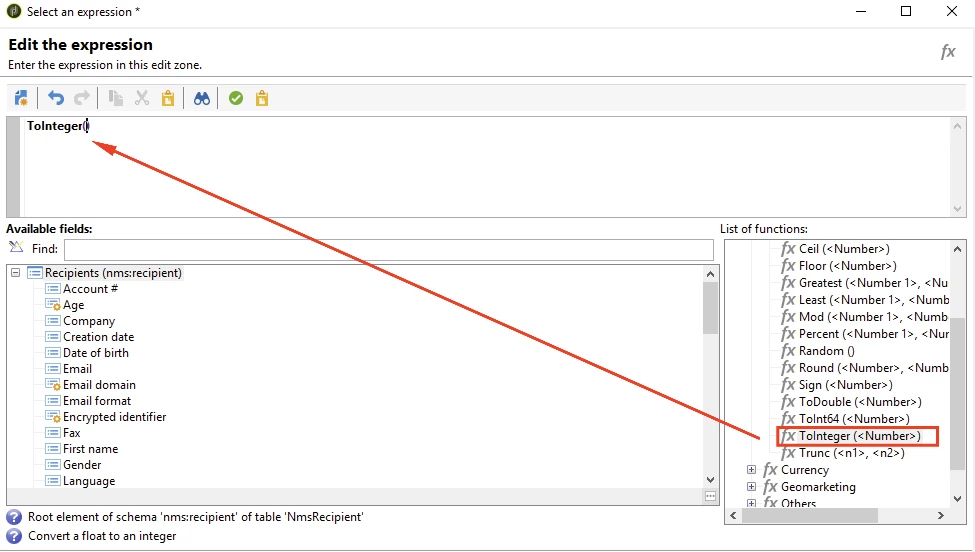
You can open the expression editor and there you will find all the existing in house formulaes.

Once such formula is ToInteger. Please make use of it to convert the instance variable to integer

Regards,
Vipul

September 28, 2018

Thanks Vipul, that's very helpful.

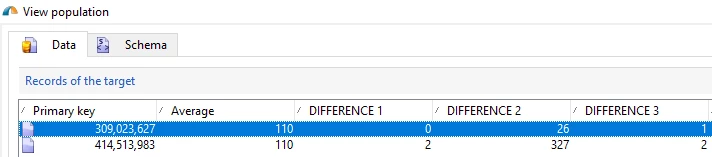
Are you able to help with the below script please? My issue is the 'Average' (integer) instance variable is giving the same value for all rows. Rather than working out the average and giving that value to each recipient.

The calculations are correct, but it only outputs the value for one row then gives rows that value. E.g. In the below screenshot all rows are given 110 for Average. This is correct for the bottom customer, but not the top. Hope that makes sense.

var query = xtk.queryDef.create(

<queryDef schema="temp:enrich112" operation="select">

   <select>

     <node expr="@difference1"/>

     <node expr="@difference2"/>

     <node expr="@difference3"/>

   </select>

  </queryDef>);

var res = query.ExecuteQuery();

for each (var row in res)

{

var difference1 = parseInt(row.@difference1);

logInfo("Difference 1: " + difference1);

var difference2 = parseInt(row.@difference2);

logInfo("Difference 2: " + difference2);

var difference3 = parseInt(row.@difference3);

logInfo("Difference 3: " + difference3);

var total = difference1 + difference2 + difference3;

logInfo("Total of days between: " + total);

var average = total / 3;

logInfo("Average: " + average);

logInfo(typeof average);

var rounded_average = Math.round(average);

logInfo(typeof rounded_average);

logInfo(rounded_average);

instance.vars.average = rounded_average;

}

davidh2892249
October 4, 2018

Hi Vipul,

Can I ask, is there anyway to make an instance variable a memo/long text data type?

I have a situation where I have some SMS content (using an adhoc solution, not the mobile channel) which I'm going to use a JS activity to shorten some URLs via API - and store the result for each record - which I'll then output to the SMS provider as a data file extract... but obviously the SMS content could well exceed 255 characters.

Please let me know if this is possible.

Thanks

David