This conversation has been locked due to inactivity. Please create a new post.



This conversation has been locked due to inactivity. Please create a new post.

Hi everyone,
I am using a delivery report and in particular a query activity with a custom schema (containing delivery iDs in particular).
In "where condition" I would filter the records for the current delivery (SCHEMA.deliveryId = <currentDeliveryId>)
Someone could tell me how to do this?
Maybe it's a simple issue.
Thanks for helping!
Note: I am not using cube
Views
Replies
Total Likes

Hi, Salvator,
In Adobe campaign this is controlled via context in reports, and this is the recommended way.
Read this here: Using the context
query activities in reports let you filter automatically using context like above.
let me know if you are getting stuck at any point.
Regards,
Amit
Views
Replies
Total Likes
Hi Amit,
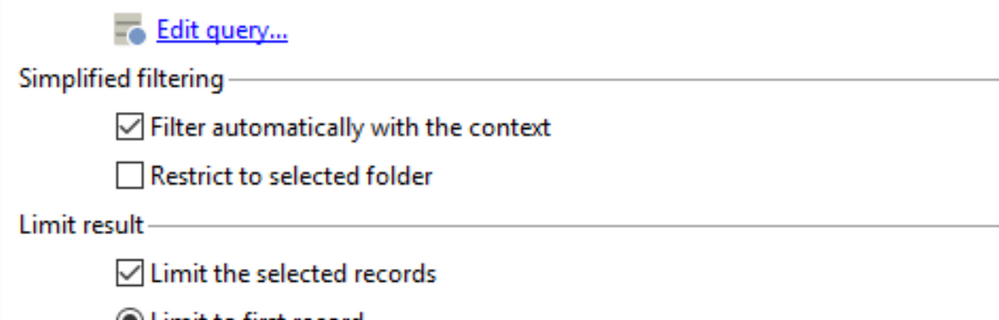
"Filter automatically with the context" is already flagged but I still see ALL THE RECORDS unfiltered for delivery id.
The same outcome if I flag in addition "limit the selected records" (limit to 1000 --> ALL THE RECORDS, limit to first record --> NO RECORD AT ALL).
Any suggestion?
Thanks,
Salvatore
Views
Replies
Total Likes
Hi, Salvatore,
Are you using "Descriptive analysis" report or Adhoc Reports?
Can you enable the debug for this report of yours and check if you have _contextFilter? If you have this in your example post the inner XML from _contextFilter here?
It should be like this:
<_contextFilter>
<where>
<condition expr="@id = $noescaping(@_selection)" enabledIf="$(@_context) = 'selection' and $(@_hasFilter) = false" />
<condition expr="@id" enabledIf="$(@_context) = 'selection' and $(@_hasFilter) and $(@_locationName) != 'descriptiveAnalysis'" subQuery="$(whereCond)" setOperator="IN" />
</where>
</_contextFilter>
Regards,
Amit
Views
Replies
Total Likes
Hi Amit,
ERRATA CORRIGE
It looks like the same!
<_contextFilter>\n" +
" <where>\n" +
" <condition enabledIf=\"$(@_context) = 'selection' and $(@_hasFilter) = false\" expr=\"@id = $noescaping(@_selection)\"/>\n" +
" <condition enabledIf=\"$(@_context) = 'selection' and $(@_hasFilter) and $(@_locationName) != 'descriptiveAnalysis'\" expr=\"@id\" setOperator=\"IN\" subQuery=\"$(whereCond)\"/>\n" +
" </where>\n" +
" </_contextFilter>
Views
Replies
Total Likes

Hi Salvatore,
Besides of what Amit suggested, filter by context (which is a powerful mean for filtering data) from interactive input flow, even with the standard query you should not have issue to select/filter the records targeted with the method you took.
Debugging reports is sometimes tedious task, so I recommend you to add some Javascript activity between each other activity (page, query) and writes some logInfo in the JS activity. In addition of Debug mode and examining XML context, it greatly helps to understand some tricky issues.
In your case, you could check dimensions variable values in debug context, before submitting the form: after selecting the value probably in a list, you must select/focus another field in order that the context variable value is reflected correctly.
It usually greatly helps.
But if the problem is the list constituted in your form, so the dimensions variable value remains empty, you should add some logInfo to better understand. By the way, is the list made of static values of another query/context values in advanced tab?
Regards
J-Serge
Views
Replies
Total Likes
Hi Jean-Serge,
vars.dimension is set through a drop-list (combo box) inside the page element. This drop-list has a series of static values.
The query activity uses a filter SCHEMA.dimension = vars.dimension that works
In addition, I should have a filter like SCHEMA.deliveryId = <ctx.deliveryId> but as suggested by you it should be done just with that flag "Filter automatically with the context"
Views
Replies
Total Likes
Jean-Serge Biron Amit_Kumar & all
Any other suggestion?
Situation has not changed..
Views
Replies
Total Likes
Hi Salvatore,
Regarding filtering on context
Please may you tell us how you execute the report?
Are you calling the report being on a delivery (Reports section of the delivery dashboard) ?
Or equivalent manner, by selecting the delivery in Preview mode instead of Global radio button?
I would like to be sure that the delivery.id is passed by parameter/filter by context as you meant it.
Regards
JS
Views
Replies
Total Likes
Hi Jean-Serge,
I usually test the report both in preview mode and through report option on the single delivery, no change between these modes.
Salvatore
Views
Replies
Total Likes
Hi Salvatore,
So, do you have included in your Query activity filters/criteria something like this (example taken from a report using context filtering in a Query activity, not only in a Page activity: deliverySending report, "Exclusion" Query activity):
Regards.
J-Serge
Views
Replies
Total Likes
I don't know what is its goal, but when I put as additional filter:
SCHEMA.deliveryId equal to [@_selection]
I immediately get back "attribute '_selection' unknown"
Views
Replies
Total Likes
Hi Salvatore,
You wrote in previous posts that:
So you should have in the ctx (debug mode) the useful elements indicated by Amit.
Please confirm that way.
BR
JS
Views
Replies
Total Likes
Hi Jean-Serge,
In debug mode, if selection type = "single selection" I have:
<where>
<condition expr="@id = $noescaping(@_selection)" enabledIf="$(@_context) = 'selection' and $(@_hasFilter) = false" />
<condition expr="@id" enabledIf="$(@_context) = 'selection' and $(@_hasFilter) and $(@_locationName) != 'descriptiveAnalysis'" subQuery="$(whereCond)" setOperator="IN" />
</where>
that is equal to that one that wrote Amit above.
Salvatore
Views
Replies
Total Likes
To sum up:
using debug mode, selecting the Selection check box, selecting one delivery in the folder (or listbox), you should have on the URL address bar something like this:
http://...&_context=selection%7CdeliverySending&_selection=1080026525&_selectionCount=1&lang=&_debug
where _selection argument value is the delivery id (primary key) of the delivery selected.
Now, for your Query activity, there are 2 cases:
1. either it is based on Delivery schema, and you have nothing to do, because Filter on context checkbox will automatically filter Delivery on the _selection argument value.
2. or it is based on your specific customer schema (I thought it was your use case...) and you have to inspired from the exemple of deliverySending report, Exclusion activity that I mentioned before for the foreign key used.
Then check in your context in debug mode the data retrieved and please share some screenshot for it. Or perhaps the issue is the relationship between your customer schema and the delivery schema, but I don't think so.
Please check also your parameter syntax, it seems you forgot the / for getting the _selection attribute from the root XML element :
SCHEMA.deliveryId equal to [@_selection] (wrong)
instead of
SCHEMA.deliveryId equal to [/@_selection] (right)
BR
JS
Views
Replies
Total Likes
To sum up:
using debug mode, selecting the Selection check box, selecting one delivery in the folder (or listbox), you should have on the URL address bar something like this:
http://...&_context=selection%7CdeliverySending&_selection=1080026525&_selectionCount=1&la ng=&_debug
where _selection argument value is the delivery id (primary key) of the delivery selected.
Correct.
.../report/deliverySegmentsReportOTB?_preview=true&standalone=1&reportId=0&_uuid=975a1104-94cc-4e1e-ab48-cc7a07de2708&_reportLabel=Segmentation%20Tracking%20indicators%20CUSTOM%20BLOCKS&_lastModified=2017-09-29 08:23:36.071Z&_context=selection%7CdeliverySegmentsReportOTB&_selection=1341861&_selectionCount=1&lang=&_debug
Now, for your Query activity, there are 2 cases:
1. either it is based on Delivery schema, and you have nothing to do, because Filter on context checkbox will automatically filter Delivery on the _selection argument value.
2. or it is based on your specific customer schema (I thought it was your use case...) and you have to inspired from the exemple of deliverySending report, Exclusion activity that I mentioned before for the foreign key used.
CUSTOM SCHEMA (DELIVERY SEGMENTS STATISTICS):
<key internal="true" name="dimensions">
<keyfield xpath="@deliveryId"/>
<keyfield xpath="@dimension"/>
<keyfield xpath="@valueIndicator"/>
</key>
<attribute label="Delivery Id" name="deliveryId" type="long"/>
<element externalJoin="true" label="Delivery" name="delivery" revIntegrity="normal" target="nms:delivery" type="link">
<join xpath-dst="@deliveryId" xpath-src="@id"/>
</element>
Then check in your context in debug mode the data retrieved and please share some screenshot for it. Or perhaps the issue is the relationship between your customer schema and the delivery schema, but I don't think so.
<query>
<deliverySegmentsOTB language="" table_id="table117" webClick="0" valueIndicator="OTHER" toSend="0" sent="0" recipientOpen="0" recipientClick="0" percSent="0" percOpen="0" percClick="0" mobileClick="0" mailClick="0" dimension="language" deliveryId="1507661" delivery-id="1507661" country="" />
<deliverySegmentsOTB language="ICB.undefined" table_id="table117" webClick="0" valueIndicator="ICB.undefined" toSend="1" sent="1" recipientOpen="1" recipientClick="0" percSent="100" percOpen="100" percClick="0" mobileClick="0" mailClick="0" dimension="language" deliveryId="4970930" delivery-id="4970930" country="" />
....
</query>
<query2>
...
<dlvExclusion label="Exclude domains" count="0" />
<dlvExclusion label="Address in quarantine" count="0" />
<dlvExclusion label="Exclude addresses" count="0" />
<dlvExclusion label="Address not specified" count="0" />
<dlvExclusion label="Double" count="0" />
<dlvExclusion label="Blacklisted address" count="0" />
</query2>
Please check also your parameter syntax, it seems you forgot the / for getting the _selection attribute from the root XML element :
SCHEMA.deliveryId equal to [@_selection] (wrong)
instead of
SCHEMA.deliveryId equal to [/@_selection] (right)
I tried in both ways but as error I receive "Attribute '_selection' unknown"
Views
Replies
Total Likes
Hi Salvatore,
It can't work with deliveryId, as is, because the _selection value is made for automatic use on the primary key of the Query activity target dimension selected. And in your custom schema, you have a compound key dimensions.
I don't know at all how it could work with delivery to be selected; except if you could select a line of your custom schema data deliverySegmentsOTB instead of selecting a delivery?
In that case, the Filter by context would replace the filter on vars/dimension, it would be equivalent, it would filter on key dimensions.
If you want to execute your report coming from a delivery line (dashboard of reports) or in preview mode, from a selection on delivery, you must have a 1st query on Delivery target dimension, then a second one with the trick that I mention for foreign key.
Please, may you confirm what is your source line? Delivery/DeliveryId or deliverySegmentsOTB /Dimensions key ?
Sorry for the time taken, it is not easy to fully understand a context by posts discussion sometimes.
Regards
JS
Views
Replies
Total Likes
Other report interesting, perhaps a bit similar to your need:
deliveryForward
The 1st activity has no Filter on context (which is applied on 2nd Activity on Delivery dimension), but the 1st activity has the forey key to reconciliate on the delivery-id.
BR
JS
Views
Replies
Total Likes
I used the deliveryForward report as base but things aren't changed, rather I get even errors and I cannot see anything.
1st activity:
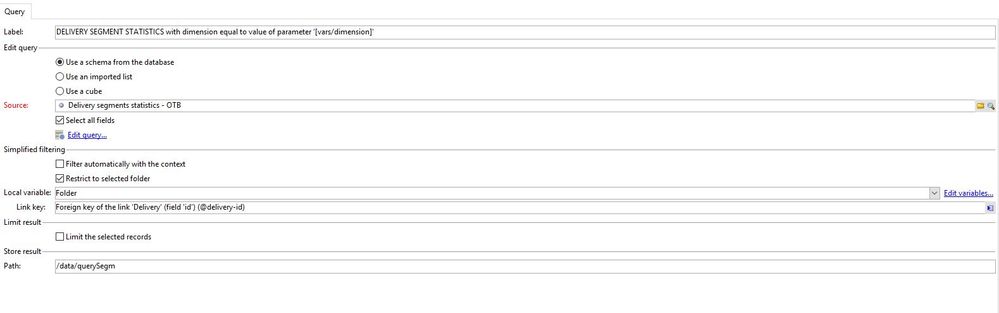
" Please, may you confirm what is your source line? Delivery/DeliveryId or deliverySegmentsOTB /Dimensions key ? "
Don't know what are you referring to, but the report schema is DELIVERY.
deliverySegmentsOTB is the schema whose records will be shown in the table/page
delveryId is a field of deliverySegmentsOTB and is linked to DELIVERY through a link in the schema (look previous messages).
I simply want that deliverySegmentsOTB woud be filtered for delveryId = DELIVERY.id
Views
Replies
Total Likes
I meant by "source" the schema dimension selected in Property/Document Type.
I still don't understand your error and wonder about any misleading somewhere, so sorry in advance if I ask for too much checks.
So, in debug & preview mode, selecting Selection one, are you on delivertSegmentsOTB dimension, and does it list records from that schema/table and you select one? Or are you on nms:delivery dimension, and you select a specific delivery?
In your URL, it was: _selection=1341861
case of Document type is Delivery:
it should work with _selection value / filter by context exactly as you did. In that case I wonder why it gives error.
case of Document type is deliverySegmentsOTB, the filter checkbox must be on the Query activity of the same and not on the Delivery activity.
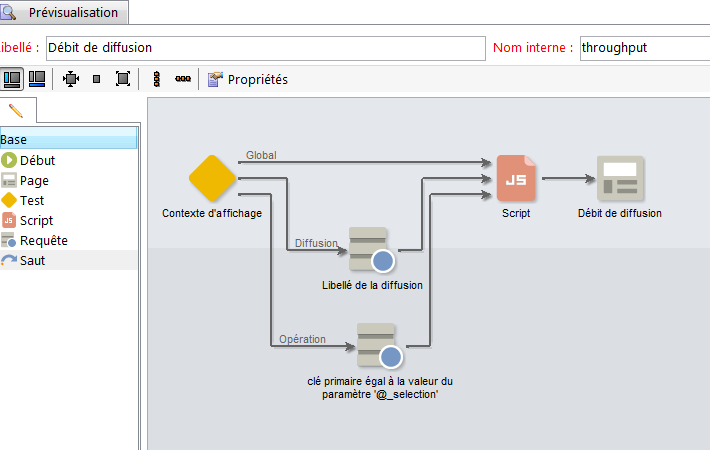
Well, see another way to proceed on same principle, report "throughput":
This report can be called on 2 selection context. See carefully the operation one, closed of your deliverySegmentsOTB: as you can see, the filter criteria is based on @_selection and of course in that case, the checkbox Filter with the context is not activated.
One more tip: force to a static variable the value of a delivery-id to see if you get good results and highlight some issue somewhere, if filtering by context is a headache for you.
Good luck and nice week-end.
Best Regards.
JS
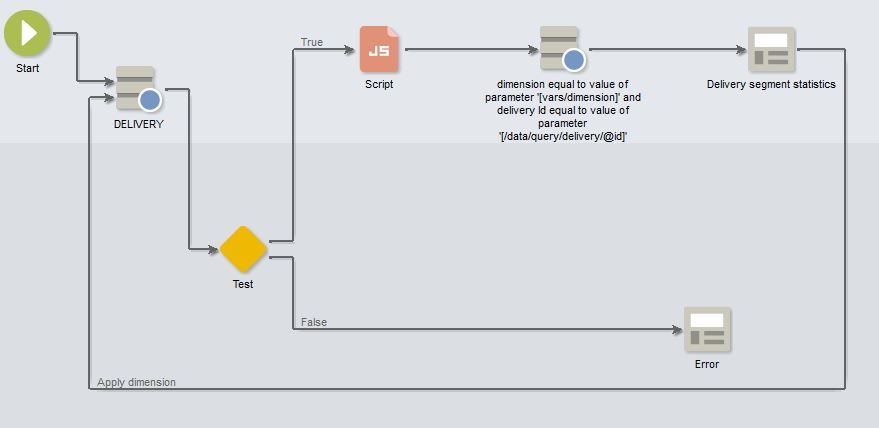
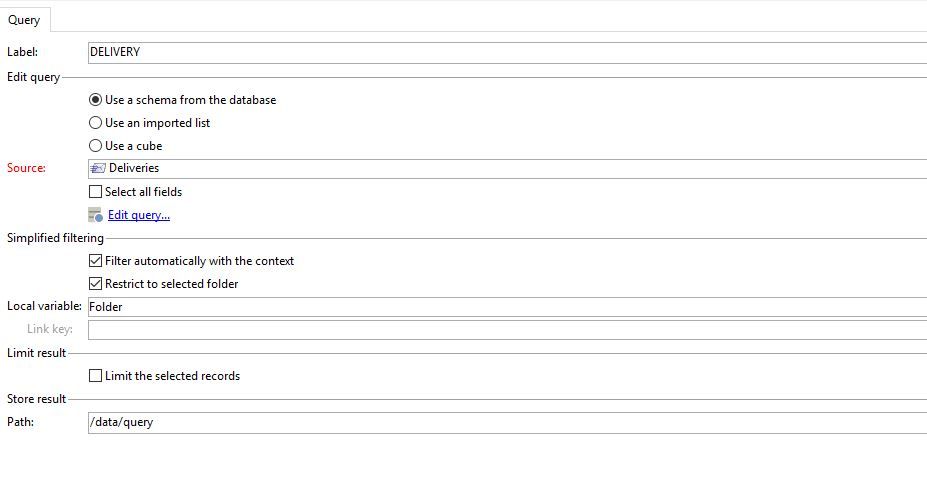
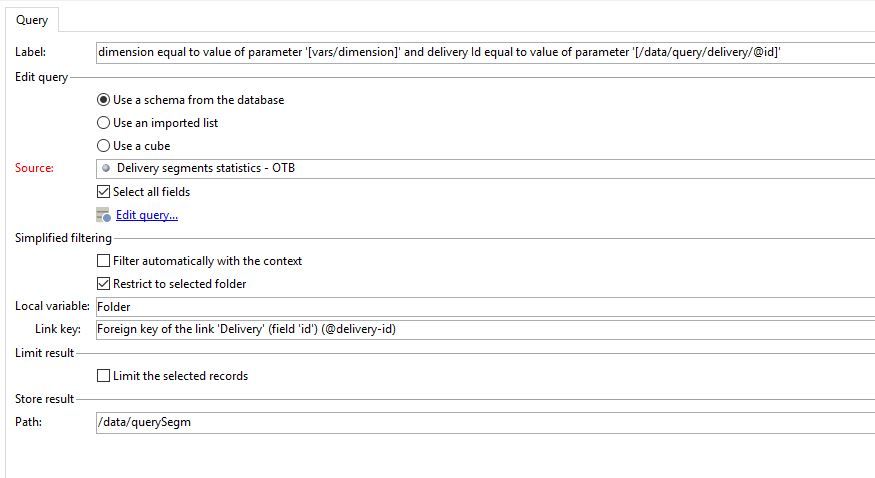
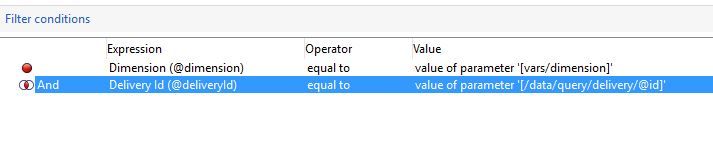
I finally solved this issue thanks to your help and after many attempts!
Here is my custom solution for anyone that might need:
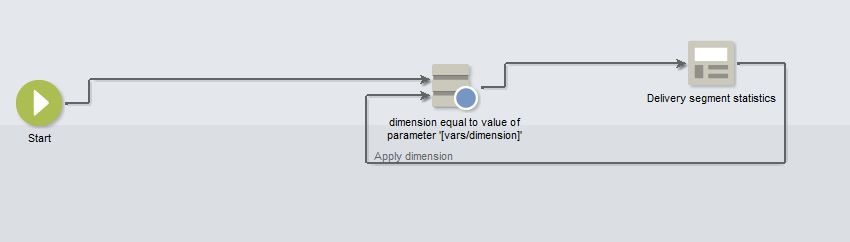
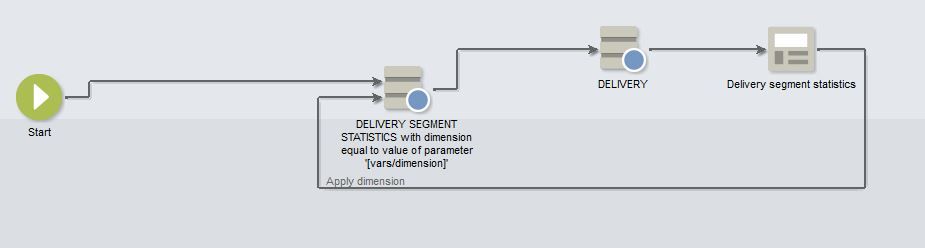
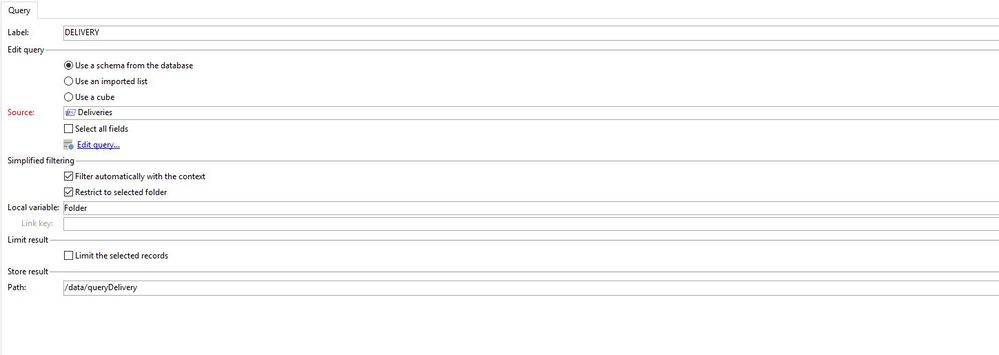
Workflow.
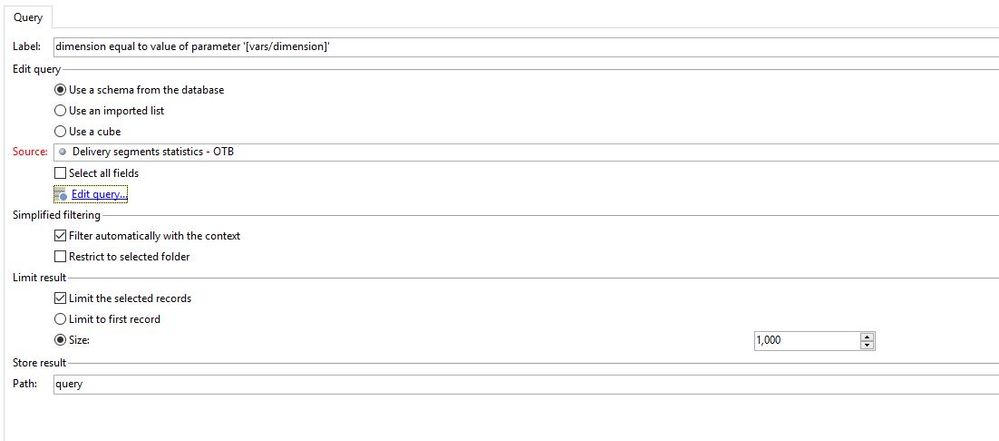
1st query:
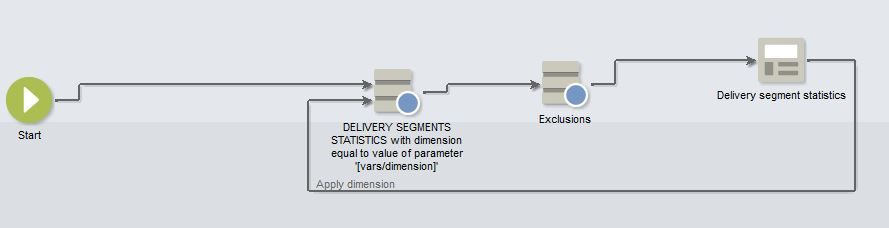
2nd query:
It does work fine!

Views
Likes
Replies
Views
Likes
Replies
Views
Like
Replies
Views
Likes
Replies
Views
Likes
Replies