How can I count the number of times a workflow is been targeted | Community
Skip to main content
mohammada451459
Level 2
December 13, 2017
Solved

How can I count the number of times a workflow is been targeted

  • December 13, 2017
  • 1 reply
  • 1614 views

Hi everyone,

for one of the request I need to send email to all those users whose workflow is in pause state , I have below query for the same.

1) How can I send the notification only to those users whose workflow is in pause state (If I have 3 workflow in pause state then owner of those three workflow should get the notification of only their worklfow and not others).

2) If one workflow has been targeted one time and user is notified, another day same workflow is been targeted again and notified to the user and so on , how can I count the number of times a workflow is been targeted so that after a certain number of times I should no more target the same workflow.

3) How can I log the output notification info in adobe campaign.

Any help on this would be great to have.
This post is no longer active and is closed to new replies. Need help? Start a new post to ask your question.
Best answer by Jean-Serge_Biro

Hello Mohammad,

First of all, you should use the default mechanism of workflow supervision, rather than a specific one, if possible for you.

So please read the xtk:workflow schema documentation, and use these attributes:

  • @failed
  • @onError
  • @errorCount
  • @errorLimit

Please display their values by adding the columns in the workflow list, it is better to understand.

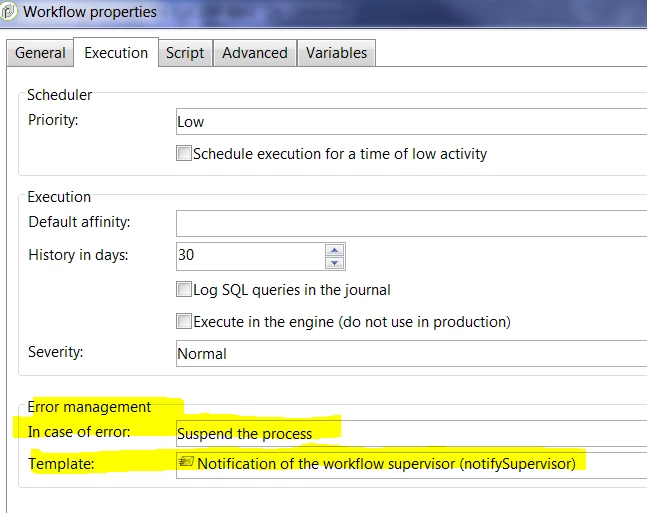
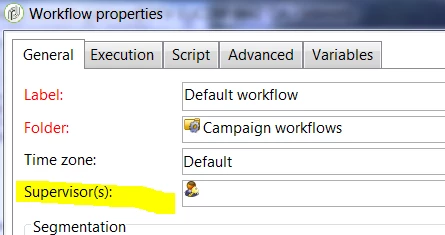
In the workflow properties, define the operators group or operator that must receive alerts (notification) automatically, in which condition.

Feel free to define operators groups for alerts needs if you want to warn specific people in your company.

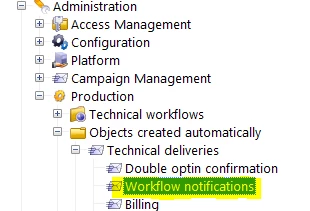
The notification deliveries are stored here:

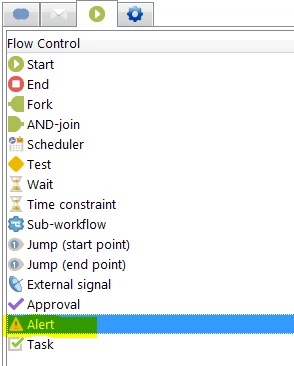
If you need to raise a specific alert notification on business rules, add an alert activity in your workflow:

Hope this helps.
Regards

Jean-Serge

1 reply

Jean-Serge_Biro
Jean-Serge_BiroAccepted solution
Level 10
December 13, 2017

Hello Mohammad,

First of all, you should use the default mechanism of workflow supervision, rather than a specific one, if possible for you.

So please read the xtk:workflow schema documentation, and use these attributes:

  • @failed
  • @onError
  • @errorCount
  • @errorLimit

Please display their values by adding the columns in the workflow list, it is better to understand.

In the workflow properties, define the operators group or operator that must receive alerts (notification) automatically, in which condition.

Feel free to define operators groups for alerts needs if you want to warn specific people in your company.

The notification deliveries are stored here:

If you need to raise a specific alert notification on business rules, add an alert activity in your workflow:

Hope this helps.
Regards

Jean-Serge