Hi Nidhi,
Yes, it is really tricky, and all people struggle with that kind of issue, not only in Adobe Campaign area, but all IT areas.
In AC Javascript activity, please note that if you user new date() you get the applicative server hour/timezone for workflows but for webApp the webServer is not usually the same as applicative server (often it is located on the MTA server). And when you use GetDate() the hour/timezone returned comes from the database server itself (the database instance actually, not the machine).
So you can get different hours/time depending where are your applicative server, your web servers/MTA, and your database instance/server.
You should compare the datetime of the 3 servers (2 AC servers and the DB instance) in your case.
Then I recommend using GetDate (and other functions) because it is the same function that you can use in queryDef, Query activity.
If you have a doubt -or want to better understand) on hour/datetime functions implementations, in Query activity you can display the SQL command generated.
And you can have a look also to the Adobe Campaign generated SQL functions as SQL User functions depending on your DB engine. For instance for SQL Server, Adobe Campaign transforms the DateOnly to this User Function:
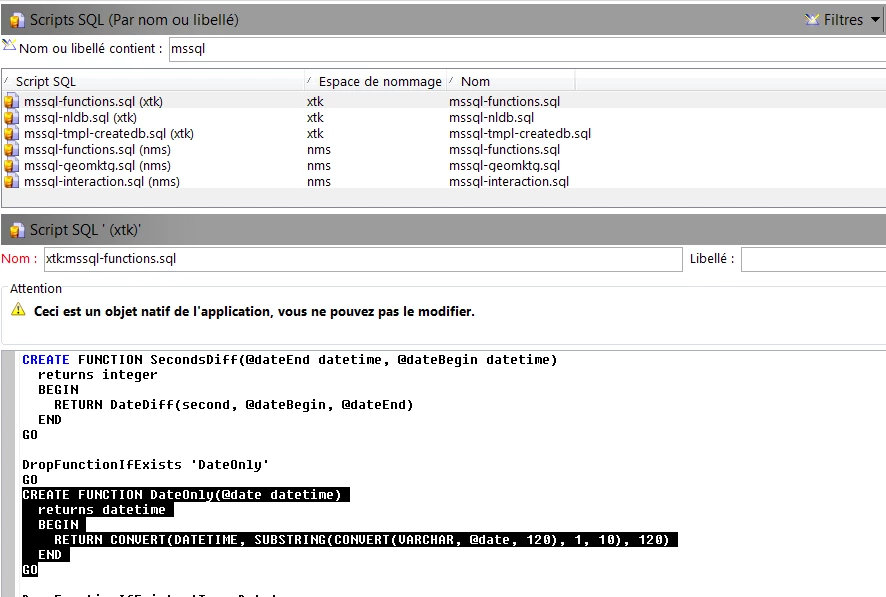
So by looking at the underlying SQL User function, you can better understand what you get, when you develop with DB oriented datetime functions (instead of Javascript ones).
Have a nice week-end.
Regards
J-Serge