Formulas / Expressions for Web Analytics (Brand Configuration) | Community
Skip to main content
davidh2892249
Level 5
September 7, 2020
Solved

Formulas / Expressions for Web Analytics (Brand Configuration)

  • September 7, 2020
  • 3 replies
  • 2499 views

Hi All,


I would like to be able to output the "event date" in YYYY/MM format for my google analytics links, which are set up in a brand configuration.


I've configured like below, using expression ToString(Year(context.eventDate)+'/'+Month(context.eventDate))
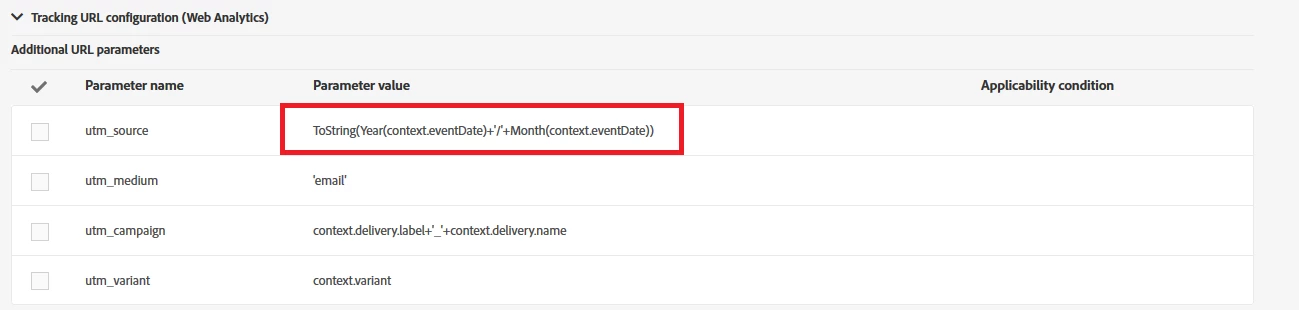


However, this returns the following error in the sending logs (with a status failed) when attempting to send a delivery.

Error while compiling script 'DM282[htmldefaultContent]' line 49: Year is not defined.


Seems I cannot use the date functions? (this type of expression worked fine on workflow worktable expressions)


Has anyone got any ideas as to how I can achieve event date in YYYY/MM for GA tracking?


Thanks


David


This post is no longer active and is closed to new replies. Need help? Start a new post to ask your question.
Best answer by costa_n11

Could you try syntax such as below? 


context.delivery.messageType.substring(0,2).toLowerCase()+':'+ context.delivery.executionType +':'+context.delivery.campaign.label+context.eventDate.getFullYear().toString().substring(2)+'-'+context.profile.location.countryCode.toLowerCase()+':'+context.cusExternalId + '::'


It should work....

3 replies

supratim1034
Level 2
September 9, 2020

Although I have not tried, however, I have seen JS methods (and not inherent ACS method) working in that brand screen. So instead of Year() or Month() which are native to ACS, can you try something like getFullYear() and getMonth().

Please let me know if this actually works!

davidh2892249
Level 5
September 21, 2020

Hi @supratim1034 - thansk for the suggestion, but sadly that doesn't work either.


Any other thoughts?

Sukrity_Wadhwa
Community Manager
Community Manager
September 16, 2020

Hi @davidh2892249,

Was the given solution helpful or were you able to resolve this query with some other solution? Do let us know.

Thanks!

Sukrity Wadhwa
davidh2892249
Level 5
September 23, 2020

Hi @sukrity_wadhwa,


Sadly the functions mentioned above also are not supported... so i don't yet have a working solution.

If you or anyone else has any ideas, please let me know

costa_n11Adobe EmployeeAccepted solution
Adobe Employee
November 4, 2020

Could you try syntax such as below? 


context.delivery.messageType.substring(0,2).toLowerCase()+':'+ context.delivery.executionType +':'+context.delivery.campaign.label+context.eventDate.getFullYear().toString().substring(2)+'-'+context.profile.location.countryCode.toLowerCase()+':'+context.cusExternalId + '::'


It should work....