Facing issue while testing the SMS configuration in ACS | Community
Skip to main content
Level 2
February 24, 2020
Solved

Facing issue while testing the SMS configuration in ACS

  • February 24, 2020
  • 7 replies
  • 10592 views

Hi,

We have configured the SMS vendor in ACS instance under external account. And adobe team confirmed that the configuration is correct. And then I have tested the SMS configuration by triggering  test SMS to few customers(Mobile numbers are valid and not in DND list). But the status of SMS delivery is in "pending status". Could you please help me ,to find the issue/fix the issue.
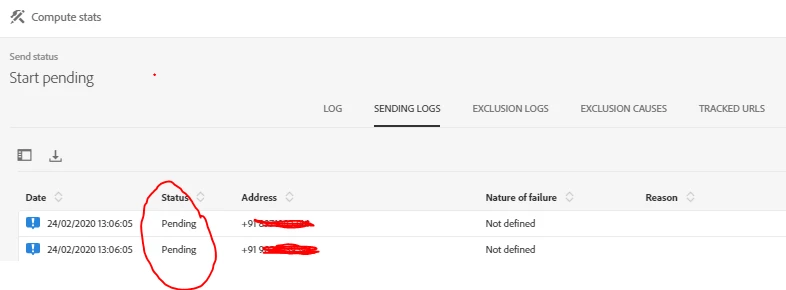
And Could you please let me know that from where can i get the MTA log file? 


Thanks.

This post is no longer active and is closed to new replies. Need help? Start a new post to ask your question.
Best answer by bisswang

Unfortunately as a customer xou can't see MTA logs.

You could enable verbose logging for the external account and ask Adobe Support to check/provide the logs.

7 replies

Sebastiane_Edberg_
Community Advisor
Community Advisor
February 25, 2020
Hi, when using an SMPP account, have you specified the TON and NPI values according to SMPP providers required settings? i have seen this happen when passing a 0 or null value in the request
Level 2
February 26, 2020
Hi,
Level 2
February 26, 2020

Hi,

Yes i have updated those parameters as per requirement as shown below.


 What could be the reason for this issue (SMS not getting triggered)? Could you please help me on the same.


Thanks,

Manjula


Sebastiane_Edberg_
Community Advisor
Community Advisor
February 26, 2020
the reason is probably that it doesnt bind correctly with your smpp host, eg the connection works as such but in the process of binding it doesnt work and your SMS ends up as pending
Level 2
February 26, 2020

Okay. If the binding is the issue, could you please let me know the next steps to follow to get it fixed.

And do we have any other possible reasons for these failure ? 


Could you please assist me.

Sebastiane_Edberg_
Community Advisor
Community Advisor
February 27, 2020

So basically you need to specify TON and NPI for source and destination under the section "SMPP channel settings" in your external account setup, and these settings affect how the number you pass to provider will be processed as destination end point, have a look here for example: https://developers.sinch.com/docs/sms-smpp-outbound#source-address so your numbers in campaign should follow a consistent format and and your settings should match. We have all numbers with country prefix (no leading 0 or +), so in our instance theres a value of "1" in source and destination TON and NPI when using SINCH as provider

bisswangAdobe EmployeeAccepted solution
Adobe Employee
February 27, 2020

Unfortunately as a customer xou can't see MTA logs.

You could enable verbose logging for the external account and ask Adobe Support to check/provide the logs.
