Creating a Audience who have clicked on specific link in a delivery | Adobe Higher Education
Skip to main content
July 1, 2021
Resuelto

Creating a Audience who have clicked on specific link in a delivery

  • July 1, 2021
  • 1 respuesta
  • 2249 visualizaciones

Hi all,


We are able to target users who has performed a clicked in the delivery under "Audience Target > Delivery > Clicked".

Is there a way to target contacts who have clicked on a specific link in the delivery?


Regards

SS


Este tema ha sido cerrado para respuestas.
Mejor respuesta de ParthaSarathy

Hi @sengsiong ,

Yes it is possible.

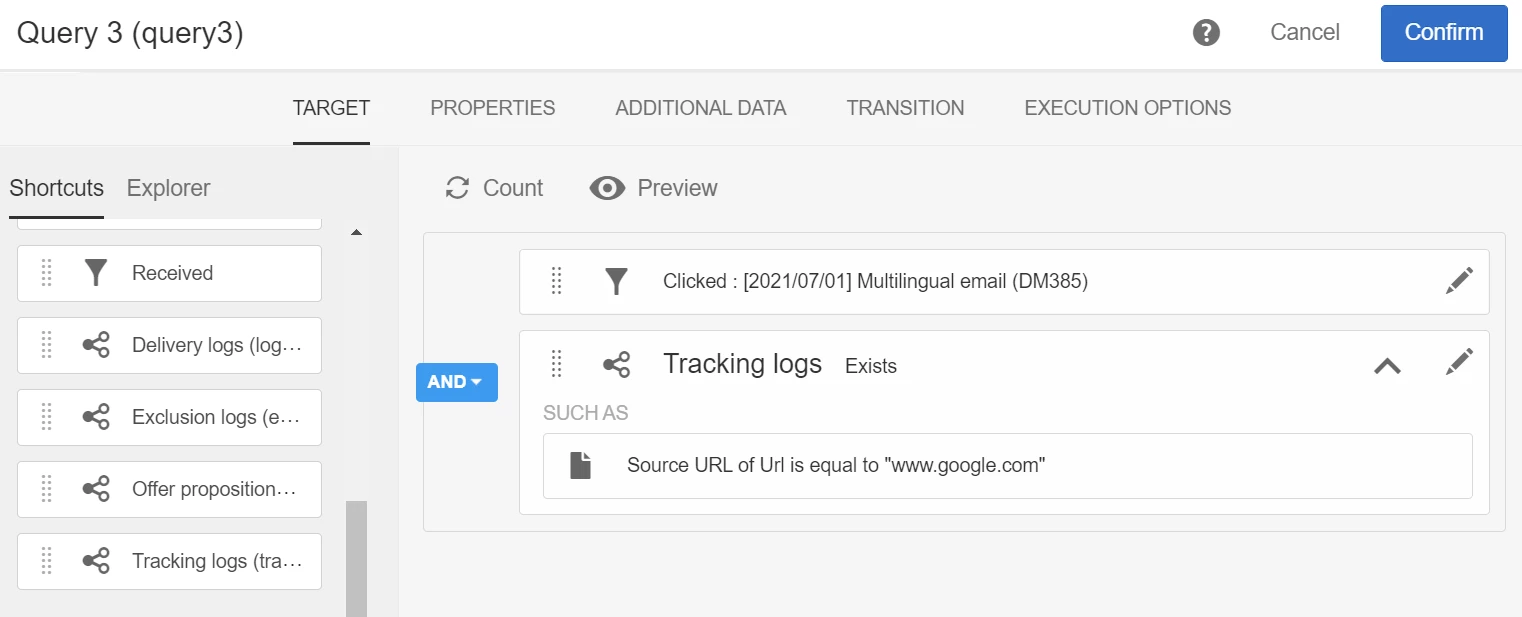
In Query, Select the delivery which you want to target by selecting 'Received' or 'clicked'.

Then under Delivery > drag and drop 'tracking log' > now it will be like 'tracking log exist ', now drag URL under tracking log.

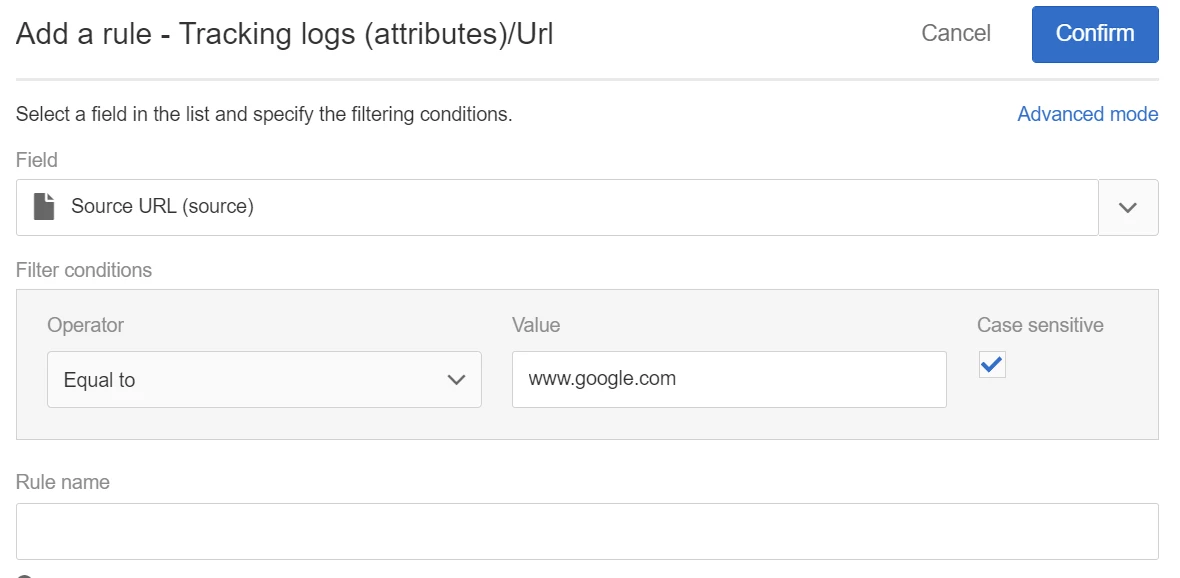
Select 'Source' under URL fields, as below

Click confirm.

Now you will filter out whoever clicked on google.com in that particular Delivery

Regards,

ParthaSarathy S


1 respuesta

ParthaSarathy
Community Advisor
ParthaSarathyCommunity AdvisorRespuesta
Community Advisor
July 1, 2021

Hi @sengsiong ,

Yes it is possible.

In Query, Select the delivery which you want to target by selecting 'Received' or 'clicked'.

Then under Delivery > drag and drop 'tracking log' > now it will be like 'tracking log exist ', now drag URL under tracking log.

Select 'Source' under URL fields, as below

Click confirm.

Now you will filter out whoever clicked on google.com in that particular Delivery

Regards,

ParthaSarathy S


~  ParthaSarathy S~  Click here to join ADOBE CAMPAIGN USER GROUP for Quarterly In-person | Hybrid | Virtual Meetups
May 24, 2022

Hello


Is this possible to do at campaign level rather at email level?

So to target all users that have clicked a specific link in any email in a particular campaign?

May 24, 2022

HI @csoile 

Yes for the field to use which holds the URL however the query won't be efficient and performance if you have 2 exist clause. Make sure you the Source URL criteria in the same Exist clause that the delivery campaign criteria... 

Also, since I don't know your volume of Profile, using Exist operator could be quite long since it will scam the whole Profile records whose tracking fit the rules. You might want to start your query at the Tracking Log level by changing the Resource entity in the Property of the query by selecting nmsTrackingLogRcp, (search for tracking in the Resource) and select the profile link in the Target field in the same Query Property....

Again it all depends on your volume of Profile

Hope this helps,

Thanks

Denis


Thanks Denis

your first paragraph makes perfect sense


Im a little unsure with regards to your second paragraph but we do not have a large database, so hopefully the above should be okay.


Many thanks 


C