Combining data from two data schemas | Community
Skip to main content
El_Loco
Level 5
March 16, 2018
Solved

Combining data from two data schemas

  • March 16, 2018
  • 15 replies
  • 10985 views

Hi,

I am trying to query data from two data schemas and combine all records that exist in both but I'm struggling.

  • I have a query that looks at all profiles where the email address is not empty.
  • I have another query that looks at the address scheme where the address is not empty.

I then want to take both sets of data and to combine them to produce one set of data that consists of all profile email addresses who also exist within the address schema.

I have tried using an intersection activity but it falls over because the two types of inbound events are incompatible.

Can anyone advise on the best way to achieve this?

Many thanks,

Bob
This post is no longer active and is closed to new replies. Need help? Start a new post to ask your question.
Best answer by florentlb

Hi Bob,

Sorry for answering so late.

I've tried the following:

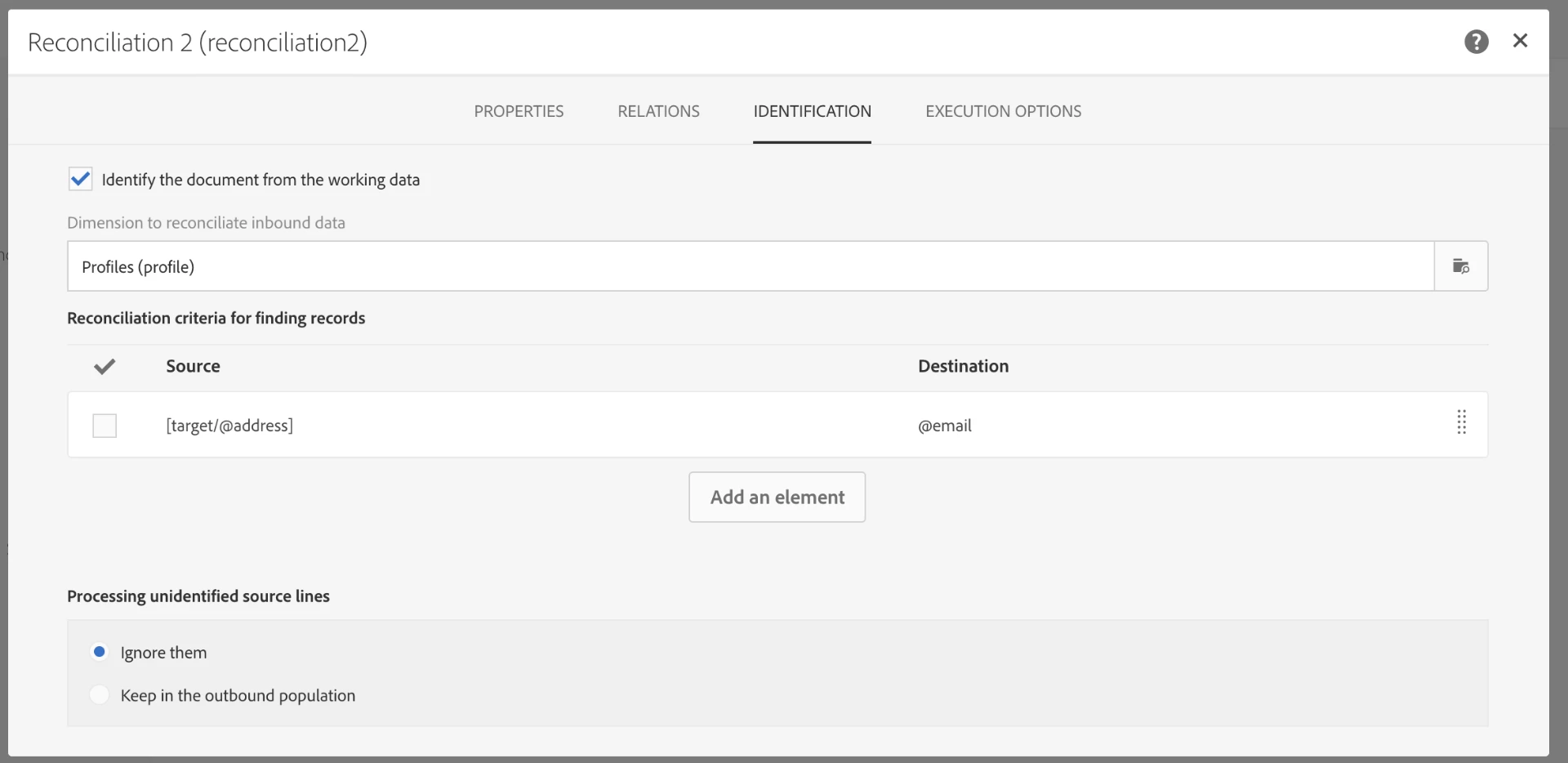
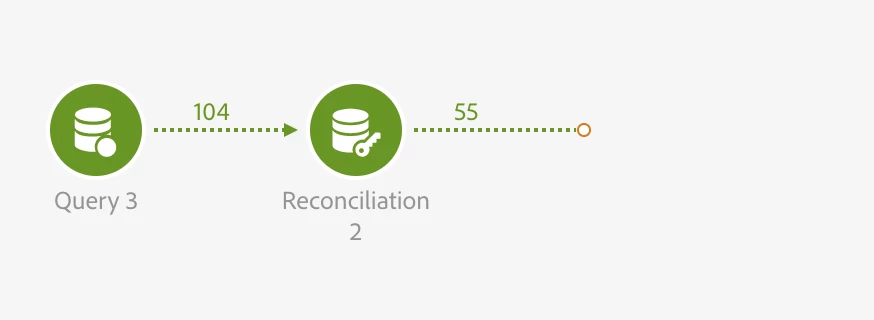
In this workflow, I query all addresses (dimension AddressStatus) for which the address field is not empty (Query). Then, I add a reconciliation activity, where I only fill the Identification tab as follows:

As you can see here:

  • I reconciliate the addresses from the Query with the Profiles schema, and specifically the email and address fields.
  • Unidentified source lines are ignored (so only identified records - which are found in both schemas - are kept).

The data of the transition after the Identification is one the Profiles dimension and corresponds to email addresses that were found in the address schema.

Would this work for you?

Florent

15 replies

menno_74
Level 2
March 16, 2018

Hi Bob,

Assuming u are using nms:recipient   and nms:address: you can use a "Change dimension" from the 'target' repository on address to change its dimension to match it to the dimension of recipient.

Kind Regards,

Menno

El_Loco
El_LocoAuthor
Level 5
March 19, 2018

Thanks for your response. I failed to mention that I am using Adobe Campaign Standard - does your suggestion still apply as I'm not familiar with the 'Change dimension' option?

Thanks,

Bob

menno_74
Level 2
March 19, 2018

Hi Bob,

Indeed: change dimension is part of campaign classic and seems not to be available in campaign standard.

My guess is that you need to match the data somehow

Perhaps you can find some answers here.

Adobe Campaign Help | Reconciliation https://helpx.adobe.com/campaign/standard/automating/using/read-audience.html

Adobe Campaign Help | Read audience

El_Loco
El_LocoAuthor
Level 5
March 19, 2018

No worries, appreciate your help anyway.

I'll wait for florentlb​ to swoop in with the answer!​

florentlb
Level 10
March 19, 2018

Hi Bob,

To make sure I understand, why do you need to query the second schema? From what I read you simply want to have all profiles who have their email address filled, but I'm not sure of why you are considering that other schema.

Florent

El_Loco
El_LocoAuthor
Level 5
March 19, 2018

Hi Florent,

All of our blacklisted and quarantined contacts are listed within the nms:address schema. All of these contacts are automatically suppressed from all of our communications, so periodically I want to run a workflow to query how many of those contacts have active profiles and remove those profiles from our database.

I assumed the easiest way to achieve this would be by bringing the data of two queries together. I just don't know how to combine the data of the two where the same value is present in both. If you think there's an alternative solution I'm all ears!

Appreciate the advice.

Amit_Kumar
Level 10
March 19, 2018

Hi Bob,

Use Adobe Campaign Help | Exclusion

1. Query all profiles with the nonEmpty email address. Q1

2. Get all blacklisted address  Q2

3. Use a https://helpx.adobe.com/campaign/standard/automating/using/fork.html to split query Q1 in two parts i.e Q1A and Q1B

4. Use Exclusion with Q1A and Q2 with Q1 as the primary target and email address and a filter will give you E1

5. Use Intersection activity with E1 and Q1B

6. this intersection will give you a list of Quarantined profiles

Alternatively, add a new column in profiles i.e blacklistedFlag and update this flag from your nms:address  query using an email address as a key.

Regards,

Amit

El_Loco
El_LocoAuthor
Level 5
March 20, 2018

Hi Amit,

Thanks for your advice. I have set up the following but I am still experiencing problems where it says the ('head:profile' and 'head:addressStatus') are incompatible. Please let me know if I've misunderstood any of the steps.

El_Loco
El_LocoAuthor
Level 5
March 26, 2018

Hi Amit,

Just checking in - Are you able to advise on the error in my workflow?

Thanks,

Bob

El_Loco
El_LocoAuthor
Level 5
March 29, 2018

Bump. Is anyone able to help with this issue?