ACS - Report Device and logs | Community
Skip to main content
eveline8
Level 4
March 7, 2019
Solved

ACS - Report Device and logs

  • March 7, 2019
  • 4 replies
  • 5676 views

Hi,

I saw that in the tab Report of Adobe Campaign Standard there is the possibility to know which are the device used to open the mails.
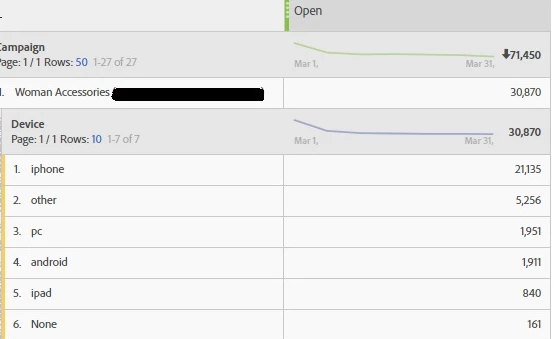
Is it possibile to export that information with delivery or tracking logs?

I need to know this information for each profiles by campaign.

Thanks

E.

This post is no longer active and is closed to new replies. Need help? Start a new post to ask your question.
Best answer by Garima_Gakhar

Hi eveline8​,

There is no way to directly export breakdown data in a Workflow.

The only way to achieve this is to have a customized report setup by Professional Services team. You will have to check with them if its possible.

A Workflow Query might allow you to fetch Tracking Logs specific to a Delivery and have corresponding Profile details retrieved as well, but it won't allow you to pull Device data along with it.
This level of breakdown is available only as a part of Reports.

4 replies

Garima_Gakhar
Adobe Employee
Adobe Employee
March 7, 2019

Hi eveline8

You could breakdown each record within a Report to check for related details.

Like try pulling Tracking Indicators Report which would have metrics like Delivered, Open, Click etc. The rows within this Report would reflect different Deliveries for which the Tracking Indicators are available.

Then breakdown the required record/row by Dimensions -> Device by right clicking on the specific record:

Hope that helps!

eveline8
eveline8Author
Level 4
March 7, 2019

Hi Garima,

thanks for your answer.

It is clear how can correlate dimension and metric in the tab Report.

My question is another: is it possible to export that information with delivery or tracking logs in a workflow?

I want to export a file with profiles, delivery label, action and device.

Thanks

Garima_Gakhar
Adobe Employee
Garima_GakharAdobe EmployeeAccepted solution
Adobe Employee
March 12, 2019

Hi eveline8​,

There is no way to directly export breakdown data in a Workflow.

The only way to achieve this is to have a customized report setup by Professional Services team. You will have to check with them if its possible.

A Workflow Query might allow you to fetch Tracking Logs specific to a Delivery and have corresponding Profile details retrieved as well, but it won't allow you to pull Device data along with it.
This level of breakdown is available only as a part of Reports.

sylvaing2936668
July 26, 2019

Hi,

It's quite disapointing to be unable to export data actually available in reports.

Any idea if a feature request is possible in the future  ?

Could really help to better know our contacts and how to better communicate with them.