Webapp form :Log Response Not working | Community
Skip to main content
Anita_punmiya
Level 5
April 1, 2019

Webapp form :Log Response Not working

  • April 1, 2019
  • 4 replies
  • 9243 views

Hi,

I am unable to track the responses in Web App form even when the log responses option is checked in the properties of the page.

What cab be the reason?

This post is no longer active and is closed to new replies. Need help? Start a new post to ask your question.

4 replies

geoffreyl240454
Level 3
April 1, 2019

Hi Anita,

Did you choose the log responses Library after option checked?

Did you re-publish the webApp after the modifications?

Thanks,

Geoffrey.

Anita_punmiya
Level 5
April 1, 2019

Hi Geoffrey,

Thank you for your response .

Yes I did republish the web app but can you please help me with the path where to check the log response Library after selecting from the properties ?

Regards,

Anita

Sent from my iPhone

geoffreyl240454
Level 3
April 1, 2019

You're welcome Anita,

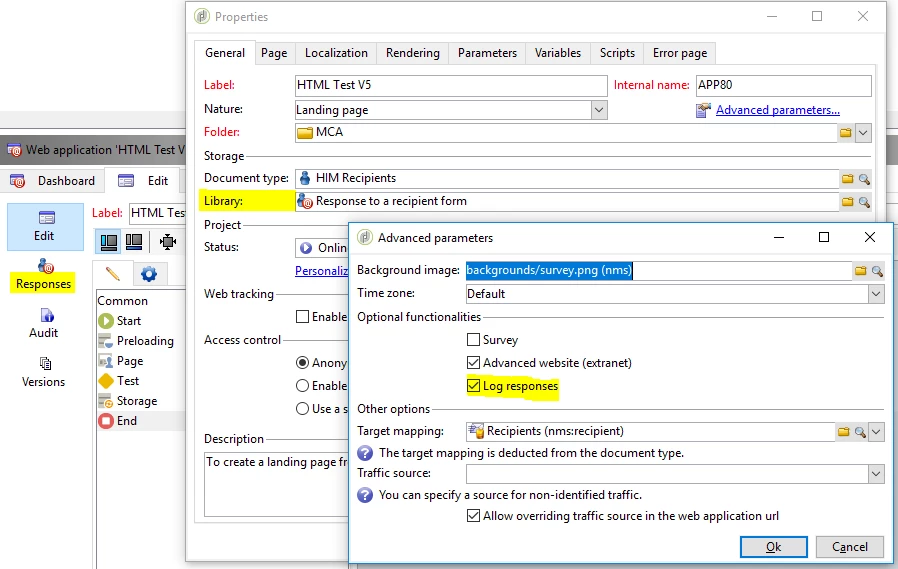
After tick the "Log responses" field, you must have the "Library" field displayed in the "Properties" form:

Thanks,

Geoffrey.

Florian_Courgey
Level 4
April 1, 2019

Hi,

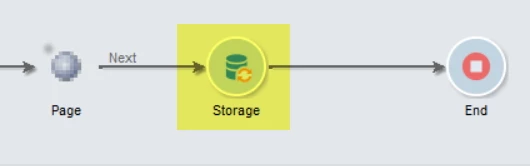
You may also need to add a "Storage" activity, after the page:

Kind regards

geoffreyl240454
Level 3
April 2, 2019

Hi Anita,

All seems good.

Is it possible for you to provide a package of the Web Application in order to control the settings?

Thanks,

Geoffrey.

Anita_punmiya
Level 5
April 2, 2019

Ho Geoffrey,

Well, its difficult to provide the package but do you mind telling me what exactly to check in and I can follow the same?

Regards,

Anita

geoffreyl240454
Level 3
April 8, 2019

Hi Geoffrey,

The issue is same across the different instances not just with one.

I replicated the web app in another instance but it did not work either.

Regards,
Anita


Hi Anita,

Could you please run a test with the debug mode in order to display the context, control if the value to store are there and if there is any error?

Feel free to put a screenshot of the web application context for control of it.

Many thanks,

Geoffrey.

Venu_Reddy
Level 6
April 10, 2019

Hi anitap82640902​,

When the form is displayed via a URL with the _uuid parameter, the value of the origin parameter is forced to Adobe Campaign.

_uuid enables form viewing before publication and error tracking. This parameter is for internal use (creation and debug): when you access the Web form via this URL, the records created aren't taken into account in the tracking (reports). The origin is forced to the Adobe Campaign value.

It is used with the _preview parameters and/or _debug:

_preview to display the last saved version. This parameter must be used in the test phase only.

_debug to display the trace of the data input or calculated in the pages of the form. This is used to obtain more information about errors, including once the form has been published.

Regards,

Venu

Anita_punmiya
Level 5
April 11, 2019

Thanks Venu for the detailed info.

Regards,

Anita