"Default" timezone : Updating WdbcTimeZone to ET doesn't change the delivery timezone | Community
Skip to main content
October 24, 2019

"Default" timezone : Updating WdbcTimeZone to ET doesn't change the delivery timezone

  • October 24, 2019
  • 3 replies
  • 8430 views

Hi,

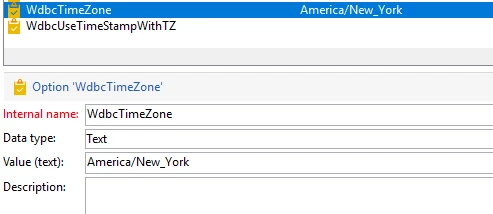
I've updated the WdbcTimeZone from "America/Los_Angeles" to "America/New_York". This is done to make the "Default" timezone in the activities run in the EST timezone. Changing the WdbcTimeZone had no effect. Please advise.
Thanks

This post is no longer active and is closed to new replies. Need help? Start a new post to ask your question.

3 replies

Jyoti_Yadav
Level 8
October 25, 2019

Hi,

You need to change it at database end. When you run any workflow, you will be getting Warning as:

'Database server time or timeZone is incorrect'.

Thanks.

Venu_Reddy
Level 6
October 25, 2019

Hi,

It will reflect the changes in the logs system date, last modified date when you change the WDBCTimeZone option.

There are more chances of day light savings and it will reflect the default changes.

By validating that you will get confirmation on how the change works.

Please check this link for more details regarding day light savings Time zone management

SheetalAgrawalSoni
Level 2
August 6, 2020

In my case updating WdbcTimeZone  options to America/New_York did not changed the system time or logs time or audit or delivery time .. its 4 hrs difference

Does it required restart ? 

SheetalAgrawalSoni
Level 2
August 6, 2020

Did it worked for you ? 


I am facing same problems 

Level 3
August 6, 2020

Yes please restart the Adobe services.