
How do add tag in each URL of delivery before send out? | Community
Skip to main content
parveshp7822672
Level 3
March 19, 2019

How do add tag in each URL of delivery before send out?

  • March 19, 2019
  • 2 replies
  • 17618 views

Hello Everyone,

I want to know, Can a tag be added to each URL of delivery before executing automatically? 

For example business user design a email like below:
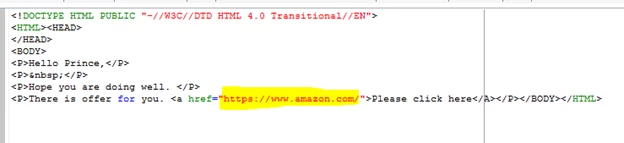
As you can see there is no tag in this URL.

When a user start this delivery, before processing of this delivery, I want to add a tag in this URL.

As shown below.

Can you please let me know, how I can do this automation?

Thanks,

Parvesh.

This post is no longer active and is closed to new replies. Need help? Start a new post to ask your question.

2 replies

Kunal_Gaba_
March 19, 2019
parveshp7822672
Level 3
March 25, 2019

Hello Kunal,

This document is regarding the tracking formaula.

I wnat to know, how to change URL in delivery.

Thanks.

Parvesh.

Jonathon_wodnicki
Community Advisor
Community Advisor
March 19, 2019

Hi,

Edit xtk:option 'NmsTracking_ClickFormula'.

Thanks,

-Jon

parveshp7822672
Level 3
March 25, 2019

Hello Jon,

NmsTracking_ClickFormula option is used to define the tracing URL creation formula.

But I do not want to default tracing URL. I want to change actual URL which is defined in delivery.

Thanks.

Parvesh. 

parveshp7822672
Level 3
March 27, 2019

Hello parveshp78226723

Could you explain us why you need it before the delivery analysis?

I can only repeat what already suggested: modifiy these options at platform level or inside each delivery template you need.

Otherwise, you have simply to add the requested parameters/placeholder to the HTML source

Other solution might be a scheduled script that append to "href" properties a string, but it seems a useless waste of time to me compared to the steps above.

Regards,
Salvatore


Hello Salvatore,

A script will not work. If the href tag exists in personalization block.

I do not want to change targeting URL also.

As per these conversations, I think the best solution is to add this tag in HTML source code.

Thanks.

Parvesh.