Export 'subject' (or in general XML field) in export template | Community
Skip to main content
salvdangelo
Level 5
October 23, 2017

Export 'subject' (or in general XML field) in export template

  • October 23, 2017
  • 1 reply
  • 12139 views

Hi,

How should I export an XML field through an export job template?

In particular regarding 'delivery subject' ([delivery/mailParameters/subject])
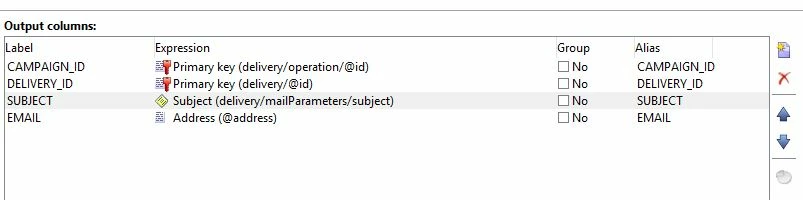
I read a similar thread, but that wasn't clear for me.

Any solution?


Salvatore

Jean-Serge Biron

Amit_Kumar

Vipul Raghav

florentlb

Adobe Campaign

This post is no longer active and is closed to new replies. Need help? Start a new post to ask your question.

1 reply

Jean-Serge_Biro
Level 10
October 23, 2017

Hello Salvatore,

As explained in this ticket (Exporting XML Fields ), it is not possible to use XML field (memo) directly from:

  • Query, Enrichment, Export activities in a workflow (either extract field or where criteria field)
  • queryDef node field or where criteria function in a Javascript activity

But you can manipulate the XML field in Javascript, so this is always a valuable workaround.

For instance, in your case, you can use:
message.delivery.mailParameters.subject

to get the delivery subject content.

But take care, the subject content in the delivery contains common data for all the messages sent to contact; so in case of personalizing the subject, you won't get the exact values per contact message but the personalisation code as raw data, as explained in the ticket indicated above.

Regards.
J-Serge

szymons55769873
Level 2
January 27, 2020

Hi All


It is often indicated that whatever workaround will be used to extract/insert subject line there is still a problem of that subject line being BEFORE personalization (so any dynamic parameters in subject will be there as plain text). 


Has anybody figured out a way to obtain the subject that is AFTER personalization step and has all the dynamic parameters changed to actual DB values?


@jean-serge_biro  @amit_kumar