Export 'subject' (or in general XML field) in export template | Community
Skip to main content
salvdangelo
Level 5
October 23, 2017

Export 'subject' (or in general XML field) in export template

  • October 23, 2017
  • 1 reply
  • 12145 views

Hi,

How should I export an XML field through an export job template?

In particular regarding 'delivery subject' ([delivery/mailParameters/subject])
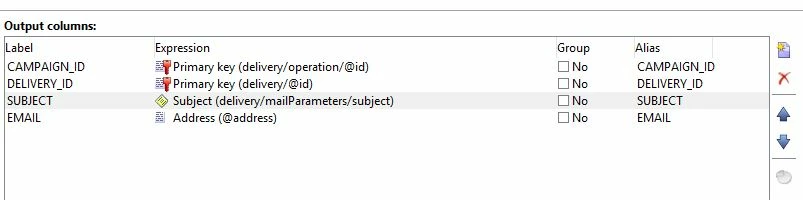
I read a similar thread, but that wasn't clear for me.

Any solution?


Salvatore

Jean-Serge Biron

Amit_Kumar

Vipul Raghav

florentlb

Adobe Campaign

This post is no longer active and is closed to new replies. Need help? Start a new post to ask your question.

1 reply

Jean-Serge_Biro
Level 10
October 23, 2017

Hello Salvatore,

As explained in this ticket (Exporting XML Fields ), it is not possible to use XML field (memo) directly from:

  • Query, Enrichment, Export activities in a workflow (either extract field or where criteria field)
  • queryDef node field or where criteria function in a Javascript activity

But you can manipulate the XML field in Javascript, so this is always a valuable workaround.

For instance, in your case, you can use:
message.delivery.mailParameters.subject

to get the delivery subject content.

But take care, the subject content in the delivery contains common data for all the messages sent to contact; so in case of personalizing the subject, you won't get the exact values per contact message but the personalisation code as raw data, as explained in the ticket indicated above.

Regards.
J-Serge

salvdangelo
Level 5
October 23, 2017

Hi Jean-Serge,

Thank you for being responsive.

How may I use this JS code (message.delivery.mailParameters.subject)

inside an export template?

Salvatore

         
Jean-Serge_Biro
Level 10
October 23, 2017

2,4 M of records for broadLogRcp

However, I don't know how should I test the performance with the workflow since the query cannot extract the XML field.
I suppose you are suggesting to use the JS code you were talking about but I don't know how to implement it in this moment


Salvatore


I confirm the issue:

it takes too much time than necessary with Export template tool; even if subject is a shared information of all messages of a delivery, the operation is probably bad managed by the Export template tool, probably because of the mData field management itself.


For my "small" servers (Windows 8 Go RAM for AC applicative server, and SQL Server medium server), I get 266.000 records exported in 50 minutes with Export template tool.

But I also confirm the same performance issue the workflow Extract activity method:

I get the same records export done in 14 minutes
Better than Export template but too much intensive calculation on applicative server, probably.

(the Query activity itself, to get the broadlog address and the delivery subject takes only a few seconds.)

However, with only broadLogRcp and delivery internalName, the whole export task is completed in a few seconds.

I have tried by putting the Javascript code in the Extract activity format section (adding an element) but the response time is not better (well, Javascript is not recommended for a large set but I did it for standard fields on millions of line and it is pretty quick, compared to this small set of lines with memo type field...).

Unfortunately this can't be achieved by retrieving the subject information from a Query activity (or Enrichment, or Change axis activities as I described in my 1st answer, due to XML type of this field).

The only way I find would be in Javascript activity within a workflow, to "merge" the queryDef for broadLogRcp and the Javascript manipulation of XML objects.

If anyone else knows a better solution, please share your knowledge.

Regards
JS