Allow Channel Level Opt Out to be sent | Community
Skip to main content
Level 3
June 25, 2018

Allow Channel Level Opt Out to be sent

  • June 25, 2018
  • 3 replies
  • 14962 views

I'd like to find out where the channel level opt outs are being excluded from a delivery, there doesn't seem to be a rule in the default typology I am using yet they are taking place.

We have a use case to allow marketeers the ability to contact recipients who have opted out of SMS (@blacklistmobile) with service or informational comms. However if they are flagged as 'Do Not Contact by Any Channel' (@blacklist) they should continue to be excluded.

If I untick the blacklist option in the delivery (To > Exclusions) then all comms are sent regardless of the opt out preferences in either the SMS level Opt Out (@blacklistmobile) or the 'Do Not Contact by Any Channel' (@blacklist) field.
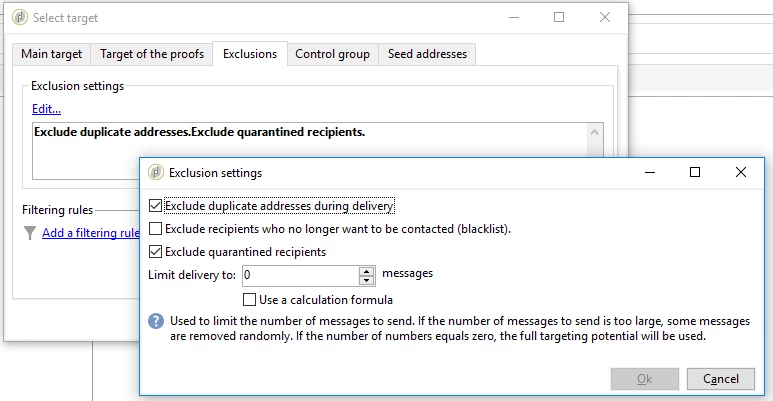
A solution would be to untick the blacklist box, and then create a new typology rule which would then reapply the @blacklist opt out preferences. This would allow channel level opt outs to be sent whilst excluding the @blacklist level opt outs, however I'm convinced there is a simple OOTB answer I've missed, I look forward to finding out I'm correct!

This post is no longer active and is closed to new replies. Need help? Start a new post to ask your question.

3 replies

Prem_Kumar_Gane
Level 3
June 26, 2018

Hi,

You can add the filtering condition (iBlackListMobile = 1 i.e. @blackListMobile ='Yes') in the query activity (or) applying this filtering condition as pre-defined filter before a delivery and keep Exclude recipients no longer to be contacted checkbox as ticked. This should give the exact result as you expected .

Thanks,

Prem Kumar Ganesan

Level 3
June 26, 2018

Thanks for that.

I've opted to build this in at a typology level rather than at a workflow level but it seems counter intuitive that I can disable only both global and channel level blacklists by default instead of being able to disable only the channel level blacklist whilst still applying the global level blacklist.

Prem_Kumar_Gane
Level 3
June 26, 2018

Can you try creating a new Typology rule which has filtering condition as No longer contact by SMS/MMS ='No'.  Then add this typology rule to the default Typology or duplicate the default Typology, include this new rule, map it in the delivery and try executing the same.

Thanks,

Prem Kumar Ganesan

Level 3
June 26, 2018

I appreciate the help.

As mentioned I already have a typology solution prepared which is similar to your one above, however it seems to me there should be a better way to make this work without me having to untick the 'Exclude Recipients who no longer wish to be contacted' box as this is removing one of the safeguards preventing globally blacklisted data from being sent out by marketeers.

davidk21713691
Level 3
June 26, 2018

Hi Alistair,

The channel level opt-outs are defined under the target mapping

You can define which field you want to use for your blacklist per channel there.

Thanks

David

September 14, 2018

My accounts have been hacked please help secure my profile name needs to be changed and secured