Solved
Why the load activity would load 1 row less than total rows? 11 instead of 12.
Even in the configuration of the Load activity the 12 rows are recognized, but after data is loaded, in Display target I see only 11.
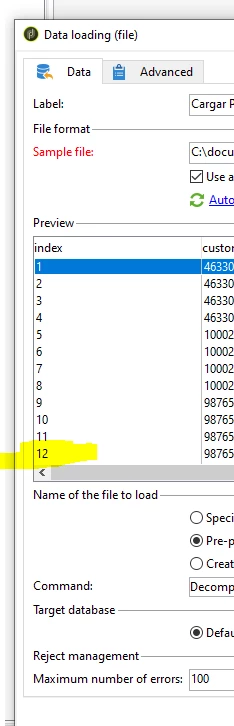
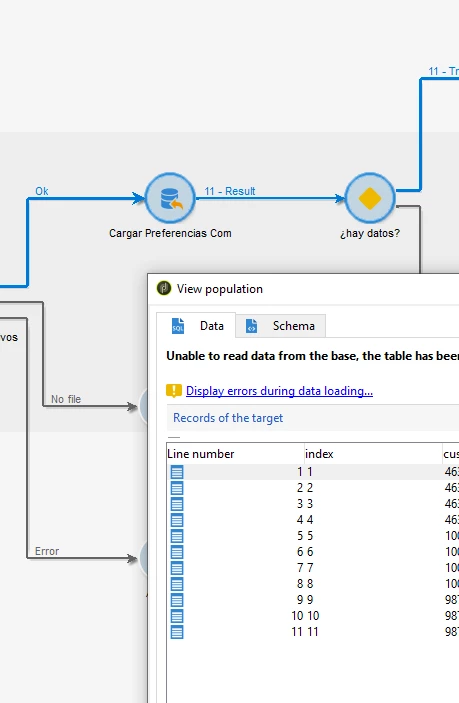
Even in the configuration of the Load activity the 12 rows are recognized, but after data is loaded, in Display target I see only 11.
@god_prophet , It seems you don't have rights to place a file in the particular path. Try providing folder path where you have access.
Between, from your log screenshot, I can see it says in one of your record for one of the column there is data mismatch (year is too long). Please cross check your data.
So out of 12 records, 11 records has proper format for all column, and one row alone has incorrect formal.
Hi @god_prophet ,
The solution for this is given in another thread.
Have you got an opportunity to try it? In data Loading activity, instead of defining it as date+time, define it as 'string'. So you will be getting all 12 records as output of 'Data loading' activity.
Now Connect data loading transition with enrichment activity.
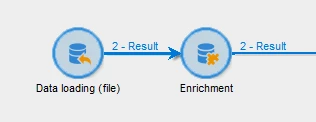
Enrichment:
Add data > add an output column in it with below expression,
ToDateTime(date_creation)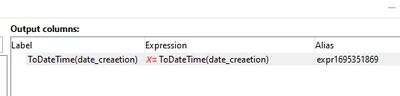
Now the new field created in enrichment, will remove the millisecond.
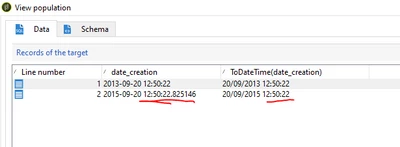
And you can use this new field in your workflow for importing the data and for other purpose.
Enter your E-mail address. We'll send you an e-mail with instructions to reset your password.