Web app: accessing context variables from client side | Community
Skip to main content
Level 2
October 30, 2023
Solved

Web app: accessing context variables from client side

  • October 30, 2023
  • 2 replies
  • 1753 views

Hello, everyone.

@angeles_arcia and I are learning ACC. We're working on a project and we would like to know if it's possible to access a context variable created in a web form from the client side. We're attempting to dynamically render some elements from an array in the HTML source code.


This is our current approach:
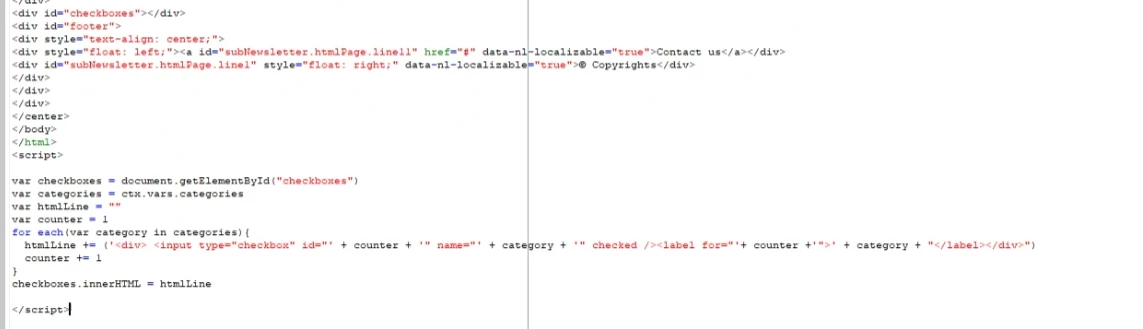
We've added a <div> element with the id "checkboxes," and we also have an array called 'categories' that stores categories such as 'Outdoor,' 'Clothing,' and so on in ctx.vars.


Although the JavaScript syntax appears to be correct for us, we keep encountering the 'ctx is not defined' error in the web console, leading us to believe that we don't have access to these variables from the client side.


Is there a way to achieve this? Are we making it more complicated than it needs to be?


Thank you for reading!

This post is no longer active and is closed to new replies. Need help? Start a new post to ask your question.
Best answer by alejandroluzuriaga

Hello, we got it solved yesterday before testing your possible solution. Anyway, we went deep into the problem and we made a summary of the solution:


What was happening? 
Here is a few things to have in mind when working with a the context of a Web App.


1. In order to access the context variable through a script from the client side, we first have to use only: document.controller.ctx (this syntax works correctly), it will return an HTML. Use the "getElementsByTagName" to access the needed tag. 


2. The document is loaded before the contexts. This means that, if we use a script to access the context, we would have to use a onload Event. So we can have access to the context from the script with the syntax we specified on step 1.


So everything seemed to be related with page loading before context, so this should be a solid solution for this matter.


Thanks.


2 replies

LakshmiPravallika
Community Advisor
Community Advisor
October 30, 2023

Hi @alejandroluzuriaga ,


Please try passing variable this way ie,  var categories=ctx.vars.@categories;


Regards,

Pravallika.

alejandroluzuriagaAuthorAccepted solution
Level 2
October 31, 2023

Hello, we got it solved yesterday before testing your possible solution. Anyway, we went deep into the problem and we made a summary of the solution:


What was happening? 
Here is a few things to have in mind when working with a the context of a Web App.


1. In order to access the context variable through a script from the client side, we first have to use only: document.controller.ctx (this syntax works correctly), it will return an HTML. Use the "getElementsByTagName" to access the needed tag. 


2. The document is loaded before the contexts. This means that, if we use a script to access the context, we would have to use a onload Event. So we can have access to the context from the script with the syntax we specified on step 1.


So everything seemed to be related with page loading before context, so this should be a solid solution for this matter.


Thanks.


_Manoj_Kumar_
Community Advisor
Community Advisor
October 31, 2023

Hello @alejandroluzuriaga 


Here is the code to access context variables:


Client Side:

var myVariable=document.controller.getValue('/ctx/vars/CONTEXT_VARIABLE');


Server Side:

<%= ctx.vars.CONTENT_VARIABLE %>
     Manoj     Find me on LinkedIn
