Variables Section in Workflow Properties | Community
Skip to main content
Level 5
July 28, 2023
Solved

Variables Section in Workflow Properties

  • July 28, 2023
  • 2 replies
  • 1549 views

Hi Everyone,


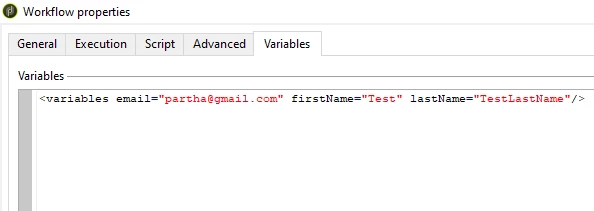
Just need to understand if I can get some examples or documentation that if we declare javascript variables in below Variable section of workflow properties, how that being assigned and worked?


Regards

Abhishek
This post is no longer active and is closed to new replies. Need help? Start a new post to ask your question.
Best answer by ParthaSarathy

Hi @aggabhi ,

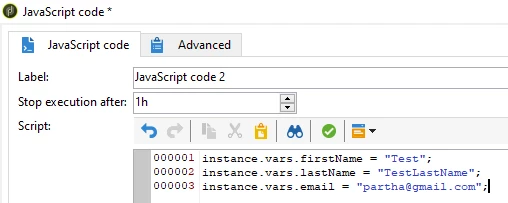
When you declare a instance variable inside a workflow and execute it, those values gets stored in this Variable tab.

Example,


Once the above JS activity is executed (refresh the console), these 3 variables and its corresponding values can be seen in workflow property > variable tab.

So, if you update particular instance variable several times in a workflow, the last updated value can be seen here.


2 replies

ParthaSarathy
Community Advisor
ParthaSarathyCommunity AdvisorAccepted solution
Community Advisor
July 28, 2023

Hi @aggabhi ,

When you declare a instance variable inside a workflow and execute it, those values gets stored in this Variable tab.

Example,


Once the above JS activity is executed (refresh the console), these 3 variables and its corresponding values can be seen in workflow property > variable tab.

So, if you update particular instance variable several times in a workflow, the last updated value can be seen here.


 ~  ParthaSarathy S~  Click here to join ADOBE CAMPAIGN USER GROUP for Quarterly In-person | Hybrid | Virtual Meetups
LakshmiPravallika
Community Advisor
Community Advisor
July 28, 2023

Hi @aggabhi ,


The Variables which you declare in the Workflow properties will allow you to see the last modified value of the Variable and if you declare in Javascript "instance.vars.Var1", then it will be visible inside the Variables Tab of Workflow properties.


Please refer to the below documentation link.


https://experienceleague.adobe.com/docs/campaign-classic/using/automating-with-workflows/advanced-management/javascript-scripts-and-templates.html?lang=en


Regards,

Pravallika.

aggabhiAuthor
Level 5
July 28, 2023

Thank you so much @lakshmipravallika  @parthasarathy  for your help, really helpful.


Regards

Abhishek